Joy Foroughi
Executive Assistant


Getting Your App Featured by Apple: What Matters Beyond ASO
Learn how to get your app featured by Apple with essential tips beyond ASO, including nomination narratives and product audits.

If you're relying on keyword optimization to catch Apple's editorial team, you're solving the wrong problem. Editorial featuring comes down to four levers that have nothing to do with your keyword strategy: product design craft, a timely narrative or event, adoption of new Apple frameworks like SwiftUI, WidgetKit, and App Intents, and a properly submitted Featuring Nomination in App Store Connect. ASO gets you found in search. It does not get you onto the Today tab.
Here's what to do this week, in order:
Draft your nomination narrative before you touch App Store Connect. Editors read a pitch, not a spec sheet.
Audit your product-page assets (icon, screenshots, preview video) against what a human reviewer would remember 30 seconds after closing the tab.
Pick a publication window tied to a launch, major update, or In-App Event, and work backward from there.
Apple’s general featuring guidance asks developers to provide at least two weeks’ notice. App Store Connect’s nomination instructions recommend submitting plans at least three weeks ahead, while nominations for wider featuring consideration can be submitted up to three months in advance.
Pro Tip: Treat the Featuring Nomination like a cover letter, not a form submission. The strongest ones read like they were written by someone who actually used the app and has an opinion about why it matters right now.
Key Takeaways
Getting featured by Apple depends on editorial-quality product craft, a timely narrative, documented technical adoption, and a correctly timed Featuring Nomination submitted through App Store Connect.
Point | Details |
|---|---|
Lead time matters | Submit at least two to three weeks ahead, six to eight weeks for major launches. |
One standout detail wins | Build your pitch narrative around a single memorable visual or interaction. |
Name your frameworks | Explicitly document SwiftUI, WidgetKit, App Intents, or Live Activities adoption in the nomination. |
Coordinate PR early | Align press and TestFlight access with your submission window, not after it. |
TouchZen as execution partner | TouchZen combines design, engineering, and launch strategy to prepare apps for editorial nomination. |
How to Get Your App Featured by Apple: What Matters Beyond ASO
Apple's editorial team is made up of human curators working against a content calendar, not an algorithm scoring your keyword density. That distinction changes everything about how you prepare. Algorithmic ranking (the kind ASO influences) rewards relevance signals: title matches, conversion rate, retention curves. Editorial featuring rewards a different kind of relevance: does this app fit a theme editors are already planning to cover, and does it look like something worth a human's recommendation?
Editors typically encounter your app in three layers: the product page itself, the nomination description you write in App Store Connect, and any supplemental assets you attach. According to reporting from SEM Nexus, editorial placements are the output of a structured pitch process tied to specific themes Apple has already mapped out weeks in advance. Apple's editorial planning window typically runs well ahead of publication, which is why a nomination submitted the week before a launch rarely lands anywhere prominent.
Editors value visual craft and human storytelling over raw metrics. Documenting your team's story and the real impact on users, not just the feature list, is what makes a submission worth copying into an editorial layout.
A Today tab feature can drive a substantial short-term spike in installs, though the exact scale varies significantly by category and placement type. A niche productivity app and a mainstream game will see very different bumps from the same slot.
None of this makes ASO irrelevant. Store search still drives a large share of overall installs, and a poorly optimized product page will undercut even a strong editorial pitch once the feature sends traffic your way. ASO is the floor you build on. Editorial featuring is a different structure entirely, and it rewards craft and timing over metadata.
Where Apple Features Apps and What Each Placement Delivers
Not every editorial slot serves the same purpose, and chasing the wrong one wastes a nomination window you won't get back for months.
Today tab — the highest-visibility placement on the App Store home screen; reserved for polished apps with a strong visual hook and a story tied to a current moment.
Lists and collections — curated groupings built around themes, categories, seasons, or specific user needs.
App of the Day / Game of the Day — a single-app spotlight that functions almost like a press hit; short-lived but high-impact.
Platform-specific placements — Apple curates stories and collections across iPhone, iPad, Mac, Apple Vision Pro, and its other platforms.
Map your app's category to see which collections Apple has run in the past year.
Identify whether your update or launch naturally fits a seasonal theme (New Year fitness, back-to-school, holiday planning).
Frame your nomination around the most relevant theme or use case rather than requesting a specific placement.
What Apple Editors Actually Look For Beyond ASO
Apple does not publish a scoring system or guarantee featuring. However, it identifies seven primary considerations: user experience, UI design, innovation, uniqueness, accessibility, localization, and App Store product-page quality.
User experience — does the app solve its core task without friction, and does that show up in the first 30 seconds of a demo video?
UI design and visual craft — a distinctive visual identity, not a generic template with your logo swapped in.
Innovation and uniqueness — a genuinely new approach to a familiar problem, or a category nobody else has addressed well.
Accessibility — VoiceOver support, Dynamic Type, and color contrast that hold up under real testing, not just a checkbox in your build settings.
Localization — screenshots, copy, and in-app text that reflect actual regional adaptation rather than machine-translated strings.
Product-page quality — screenshots and preview video that communicate the hook without requiring the viewer to read captions closely.
Technical adoption — visible use of frameworks like SwiftUI, WidgetKit, App Intents, or Live Activities, since these signal you're building with Apple's current platform direction rather than legacy code.
To show these in a submission, don't describe them, demonstrate them. Your first screenshot should carry the strongest visual hook, not a login screen. Your preview video should show the interaction that makes reviewers pause, not a feature tour. If you support VoiceOver, say so explicitly in your accessibility notes rather than assuming an editor will find it during testing.
Pro Tip: Pick one interaction detail, a gesture, an animation, a widget that updates live, and build your entire pitch narrative around it. Editors remember one distinctive thing far better than a list of five decent things.
How to Submit a Featuring Nomination in App Store Connect
Submitting a nomination requires the right account permissions before you can even open the form. Only an Account Holder, Admin, App Manager, or someone with Marketing role access can create a Featuring Nomination in App Store Connect. If your marketing lead doesn't have that access set up ahead of time, that's the first thing to fix, not something to discover the week you want to submit.
Sign in to App Store Connect and navigate to the Featuring Nominations section for your app.
Choose your nomination type: App Launch, App Enhancements, or New Content, depending on where your app currently sits in its lifecycle.
Set a publication date or range that respects Apple's recommended lead time rather than a date you'd prefer.
Attach supplemental materials, including up to five supporting URLs, TestFlight links, and any relevant In-App Event.
Submit and monitor your nomination. If your app is selected for certain placements, Apple may notify eligible team members by email or through the App Store Connect app.
For teams managing multiple apps or region-specific nominations, App Store Connect also supports CSV bulk uploads, which saves significant time if you're coordinating a global launch across several storefronts at once.
Your supplemental checklist should include:
An optional public TestFlight link, if giving editors access to a beta build would help explain the nomination.
Up to five supporting URLs (press coverage, a landing page, a demo reel).
Accessibility notes documenting specific support, not a generic accessibility statement.
Pro Tip: Match your nomination type to what's actually true. If you're pitching a two-year-old app with a minor update, submit under "App Enhancements," not "App Launch." Editors notice the mismatch immediately, and it costs you credibility on future submissions.
Building a Pitch and Asset Set That Actually Grabs an Editor
Your nomination description is the only place you get to argue your case in your own words, and most teams waste it on a feature list instead of a story.
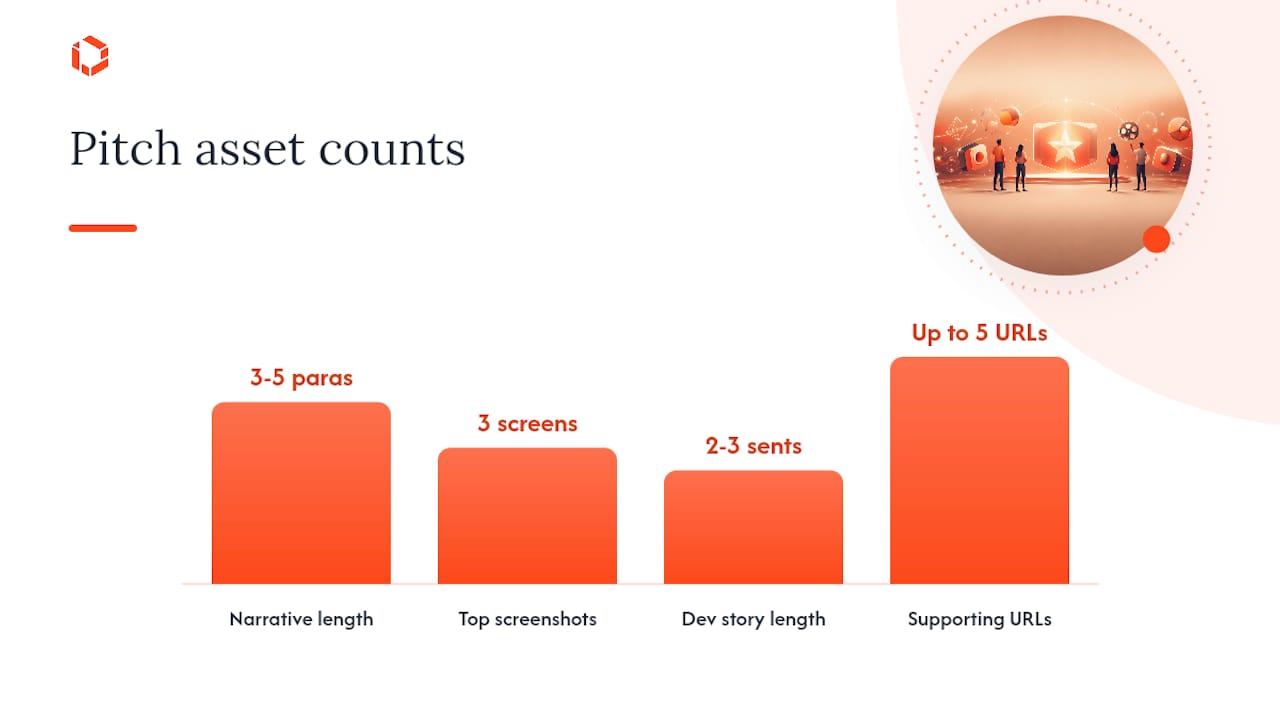
Structure the narrative in three parts. Open with a headline hook, one sentence that captures why this app matters right now. Follow with three to five paragraphs connecting the product to a timely moment: a cultural trend, a seasonal need, a platform shift like a new iOS release. Close with a technical or innovation highlight that names the specific Apple framework or design choice that sets the app apart.
Required and recommended assets for the pitch:
App icon that reads clearly at small sizes, not just on a full-screen mockup.
Top three screenshots, ordered by impact, with the strongest visual first.
App preview video between 15 and 30 seconds that shows the core interaction clearly.
Short developer story, two to three sentences on why you built this and what changed for users.
Supporting URLs, including press mentions and a demo link.
A workable pitch template looks like this: headline hook (one line) → problem statement (one paragraph) → your solution and what makes it different (two paragraphs) → the technical or design detail worth highlighting (one paragraph) → a closing line tying it to the requested publication window. Localize the pitch by adapting cultural references and screenshot copy for target markets, not by running the same paragraph through translation software. Reviewing your screenshot design approach before you write the pitch often reveals gaps the narrative alone won't fix.
Pro Tip: Write your headline hook last. You won't know what's actually distinctive about your pitch until you've drafted the full narrative and can see which paragraph you keep coming back to.
Point | Details |
|---|---|
Headline hook | One sentence, written after the full narrative is drafted, not before. |
Narrative length | Three to five paragraphs connecting product to a timely moment. |
Screenshot order | Strongest visual first; never lead with a login or onboarding screen. |
Supporting URLs | Up to five, prioritizing press coverage and a working demo link. |
Technical and Accessibility Standards That Determine Feature Quality
A polished pitch won't save an app that crashes during editorial testing. Before you submit, run your app through a quality bar that goes beyond passing App Review.
Check your crash-free rate against category norms, your cold-start time across representative devices, addressing any noticeable delays before submission, memory behavior during extended sessions, and battery drain relative to comparable apps in your category. These aren't vanity metrics. An editor testing your app for thirty seconds will notice a stutter or a slow launch faster than they'll notice a missing keyword.
Technical integration signals matter almost as much as performance. Adoption of SwiftUI for your interface, a functioning WidgetKit widget, support for App Intents so your app works with Siri and Shortcuts, and use of Live Activities for real-time updates on the Lock Screen all signal that you're building with Apple's current platform direction. Document each one explicitly in your nomination rather than assuming an editor will discover it during a quick test.
Accessibility deserves the same explicit documentation. Confirm VoiceOver reads every interactive element correctly, that Dynamic Type scales your layout without breaking it, that color contrast meets WCAG AA minimums, and that reduced motion settings are respected throughout. Reviewing common rejection reasons before submission catches many of these issues before they become a problem during editorial testing, not just App Review.
Item to check | Test to run | Internal readiness target | Where to show proof |
|---|---|---|---|
Crash-free rate | Extended session testing across devices | Consistent with top apps in your category | Nomination notes, referencing crash analytics |
Cold-start time | Time from tap to usable screen | Under two seconds on mid-range hardware | Preview video opening sequence |
VoiceOver support | Full navigation with VoiceOver enabled | Every interactive element reads correctly | Accessibility notes field |
Dynamic Type | Scale text to largest accessibility size | Layout remains usable, no clipped text | Screenshot showing scaled text |
Framework adoption | Confirm SwiftUI, WidgetKit, App Intents in use | Visible, functioning implementation | Technical highlight paragraph |
Pro Tip: Record your accessibility testing on video, even briefly. A ten-second clip of VoiceOver navigating your app is more convincing to an editor than a bullet point claiming support.
Does Off-Store Buzz Actually Influence Editorial Decisions?
Apple’s published featuring considerations do not identify press coverage, influencer activity, TestFlight participation, retention metrics, or paid acquisition as formal editorial selection criteria. These activities can support the broader success of a launch, but teams should not assume they directly influence Apple’s editorial decisions.
Coordinating a PR and community timeline around your nomination window matters more than most teams plan for.
The following is a suggested launch-marketing timeline, not official Apple editorial guidance.
Eight weeks out: begin outreach to relevant press and niche influencers in your category.
Six weeks out: open your public TestFlight link to build early word of mouth.
Three to four weeks out: submit your Featuring Nomination, timed to land within Apple's recommended window.
Launch week: coordinate press embargoes to land near your requested feature date, not before it.
PR, community outreach, and Apple Ads can support launch visibility independently of editorial featuring. These activities should complement your launch plan, not be presented as factors Apple uses to select featured apps.
Press coverage timed to launch week, not the nomination submission date.
Influencer previews that generate organic screenshots and shares.
When to Submit: Launches, Updates, and Seasonal Hooks
Timing determines whether your nomination lands in a relevant editorial slot or gets buried behind dozens of other submissions competing for the same week.
Apple's own guidance sets two to three weeks as the operational minimum for a nomination, with up to three months recommended if you want to be considered for wider placement. For a major launch, plan for six to eight weeks of lead time, since larger features require more coordination on Apple's side and more assets on yours.
In-App Events, seasonal moments, and major platform launches (a new iOS release, a new Vision Pro software update) all function as natural editorial hooks. Apple explicitly encourages attaching In-App Events or notable version updates to nominations, since a nomination tied to a live event gives editors a concrete reason to feature you right now rather than "eventually."
A realistic timeline for a major update looks like this:
Eight weeks out: finalize the update roadmap and confirm the feature you'll highlight is fully shipped, not planned.
Six weeks out: begin building nomination assets, including the preview video and screenshots.
Four weeks out: open PR outreach and finalize your TestFlight public link.
Three weeks out: submit your Featuring Nomination with the update and any In-App Event attached.
Launch week: coordinate press and social activity to land around your requested feature date.
Pro Tip: If your update doesn't naturally align with a seasonal theme, don't force one. A well-timed, honest pitch tied to your actual roadmap beats a seasonal angle that feels bolted on.
Mistakes That Cost Teams a Featuring Opportunity
Most failed nominations fail for avoidable reasons, not because the app wasn't good enough.
Submitting too late. Filing a nomination only a week before launch gives Apple less time to consider it and may limit potential placement opportunities.
Weak product-page assets. Screenshots that look like a settings menu instead of a hook.
Pitching without a narrative hook. A feature list is not a story; editors need a reason this matters now.
Ignoring accessibility or performance. Editors testing an app that crashes or ignores VoiceOver stop reading the pitch.
Presenting undeveloped ideas as confirmed features. Apple accepts nominations for app launches and pre-orders, but every detail should reflect a credible launch plan or functionality available in the submitted build.
Quick fixes, most doable within 24 to 72 hours:
Reorder your screenshots so the strongest visual leads.
Rewrite your nomination description around a single hook instead of a feature list.
Run a VoiceOver pass and document what you find in your accessibility notes.
Confirm every claim in your pitch matches what's actually live in the current build.
If a nomination doesn't get picked up, Apple doesn't usually send detailed feedback, but a lack of response after your requested window closes is itself a signal. Treat it as an invitation to revisit your product-page assets and narrative before resubmitting for the next cycle, rather than repeating the same pitch verbatim.
The TouchZen Featuring Playbook: Templates and Timelines
Agencies that manage nominations regularly build reusable structures rather than starting from scratch every cycle. Here's the framework we rely on for three common scenarios.
Launch nomination structure: headline hook naming the core problem solved → two paragraphs on the solution and target user → one paragraph on the standout design or technical detail → closing line requesting a specific publication window.
Major update nomination structure: opening line naming what changed → paragraph explaining why the update matters to existing users → technical highlight naming the specific framework adopted (SwiftUI rebuild, new widget, App Intents integration) → closing tied to the update's release date.
In-App Event nomination structure: headline naming the event → paragraph on why the event is timely → paragraph on expected user engagement → closing line requesting alignment with the event's live dates.
A 12-week featuring push generally breaks down like this:
Weeks 1 to 2: audit the current build against the technical and accessibility checklist.
Weeks 3 to 5: build or refine product-page assets, screenshots, and preview video.
Weeks 6 to 7: open a public TestFlight link and begin PR outreach.
Weeks 8 to 9: draft and finalize the nomination narrative.
Week 10: submit the Featuring Nomination, three weeks ahead of the target date at minimum.
Weeks 11 to 12: coordinate press and social activity around the requested feature window.
Supporting callouts we typically include in a client nomination highlight specific technical adoption (naming the exact framework and what it enables), concrete accessibility support (not a general statement), and localization coverage across target markets rather than a single English-only asset set. Before pitching, measure readiness against a simple bar: would a stranger understand the hook from your first screenshot alone, in under five seconds? If not, the nomination isn't ready yet, regardless of how strong the underlying app is.
How TouchZen Thinks About Editorial Featuring
Getting featured rarely comes down to one department doing its job well. It comes down to design, engineering, PR, and ASO moving in the same direction at the same time, which is the structural reason most in-house teams struggle to pull it off consistently. A designer can build a beautiful interface, but if the product-page screenshots don't communicate the hook, or if the PR timeline doesn't align with the nomination window, the pitch falls apart before an editor ever sees it.
Teams can improve their nomination process over time by documenting previous submissions, maintaining current product-page assets, and preparing new nominations around meaningful launches, updates, or In-App Events.
Coordinating around Apple-facing developer programs adds another layer most teams overlook. WWDC sessions and Apple Developer Labs can help teams understand Apple’s publicly stated platform direction and current technologies. They do not provide insight into confidential editorial decisions. Teams that align their technical roadmap with what Apple is publicly emphasizing at WWDC tend to have an easier time framing their nomination's "innovation" angle, since they're building toward a direction Apple has already signaled matters.
Get Your App Feature-Ready With TouchZen
TouchZen builds the cross-functional pieces this playbook demands, design, engineering, and launch strategy, under one senior team instead of scattered across freelancers or junior staff who need constant oversight. That matters here specifically because a strong nomination depends on product craft and technical adoption arriving together, not sequentially, and most in-house teams simply don't have design and engineering talking to each other closely enough to hit both at once.
A typical engagement starts with a readiness audit: a review of your product-page assets, technical framework adoption, and accessibility support against the criteria editors actually use. From there, TouchZen's team, having shipped more than 75 apps across industries, can help refine the UX and UI design that editors weigh heavily, or take on full mobile app development if your product needs deeper technical work before it's feature ready. If you're preparing a nomination in the next quarter, request a readiness audit now so there's enough runway to fix gaps before your submission window opens.
Sources
Apple's own documentation should be your first reference point before any third-party guide, including this one. Bookmark Getting Featured on the App Store for the official editorial criteria and lead-time guidance, the Featuring Nominations help page for the exact submission workflow, and the Promote your app guide for generating approved promotional assets.
Beyond Apple's own pages, industry trackers like SEM Nexus's analysis of featured placements and AppScreenshotStudio's breakdown of Apple's scoring criteria are worth checking periodically, since editorial themes shift with seasonal calendars and platform launches. Developer blogs covering creative technical implementations, like Sorcery's feature engineering posts, can also surface framework adoption patterns editors are currently favoring.
Getting Featured on the App Store - App Store - Apple Developer
App Store featured placements: How teams get picked | SEM Nexus
App Store Featuring Nominations: Apple's 7 Scoring Criteria | AppScreenshotStudio
FAQ
How Do I Get My App Featured on the App Store?
Submit a Featuring Nomination through App Store Connect at least two to three weeks before your target date, built around strong product-page assets, a timely narrative, and documented technical adoption of frameworks like SwiftUI or App Intents. Editorial featuring rewards design craft and storytelling far more than keyword optimization.
What Is Apple's Most Overlooked App Category for Featuring?
Apple's editorial calendar covers a wide range of niche categories, and smaller placements like specific category features often go to apps with less competition than mainstream productivity or gaming slots. Indie teams targeting focused categories, accessibility tools, niche hobbies, local utilities, often have a realistic shot at category features long before they'd compete for a Today tab spot.
Can I Pitch an Idea to Apple Before Building an App?
Apple accepts Featuring Nominations for app launches and pre-orders, so the app does not necessarily need to be publicly available yet. However, the nomination should be connected to a credible launch plan, near-final build, significant update, or new content—not just an undeveloped idea. A public TestFlight link may be included as optional supporting material.
Does ASO Still Matter If I'm Targeting Editorial Featuring?
Yes. Store search still drives a substantial share of installs, and a poorly optimized product page will undercut the traffic spike a feature sends your way. ASO and editorial featuring solve different problems and both need attention.