

Joy Foroughi
Executive Assistant


How to Submit to the App Store: First-Launch Checklist
To submit an app to the App Store, you enroll in the Apple Developer Program, upload a tested build through Xcode, complete your listing and compliance details in App Store Connect, add review information, choose the build and send it to App Review. Missing accounts, incomplete metadata and unclear review notes can delay a first submission, alongside issues in the app itself. This checklist walks through each stage in the order you should do it, so you can submit once and avoid expensive rework.

To submit an app to the App Store, you enroll in the Apple Developer Program, upload a tested build through Xcode, complete your listing and compliance details in App Store Connect, add review information, choose the build and send it to App Review. Missing accounts, incomplete metadata and unclear review notes can delay a first submission, alongside issues in the app itself. This checklist walks through each stage in the order you should do it, so you can submit once and avoid expensive rework.
TL;DR
Start the developer account early: organization enrollment needs a D-U-N-S Number and a working company website, so allow time for account verification before launch.
Treat App Review as a final check, not a testing service. Test on real devices and the OS versions you support first.
Give the reviewer everything: live demo credentials, populated test data, a clear explanation of how you make money, and accurate privacy answers.
Apple aims to review 90% of submissions within 48 hours, but plan your launch date with buffer for a rejection round.
Reserve expedited review requests for genuine urgency, such as critical bug fixes or releases tied to an upcoming event; approval is not guaranteed.
Before you open App Store Connect
The submission screen is the last step of a longer process. Three things have to be true before it makes sense to start.
Your developer account is approved
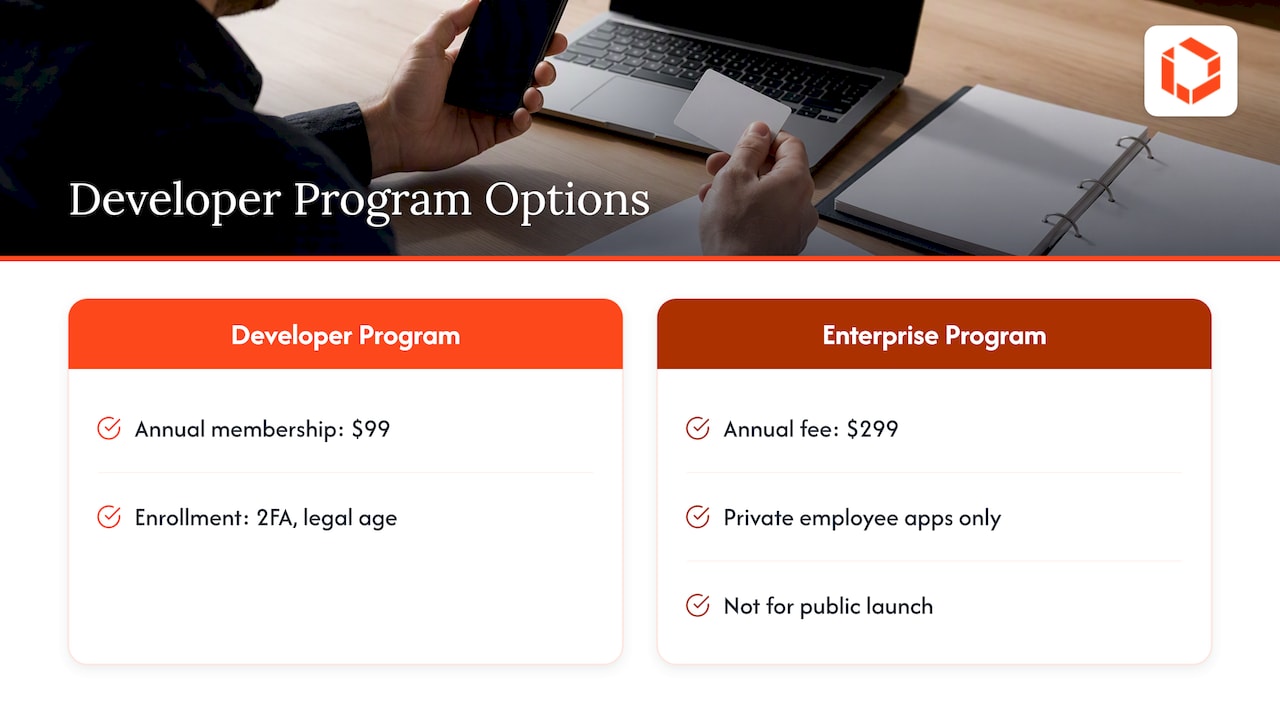
Annual membership in the Apple Developer Program costs $99. Enrollment requires an Apple Account with two-factor authentication turned on, and you must be of legal age in your region. The Enterprise Program, at $299 a year, is only for distributing apps privately to your own employees, so it is not the route for a public launch.
If you are publishing under a company name, Apple asks for a D-U-N-S Number, and the legal entity name you enroll with becomes the seller name shown on the App Store. Apple also checks your organization's website, and social media pages or placeholder sites do not pass. If your company site is still a one-page holding page, fix that first. Our partners at Blue Lake Web Design publish a useful on-page SEO checklist you can use to get the site, and the support and marketing pages your listing will point to, into shape.
Your app is genuinely finished for a first release
Apple states plainly that App Review is not a substitute for your own testing. Before you submit, confirm that:
Every screen works on real devices, not only the simulator.
The app runs on every OS version you claim to support.
There are no placeholder screens, dead buttons, lorem ipsum text or broken links.
Login, sign-up, purchase and account deletion flows all complete end to end.
Your build meets Apple's upload requirements. Apple recommends Xcode 27 and the latest SDKs, but that recommendation is separate from the minimum toolchain and SDK requirements currently enforced for uploads. Check the requirements and their effective dates before submitting.
Accessibility belongs in this pass too. Our mobile app accessibility checklist lists what to test before launch, and it is far cheaper to fix contrast and labeling now than after a rejection or a bad review.
You know what you are asking Apple to approve
Read the "Before You Submit" section of the App Review Guidelines. It lists the common missteps that slow reviews or trigger rejection. Repeated rejections for the same issue can add avoidable delays. If you want a preview of the most frequent problems, we cover them in App Store rejection: 10 real reasons and how to fix each.
The submission checklist, step by step
Step 1: Create the app record
In App Store Connect, create a new app and set the platform, name, primary language, bundle ID and SKU. The bundle ID must match the one in your Xcode project, and it is hard to change once builds are attached, so settle it with your engineering lead before you click create.
Pick a name you have the right to use. A name that clashes with a trademark or another app is a classic late-stage surprise.
Step 2: Upload a build
Archive the app in Xcode and upload it to App Store Connect. Then run it through TestFlight with internal testers, and with external testers if you have a beta group. Treat this as a dress rehearsal on the exact binary you plan to ship.
Once the build finishes processing, you choose one build for each app version. You can swap that build as often as you like until you submit, which is handy if testers find a last bug.
Step 3: Build the product page
This is the part users see, and it is also where many first submissions are incomplete. Prepare:
App name and subtitle: clear, specific, no keyword stuffing.
Description and promotional text: lead with what the app does for the user.
Keywords: relevant terms, no competitor names.
Support URL and privacy policy URL: both must load and be real.
Category and age rating: answer the age rating questionnaire honestly. Apple generates the rating from your answers, and an unrated app cannot be published on the App Store.
Screenshots: you must include at least one screenshot and can upload up to 10 per device size, as .jpeg, .jpg or .png.
Screenshots are your first conversion asset, so do not treat them as paperwork. Our founder's playbook on App Store screenshot design covers what to show and in what order. For the wider listing, see how to optimize your app for the App Store and Google Play.
Step 4: Complete the privacy details
Every app must describe its privacy practices in App Store Connect, because those answers generate the privacy label on your product page. Go through every SDK in the app: analytics, crash reporting, ads, attribution, payments, push. Each one may collect data you have to declare.
Mismatches are a common trap. If your label says you collect nothing but an analytics SDK is sending device identifiers, you have a compliance problem that no amount of polish will hide. Ask your engineers for a written list of third-party SDKs and what each collects.
If you handle health data, the bar is higher still. Our HIPAA compliant mobile app checklist lays out the controls to assign before you launch.

Step 5: Fill in the App Review information
This section decides whether your review is smooth or stalls. Apple asks you to add everything App Review needs to complete its review, including general information about the app's concept and features, and any special setup. In practice, provide:
Demo credentials for every account type (for example, customer and admin), valid on the day you submit.
Populated accounts. An empty demo account shows a reviewer empty screens. Fill it with realistic content so every feature can be exercised.
A plain explanation of your business model: what is free, what is paid, how subscriptions or in-app purchases work, and where purchases happen.
Documentation for regulated fields, such as finance, health or children's content.
Notes on anything non-obvious, such as hardware dependencies, location-based features or content that only appears at certain times.
A reachable contact so the reviewer can ask a question rather than reject.
Pro tip: log into your demo account from a clean device before you submit. If you cannot get in within a minute, neither can the reviewer.
Step 6: Choose the release method and submit
Decide how the app goes live once approved: automatically, manually after approval, or on a scheduled date. For a first launch with marketing attached, manual release gives you control, so you are not forced to go live on a Friday night because Apple approved early.
Then add the build to the version and submit it for review. Keep your phone nearby, because App Store Connect messages are where questions and rejections arrive.
Pre-submission checklist at a glance
Area | Confirm before you press submit |
|---|---|
Account | Developer Program active, correct seller name, agreements accepted |
Build | Tested on real devices, correct OS support, one build selected |
Listing | Name, subtitle, description, keywords, category, screenshots |
URLs | Support and privacy policy pages live and accurate |
Privacy | Every SDK reviewed, privacy answers match real behavior |
Age rating | Questionnaire answered honestly |
Review info | Working demo logins, populated data, business model explained |
Release | Manual, automatic or scheduled release chosen |
How long review takes, and how to plan around it
Apple says App Review aims to review at least 50% of submissions in under 24 hours and 90% in under 48 hours. Those are goals for the majority, not a promise for your app. A first submission, an app with sign-in, payments or regulated content may take longer or draw questions.
A sensible plan for a launch date:
Submit at least a week before any fixed date, such as a press push or an event.
Leave room for one rejection and resubmission cycle.
Do not schedule paid campaigns until the app is approved and you have confirmed the release.
Expedited review is available for extenuating circumstances, including a critical bug fix or a release tied to an upcoming event. For an event-related request, explain the event, its date and how your app is associated with it in the review notes. Reserve requests for genuine urgency: Apple evaluates them based on availability and demand, so approval is not guaranteed.
If Apple rejects your app
A first-time rejection does not necessarily mean there is a fundamental problem with your product. Do this:
Read the message fully, including the guideline number cited.
Reproduce the issue on a clean install.
Fix the cause, not the symptom. If the reviewer could not log in, check why, rather than only changing the password.
Reply in App Store Connect if something is unclear. Apple encourages talking to the review team, and a clear explanation often works better than resubmitting the same binary.
Document the fix in the review notes so the next reviewer sees the context.
Our breakdown of ten real rejection reasons goes deeper on each common cause.
Our perspective: submission is a project, not an event
We have launched over 75 apps, and our approach is to give someone senior ownership of the checklist weeks before submission. Gaps between design, engineering and product can leave important details unresolved. The designer did not know about the privacy label. The developer did not know the demo account was empty. The founder did not know the business model needed to be explained to Apple.
That is why we work with founders directly through senior developers and designers, without handing the work to junior staff. When the person who built the login flow is also the person writing the review notes, nothing gets lost in translation. It is also why we treat launch as a milestone in a longer relationship: the first version is the start of data, not the end of work.
If you take one habit from this guide, make it this: assign a single owner for submission readiness, give them this checklist, and review it together two weeks before the planned date. Clear ownership and timely decisions help reduce delays within your control.
— Cyrus
Need a senior team to get you to launch?
If you would rather not carry this alone, we handle the full path from strategy and design to engineering, submission and support. See our mobile app development service, or if you are validating an idea first, our MVP development for startups. After launch, ongoing support and growth keeps the app updated as you learn from real users.
After approval: the first two weeks
Approval is not the finish line. In the first weeks:
Watch crash reports and reviews daily, and reply to reviews promptly.
Check that the privacy label, screenshots and description match the live behavior of the app.
Plan your first update within a few weeks, using real feedback. Small, frequent releases also show reviewers a healthy, maintained app.
Study what makes an app stand out. Our guide on getting featured by Apple covers what matters beyond keywords.

FAQ
How much does it cost to submit an app to the App Store?
The main fixed cost is the Apple Developer Program membership, which is $99 per year. There is no separate per-submission fee. Your real costs are design, development, testing and any compliance work your app needs.
How long does Apple take to review a new app?
Apple's stated goal is to review at least half of submissions in under 24 hours and 90% in under 48 hours. Complex apps, or ones that raise policy questions, can take longer. Build in extra days for a first launch.
What do I need to give App Review if my app has a login?
Provide working demo credentials for each account type, and make sure the accounts contain realistic content. Apple's guidance is to include everything the reviewer needs in the App Review information section. Add a short explanation of how the app earns revenue.
Can I ask for an expedited review for my launch date?
You can request an expedited review for genuine urgency, including a critical bug fix or a release tied to an upcoming event. Explain the event, its date and your app's connection to it in the review notes. Apple evaluates requests based on availability and demand, so submit early and do not rely on expedited approval.
What should I do first if my app is rejected?
Read the cited guideline, reproduce the problem, fix the root cause and reply in App Store Connect with a clear explanation if anything is ambiguous. The App Review Guidelines list the common missteps worth checking before you resubmit.


