

Joy Foroughi
Executive Assistant


Mobile App Onboarding Examples: 7 Signup Design Patterns
ffective onboarding asks for essential information when users understand why it is needed. These seven signup and first-use patterns include illustrative screen examples, supporting research, and practical tradeoffs. Choose the patterns that fit your product and test whether they help users create an account and complete their first meaningful action.

ffective onboarding asks for essential information when users understand why it is needed. These seven signup and first-use patterns include illustrative screen examples, supporting research, and practical tradeoffs. Choose the patterns that fit your product and test whether they help users create an account and complete their first meaningful action.
TL;DR
Let users experience useful functionality before registration wherever the product allows it.
When an account is necessary, request only essential information and offer suitable authentication options. For password-based signup, avoid duplicate fields and provide a show-password control.
Ask for permissions at the moment a feature needs them, after a short explanation in your own words.
Treat tutorial carousels as optional and testable. NN/G found no significant task-success gain from them.
Collect profile details after activation, not before it.
Why signup completion deserves its own design pass
Signup is the first commitment you ask of a user, and it arrives when trust is lowest. Jakob Nielsen has long argued that upfront registration shouldn't be required before use, because most mobile apps are used intermittently and users begin with low commitment.
The cost of friction is also commercial. Baymard's 2021 study of native mobile apps included more than 200 qualitative usability sessions and a survey of 3,536 US e-commerce shoppers. Among respondents who had their primary site's app installed, 63% said they were more likely to buy through the app than the mobile website. Baymard also reported that almost all test users were annoyed by the number of startup overlays for notifications, location tracking and account signup.
These findings describe ecommerce app usage, rather than proving that a particular signup design increases purchases. For your own product, measure where users leave registration and whether those who complete it reach a meaningful first action.
The underlying model for everything below is progressive disclosure: show what is needed for the next step, defer advanced choices, and keep the path forward obvious. NN/G adds a caution that matters in practice. Frequently needed controls belong in the primary flow, and only rarely used options should move later.
The 7 patterns at a glance
# | Pattern | Best for | Main risk |
|---|---|---|---|
1 | Value-first guest access | Content, utility and marketplace apps | Users never convert if the account prompt is vague |
2 | Short progressive signup | Almost any app that needs an account | Too many steps hidden behind "just one more" screens |
3 | Social or platform sign-in | Consumer apps, fast-start products | Platform rules and account-recovery edge cases |
4 | Contextual permission requests | Apps using location, camera, notifications | Early requests that users decline, limiting access to the feature |
5 | Progressive profiling | Personalized or complex products | Personalization that feels like an interrogation |
6 | Task-based coach marks | Apps with one or two non-obvious features | Tooltips that block the interface |
7 | Optional tutorial cards with Skip | Complex or unfamiliar interactions | Treating the carousel as the onboarding |
Pattern 1: Value-first guest access
What it looks like: A shopping app opens on a browsable catalog. A meal-planning app lets you build one plan. A fitness app lets you start a sample workout. The account prompt appears when a feature needs an account, such as saving a plan across devices or syncing progress. Shopping apps can still offer guest checkout.
Why it works: NN/G's guidance is to make registration optional when feasible and allow as much functionality as possible before login. You get a real signal about intent before you ask for anything, and the signup request now has a clear reason attached.
How to build it well:
Define the smallest meaningful moment of value in your app. That is the first action a user would describe to a friend.
Place signup immediately before or after the action that needs persistence, personalization or payment.
Explain the benefit in the prompt: "Create an account to save this plan." Test this wording against a generic registration prompt.
Keep guest work when the user signs up. Losing it at the gate is the fastest way to lose them.
When not to use it: Some features, such as viewing a bank balance or personal medical records, require authentication before access. Public information, demonstrations, or other features may still be available without an account. Place the signup requirement around the functionality that needs it.
Pattern 2: Short progressive signup
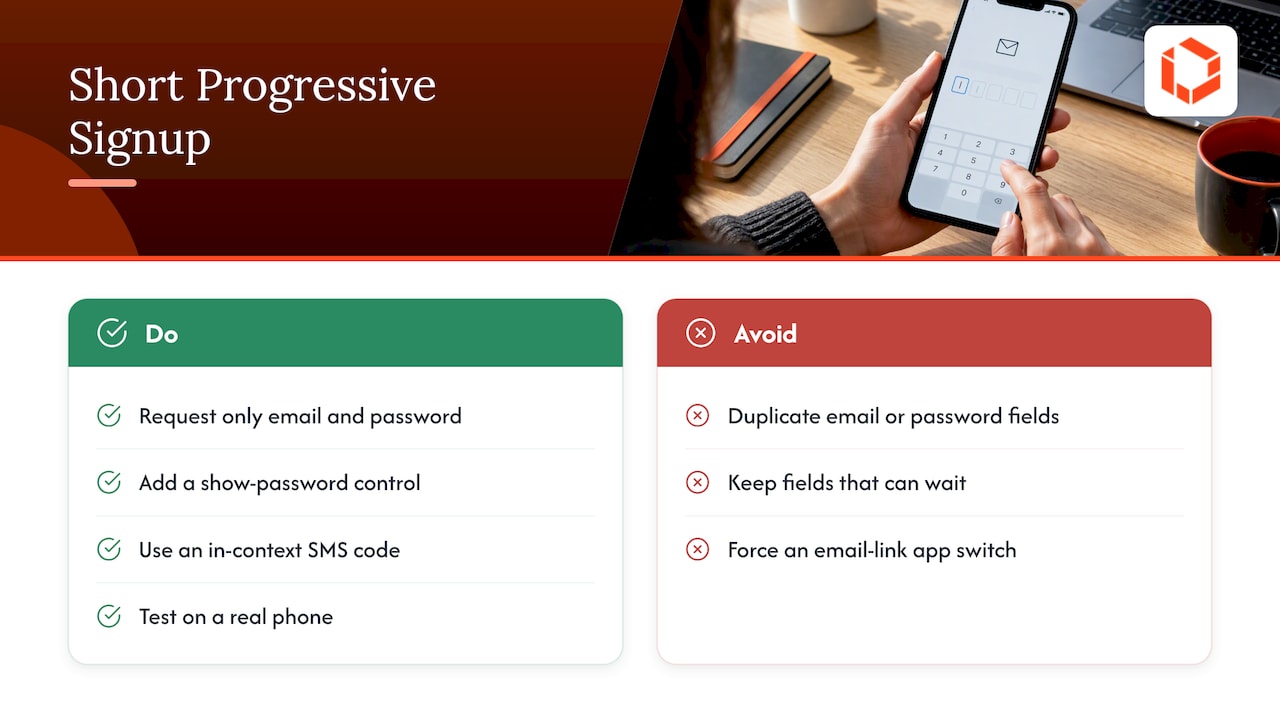
What it looks like: A first screen with email and password only. A visible show-password toggle. A single primary button. Nothing else.
NN/G's registration checklist recommends requesting only the minimum information, ideally email and password, and not duplicating email or password fields. It also recommends a show-password control and fingerprint authentication where available. Its opening point is worth remembering: typing a password takes twice as long on mobile as on desktop.
This checklist was published in 2017. Its advice on reducing typing remains useful, but email and password are not the only options. Depending on your product and supported platforms, consider passkeys or platform sign-in alongside a clear account-recovery path.
A practical field audit: For every field on your signup form, answer one question: what breaks if we ask for this after the first session? If the answer is "nothing," move it. Names, birthdays, company size and marketing preferences almost always pass this test.
Verification: Choose verification based on what you need to confirm, such as ownership of an email address or phone number. Keep instructions clear, support code autofill where available, preserve progress when users switch apps, and provide resend and correction options. Account verification and login authentication serve different purposes; SMS should not be treated as the default for every product.
Pro Tip: Test your signup form on a real phone, one-handed, on a bad connection. Check autofill, field-appropriate keyboards, and clear inline errors before investing in visual refinements.
Pattern 3: Social or platform sign-in
What it looks like: "Sign in with Apple" and "Continue with Google" buttons alongside an alternative signup method. Additional account-selection or consent steps may still be required.
Why it can help: Platform sign-in can reduce typing and avoid creating another password for your app. Users still need clear consent, account-linking behavior, and recovery options.
Details that decide the outcome:
Always keep an email fallback. Some users do not want to link a social account.
Show clearly which buttons are sign-in and which are signup, or merge them into a single "Continue" flow so users do not create duplicate accounts.
Design the recovery path now. Apple's guidance on managing accounts favors getting people into the experience quickly, and the account states after that (sign out, switch, delete) need to be just as clear.
If you offer third-party login on iOS, check the current App Store Review Guidelines on login services before you ship. They can require an equivalent privacy-focused option, and finding that out at review time costs you days.
Pattern 4: Contextual permission requests
What it looks like: A camera app opens straight to the viewfinder and asks for camera access there. A delivery app asks for location when the user taps "Use my current location," not on the first launch. A notification prompt appears after the user has set up something worth being notified about.
Apple's onboarding guidance points the same way: ask only for permissions essential to the core experience on first use, defer optional requests until the related feature is selected, and explain the benefit before the system prompt appears.
NN/G frames permission requests as an implicit cost-benefit analysis: users weigh the benefit they will get against how much they trust the app. When an explanation is needed, make it brief and specific to the feature the user selected. Follow the platform's guidance for any custom screen shown before its system permission alert. NN/G also recommends respecting a decline and letting the choice be reversed later.
Why permission timing matters: Location, contacts, camera, notifications, and health data can involve sensitive information. Explain what the feature needs and why, request only necessary access, and respect the user's decision.
Do:
Send one request per moment, never a stack of system prompts at launch.
Follow platform-specific permission guidance. Apple specifies a single Continue or Next button for a custom explanatory screen immediately preceding a protected-resource permission alert.
Build a fallback so the app still works after a "Don't Allow," with a settings shortcut where the feature needs the permission.
Pattern 5: Progressive profiling after activation
What it looks like: The user signs up with email, completes a first action, and only then sees one or two light questions: "What are you training for?" or "Which topics interest you?" Further questions arrive across later sessions, each tied to a feature that uses the answer.

This is progressive disclosure applied to data collection. The rule of thumb: collect a detail only when you can show the user what it changes. A fitness goal that reshapes the home screen immediately is a good trade. A phone number "for security" with no visible use is not.
Where teams go wrong: They front-load a ten-question quiz because personalization sounds valuable. NN/G's analysis of onboarding suggests that apps whose functionality is highly tailored to the user's context may justify a more deliberate flow. Notice the conditions: tailored, and needed to get started. If your app works without the answers, ask later.
Pro Tip: Start with only the questions needed to make the first experience useful. Make optional questions skippable and compare activation among users who answer and those who skip.
Pattern 6: Task-based coach marks
What it looks like: The first time a user opens the editor, a single hotspot points at the one control that is not obvious, with a short line of text and a dismiss tap. Once dismissed, it stays out of the way, while help remains available if the user needs it again.
NN/G recommends brief, unobtrusive onboarding and contextual overlays shown when a user first encounters a feature, rather than a tour of everything up front. Contextual help meets people at the point of need, when the information is useful and memorable.
Rules we apply:
Tie each mark to a user action, not a screen load.
Limit it to one mark at a time.
Never cover the control you are explaining.
Let the user act on the real interface instead of tapping "Next" through a slideshow.
Track dismissals alongside task completion. Frequent dismissal combined with task failure can signal that the interface or guidance needs improvement.
Pattern 7: Optional tutorial cards with a visible Skip
What it looks like: Three or four cards before or just after signup, each with one benefit and one image, a progress indicator, and a Skip link that is never hidden.
In NN/G's 2020 study of 70 participants using four relatively simple iOS apps, task success was 91% among tutorial readers and 94% among those who skipped. Geometric mean task-completion times were 93.49 and 85.17 seconds, respectively, excluding tutorial-reading time. Neither difference was statistically significant. These results support testing whether cards help your users; they do not establish that tutorials are ineffective for every product.
That does not mean carousels are harmful. It means they are not a substitute for a clear interface, and you should not assume they help. If users can complete the core task without a tutorial, the better investment is simplifying the interface and validating the first-use path.
When cards earn their place: Unfamiliar gestures, a new category where users do not know what the app is for, or a product with a genuinely different mental model. NN/G's guidance is that simple apps generally benefit from direct access to the interface, while complex or personalized apps may justify a more deliberate flow. In every case, keep the Skip action visible and obvious.
How to choose your combination
The patterns are not equally weighted. Start with the decision that has the most leverage: when authentication appears. Then fill in the rest.
Map the first valuable action. If users can reach it without an account, use pattern 1. If not, make signup as short as pattern 2 and offer pattern 3.
List every permission your app requests. Move each one to the feature that needs it (pattern 4).
List every question you ask at setup. Move anything that does not change the first screen into pattern 5.
Decide whether the interface needs teaching. Use pattern 6 for one or two features. Add pattern 7 only if testing shows users stall without it.
Measure signup and activation separately. Track how many new users see the account prompt, complete registration, and finish a defined first meaningful action. For guest flows, also measure users who reach value before registering.
Check accessibility: Use persistent field labels, support screen readers and larger text, maintain readable contrast, and explain errors in text rather than color alone. Ensure users can reach and dismiss contextual help with assistive technology.
For the follow-through after signup, our guide to onboarding that survives day 7 covers first-run flows that hold retention, and why users abandon apps during onboarding is the diagnostic companion.
Mistakes that quietly cost completed signups
Stacked overlays. Notification, tracking, location and account prompts in the first thirty seconds. Baymard's testers noticed and disliked exactly this.
Forgetting the unhappy path. Password reset, email typos, expired codes and "I already have an account" deserve screens as polished as the welcome screen.
Tutorials as a patch. If a screen needs a paragraph of explanation, redesign the screen first.
No measurement. Without a funnel, every onboarding debate becomes opinion.
Changing too much at once. Test a focused change where possible and monitor signup completion, activation, and errors before expanding the rollout.
Our perspective: plan onboarding during product definition
We have launched more than 75 apps across industries, and the pattern we see most often is that onboarding gets treated as a visual layer applied at the end. By then the signup gate, the data model and the permission strategy are already fixed, and the design team is left decorating a flow that cannot change.
Our view is the opposite. Decide where the account belongs while you define the MVP, because that choice shapes your backend, your analytics and your launch plan. Bring design and engineering into the discussion early so decisions about guest access, authentication, data sync, and permissions are made together. This helps teams identify dependencies before implementation begins.
Our advice to founders: pick one valuable first action, remove everything between the install and that action, and earn the rest of the information later. Then test it with real users before you add a single tutorial card.
— Cyrus
Want a second pair of senior eyes on your signup flow?
If you are planning a new app or improving signup, our UX/UI design service covers research, flows, and prototypes. Talk to TouchZen about your project.

FAQ
Should every app let users skip signup?
No. Features that expose personal records or account-specific services need authentication. Other parts of the same app may still support guest access. Test it: guest access helps most when the product's value is visible without personal data.
How many onboarding screens are too many?
There is no magic number, and NN/G's study found no significant task-success difference between readers and skippers of tutorial cards. A better question is whether users can complete the core task without them. If they can, keep cards short and skippable, or drop them.
When should an app ask for notification or location permission?
When the user reaches the feature that needs it, after a short explanation of the benefit. Apple's guidance is to ask only for permissions essential to core use at first launch and to defer optional ones. Respect a decline and let the user change the choice later.
What is the minimum a signup form should ask for?
Request only what is necessary to create and secure the account. For password-based signup, that may be an email address and password; passkeys or platform sign-in may provide alternatives. Collect optional profile information when it becomes useful, and provide a clear recovery path.
Sources
NN/G: Mobile-App Onboarding: An Analysis of Components and Techniques
NN/G: A Checklist for Registration and Login Forms on Mobile
NN/G: 3 Design Considerations for Effective Mobile-App Permission Requests


