

Joy Foroughi
Executive Assistant


Mobile App Maintenance Costs After Launch: 2026 US Guide
Discover how much do mobile app maintenance services cost after launch in 2026. Get insights on budgeting for your app’s upkeep.
Post-launch mobile app maintenance typically incurs varying monthly costs depending on app complexity, with small MVPs costing less, growing apps with regular releases costing more, and complex or revenue-driving apps receiving the highest budgets, according to 2026 U.S. benchmark data. A widely used rule of thumb: budget a meaningful percentage of your original build cost annually for ongoing upkeep, with the exact share scaling up as your app grows in complexity and user load.
Benchmark snapshot: U.S. maintenance costs vary widely, extending from lean MVPs to enterprise-grade apps, based on published 2026 industry planning ranges and TouchZen’s experience supporting mobile products.
Three quick buckets to orient your planning:
MVP / small app: monthly maintenance costs cover hosting, crash monitoring, minor bug fixes, and store submissions.
Growth-stage app with regular releases: monthly costs reflect additional API maintenance, performance tuning, push notifications, and faster support SLAs.
Complex / enterprise app: monthly budgets accommodate dedicated engineering, compliance, live operations, and multi-platform release management.
Most founders under-budget maintenance because they plan only for build costs. The recurring bills arrive fast: Apple's App Store Connect and Google's Play Console both require active management for every release, and platform OS updates alone can trigger unplanned engineering sprints within weeks of launch.
What does post-launch mobile app maintenance actually cover?
Maintenance is not a single task. It is a category of ongoing work that keeps your app functional, secure, and competitive after the build is done. Understanding the scope prevents scope creep from inflating your budget and stops you from accidentally treating a major feature build as a "maintenance item."
The industry recognizes five distinct maintenance types:
Corrective maintenance: Bug fixes, crash resolution, and error triage. This is the reactive layer — what you do when something breaks in production.
Adaptive maintenance: Updates driven by external changes — new iOS or Android OS versions, App Store Connect policy changes, Google Play Console policy updates, deprecated SDKs, or third-party API changes outside your control.
Perfective maintenance: Performance tuning, database query optimization, UI refinements, and load-time improvements. This is proactive work to keep the experience sharp as usage grows.
Preventive maintenance: Security patching, dependency upgrades, code refactoring to reduce technical debt, and architecture hardening before problems surface.
Support and operational maintenance: Help desk triage, analytics cleanup, crash report review, push notification audits, and store listing updates (metadata, screenshots, ASO adjustments on both App Store Connect and Google Play Console).
Store-related work deserves its own line in your budget. Every release requires a submission review cycle on App Store Connect and Google Play Console. Release cadence, metadata updates, and app store optimization (ASO) work all consume real engineering and product hours that many founders forget to price in. TouchZen's app store optimization service covers this end of the maintenance picture.
A few items that do NOT belong in a maintenance budget:
Major new feature builds (a new module, a redesign, or a new integration that changes core functionality)
Full rewrites or platform migrations
Marketing campaigns, paid acquisition, or growth experiments
Pro Tip: If a task requires more than three to five days of engineering effort or changes more than roughly 20% of the codebase, it should move out of your maintenance retainer and into a scoped project with its own statement of work. Treating large work as maintenance leads to scope creep, budget overruns, and strained vendor relationships.
What factors drive your ongoing maintenance cost?
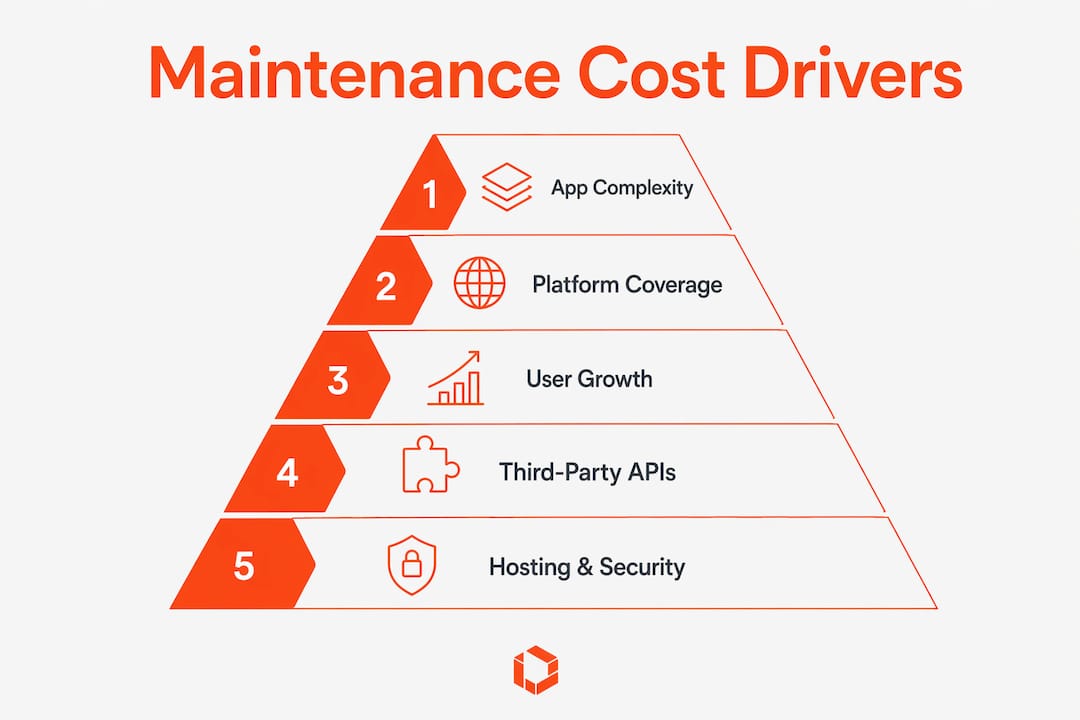
No two apps cost the same to maintain. The variables below are the primary levers. Run through each one honestly and you will know which benchmark band applies to your situation.

App complexity and feature surface area
A simple content app with five screens and no backend logic costs a fraction of what a marketplace app with real-time messaging, payments, and user-generated content costs to maintain. Every feature you ship becomes a surface area that needs monitoring, patching, and updating.
Platform coverage
Supporting both iOS and Android increases the adaptive maintenance workload because each platform has its own requirements and update cycles. Apple and Google release major OS updates on different schedules, and each platform has its own review policies, SDK requirements, and deprecation timelines. Cross-platform frameworks like Flutter and React Native reduce some duplication, but platform-specific behavior still requires platform-specific attention.
User base size and growth rate
More monthly active users (MAUs) mean more crash reports to triage, more support tickets, higher infrastructure costs, and more pressure on backend performance. An app that grows from 1,000 to 100,000 MAUs in a year will see its scalability costs climb significantly, even if the feature set stays identical.
Third-party integrations
Payment gateways (Stripe, Braintree), mapping APIs, authentication providers, analytics SDKs, and CRM connectors all have their own update cycles and deprecation risks. Each integration is a dependency that can break independently of your own code.
Backend architecture and hosting model
A serverless architecture on AWS Lambda or Google Cloud Run scales automatically but introduces per-request cost variability. A self-managed server is cheaper at low scale but requires more hands-on maintenance. The architecture decision made at build time directly shapes your monthly infrastructure bill.
Security and compliance requirements
Apps handling health data, financial transactions, or EU user data may require additional security reviews, documentation, testing, and ongoing compliance controls. App security is especially important for these categories and should be included in ongoing planning.
Release frequency and cadence
A team shipping biweekly updates spends far more on QA, regression testing, and store submission cycles than one shipping quarterly. Higher cadence increases quality assurance costs and the risk of introducing regressions that require corrective maintenance.
Self-assessment checklist — answer these before picking a benchmark band:
How many platforms does your app support (iOS only, Android only, or both)?
How many third-party integrations does your app rely on?
What is your current MAU count, and what is your 12-month growth target?
Does your app handle regulated data (health, financial, children's data)?
How often do you plan to ship updates (weekly, biweekly, monthly, quarterly)?
Is your backend self-managed, fully managed (PaaS), or serverless?
Industry-specific cost multipliers to know:
E-commerce apps: Payment gateway maintenance, inventory API sync, and promotional campaign support add recurring cost.
Fintech and healthcare: Compliance audits, penetration testing, and mandatory security patching push annual maintenance costs to the higher end of any benchmark band.
Gaming with live ops: Event management, leaderboard infrastructure, and real-time server costs create a continuous operational overhead that standard maintenance budgets rarely anticipate.
One timing factor that catches founders off guard: major OS releases from Apple and Google create cyclical spikes in adaptive maintenance effort. When Apple ships a new iOS version, maintenance budgets may need temporary adjustments because deprecated APIs and new permission models can require significant engineering work on short timelines.
What do U.S. maintenance costs actually look like by app stage?
The table below maps each app stage to annual cost as a percentage of the original build, typical monthly range, and the cost components that dominate each band.
App stage | Annual % of build cost | Typical monthly range (US) | Dominant cost components |
|---|---|---|---|
MVP / small app | A moderate percentage | Varies from lower to mid-range monthly costs | Hosting, crash monitoring, minor bug fixes, store submissions |
Growth-stage app | Higher percentage | Mid-range monthly costs | APIs, performance tuning, push notifications, QA, support SLA |
Complex / enterprise | Higher still | Higher monthly costs | Dedicated engineering, compliance, live ops, multi-platform releases |
Statistic callout: U.S. benchmark data indicates varying monthly maintenance expenses reflecting the spectrum of post-launch app support costs across the market in 2026.
Three sample budget scenarios:
Scenario A — $60,000 build, MVP fitness app (iOS only): At 20% annually, expect roughly $12,000/year ($1,000/month). That covers managed hosting, crash reporting, monthly bug-fix sprints, and two App Store Connect submissions per quarter. This lands squarely in the lower MVP band.
Scenario B — $150,000 build, two-sided marketplace (iOS + Android): At 20–25% annually, the range is $30,000–$37,500/year ($2,500–$3,125/month). The dual-platform requirement, payment gateway maintenance, and biweekly release cadence push this cost toward the mid-range of the growth band. Many vendors quote $2,000–$7,000/month for standard apps at this level, which aligns.
Scenario C — $400,000 build, fintech app (iOS + Android + web): At 25%+, annual maintenance runs $100,000+ ($8,333+/month). Compliance audits, penetration testing, dedicated senior engineering time, and a 4-hour SLA response commitment all contribute to the higher floor.
The percent-of-build rule is a starting point, not a ceiling. Apps that grow faster than projected, add integrations post-launch, or face a major OS deprecation cycle will spend above the baseline percentage in that year.
What recurring line items should you budget for every month?
Breaking maintenance into concrete line items is the fastest way to catch hidden costs before they appear on an invoice. The list below covers the standard recurring components for a U.S.-based app, with typical ranges marked as sourced benchmarks or example estimates.
Monthly recurring items:
Hosting / backend infrastructure: AWS, Google Cloud, or Azure costs vary by architecture. A lightweight serverless backend might run $50–$300/month at low MAU counts; a dedicated server setup for a high-traffic app can reach $1,000–$5,000+/month.
Database costs: Managed database services (RDS, Firestore, PlanetScale) typically add $20–$500/month depending on storage and query volume.
CDN and storage: Cloudflare, AWS CloudFront, or similar services for media-heavy apps add $10–$200/month.
Third-party APIs: Mapping, SMS, email, and data APIs charge per call or per seat. Budget $50–$500+/month depending on usage volume.
Push notification infrastructure: Firebase Cloud Messaging is free at most scales, but enterprise notification platforms (OneSignal Pro, Braze) can run $100–$1,000+/month.
Analytics platform: Mixpanel, Amplitude, or Segment plans range from free tiers to $500+/month for growing apps.
Monitoring and observability: Datadog, New Relic, or Sentry for crash reporting and performance monitoring typically costs $20–$300/month. Small apps still need this layer — skipping it produces hidden costs as MAUs grow.
Security scanning: Automated vulnerability scanning tools add $50–$200/month for most app categories.
Payment gateway fees: Stripe charges 2.9% + $0.30 per transaction (not a flat monthly fee, but a significant variable cost for e-commerce and marketplace apps).
Customer support tooling: Intercom, Zendesk, or similar platforms run $50–$500+/month depending on seat count and ticket volume.
Annual recurring items:
Apple Developer Program: Required for App Store Connect access and iOS distribution. The fee is annual and publicly listed on Apple's developer site.
Google Play Console: A one-time developer registration fee, publicly listed by Google. No annual renewal required.
Security audits / penetration testing: For regulated apps, annual third-party audits can run $5,000–$20,000+ depending on scope.
SSL certificates and domain renewals: Typically $10–$200/year depending on certificate type.
Line item | Billing cycle | Typical US range | Pricing model |
|---|---|---|---|
Hosting / backend | Monthly | $50–$5,000+ | Usage-based or reserved |
Database | Monthly | $20–$500 | Usage-based |
CDN / storage | Monthly | $10–$200 | Usage-based |
Third-party APIs | Monthly | $50–$500+ | Per-call or per-seat |
Push notifications | Monthly | $0–$1,000+ | Tiered / usage |
Analytics platform | Monthly | $0–$500+ | Tiered |
Monitoring / crash reporting | Monthly | $20–$300 | Tiered |
Security scanning | Monthly | $50–$200 | Subscription |
Customer support tooling | Monthly | $50–$500+ | Per-seat |
Apple Developer Program | Annual | Publicly listed | Flat annual |
Google Play Console | One-time | Publicly listed | One-time |
Security audit | Annual | $5,000–$20,000+ | Project-based |
As your MAU count grows, unit economics shift the totals materially. An analytics platform that costs $50/month at 5,000 MAUs may cost $500/month at 100,000 MAUs. Build MAU growth projections into your infrastructure budget from day one — not as an afterthought when the invoice arrives.

How is mobile app maintenance priced in the U.S.?
There are four primary engagement models for ongoing app maintenance in the U.S. market, and the right choice depends on your release cadence, budget predictability needs, and how much senior engineering access you require.
The four models:
Monthly retainer (fixed scope): You pay a set monthly fee for a defined scope of work — typically X hours of engineering, Y bug fixes, and Z releases per month. Predictable cost, clear accountability. Best for apps with a stable, well-understood maintenance load.
Hourly / sprint-based: You pay for time used, usually in two-week sprint blocks. Flexible for variable workloads but harder to budget. Works well when maintenance needs fluctuate significantly month to month.
Dedicated in-house hire: You employ one or more engineers full-time. Total compensation for a mid-level mobile engineer in the U.S. runs significantly higher than a retainer when you factor in salary, benefits, payroll taxes, and tooling. Mobile developer compensation varies by specialization and market, but the all-in cost of a single senior iOS or Android engineer typically exceeds most agency retainers for small-to-mid apps.
Hybrid model: An agency retainer handles routine maintenance while one in-house product manager or junior engineer owns day-to-day triage and communication. This is increasingly common for growth-stage startups that want senior engineering access without full-time headcount.
Typical U.S. rate ranges:
Agency retainer: monthly fees vary according to app complexity, with standard apps costing less than complex or enterprise apps. Senior developer access is often included in well-structured retainers.
Hourly contractor rate: Varies widely by experience and specialization. Senior mobile engineers typically bill at premium rates; junior contractors bill lower but often require more oversight.
In-house FTE (fully loaded): A single senior mobile engineer in the U.S. costs substantially more annually than a mid-range agency retainer when benefits and overhead are included.
Freelancer (project-based): Lower hourly rates but higher coordination overhead, no SLA guarantees, and availability risk.
SLA tiers and their cost impact:
Standard response (next business day): Included in most base retainers.
Priority response (4–8 hours): Adds a premium to the monthly retainer, typically 15–30%.
On-call / 24-7 coverage: Reserved for revenue-critical apps. Adds significant cost and is usually structured as a separate on-call fee on top of the base retainer.
The faster the required response time, the more the vendor must staff for availability. A 1-hour SLA on a Saturday night requires a different staffing model than a next-business-day SLA — and that difference shows up directly in your monthly bill.
How do you calculate your app's maintenance budget?
A defensible maintenance budget is not a guess. It follows a repeatable formula that you can apply to your specific app and revisit as conditions change.
The formula:
Annual maintenance budget = (Baseline % × Build cost) + Scale adjustment + Third-party and support fees + Contingency
Walk through each variable:
Baseline % × Build cost: Start with the percent-of-build rule. Use 15–20% for a simple app, 20–25% for a growth-stage app, and 25%+ for a complex or enterprise app. Multiply by your total original build cost.
Scale adjustment: If your MAU count is growing faster than 20% per quarter, add 10–15% to the baseline figure to account for infrastructure scaling, increased support volume, and more frequent performance tuning.
Third-party and support fees: Sum your known recurring line items (hosting, APIs, monitoring, analytics, store fees, support tooling). This is the floor — the number you will spend even if no bugs appear.
Contingency: Add a buffer for unplanned work. A contingency of 10–20% of the maintenance line is standard practice, covering unplanned work triggered by scale events or platform changes.
Inputs checklist — gather these before running the formula:
Total original build cost (design + engineering + QA)
Current MAU count and 12-month growth projection
Number of platforms (iOS, Android, both)
Release cadence (weekly, biweekly, monthly, quarterly)
Known third-party API and service costs
Compliance requirements (HIPAA, PCI-DSS, GDPR)
Desired SLA response time
Example calculation:
A startup built a two-sided marketplace for $180,000. Current MAUs: 8,000, growing at 25% per quarter. Dual platform (iOS + Android). Biweekly releases. Known third-party costs: $600/month ($7,200/year). No regulated data.
Baseline: 22% × $180,000 = $39,600/year
Scale adjustment: +12% = $4,752/year
Third-party fees: $7,200/year
Subtotal: $51,552/year
Contingency (15%): $7,733/year
Total annual budget: $59,285/year ($4,940/month)
That figure sits comfortably in the growth-stage band ($2,000–$7,000/month), which validates the inputs.
Pro Tip: Review your maintenance budget quarterly, not annually. A major OS release, a new third-party API pricing change, or a traffic spike can shift your actual spend by 20–30% within a single quarter. Build the review cadence into your product planning calendar so adjustments happen proactively, not reactively.
What should your maintenance agreement include, and what are the red flags?
A maintenance contract without clear SLA terms is a liability. Before you sign, verify that the agreement covers every item below.
Essential SLA clauses to insist on:
Scope of work: A written definition of what is and is not included in the monthly fee. Ambiguity here is where budget overruns originate.
Response and resolution times: Separate commitments for initial response (e.g., within 4 hours for critical bugs) and full resolution (e.g., within 48 hours for P1 issues).
Update and release cadence: How many releases per month are included? What is the process for emergency hotfixes?
Reporting: Monthly or biweekly written reports covering work completed, open issues, infrastructure costs, and upcoming risks.
Security patching: A defined timeline for applying critical security patches (e.g., within 72 hours of a CVE disclosure affecting your stack).
On-call support: Is after-hours support included? If so, what triggers it and what is the escalation path?
Escalation path: Who do you contact when the primary engineer is unavailable? Is there a named backup?
Termination terms: How much notice is required? What happens to your codebase, credentials, and documentation at offboarding?
Negotiation tips:
Ask for a change-request process with written estimates before work begins. Verbal approvals for out-of-scope work are how budgets balloon.
Require itemized invoices that separate labor from third-party pass-through costs. Hidden hosting or API markups are common.
Negotiate a cap on overage billing. If the vendor exceeds the monthly hour allotment, you should approve the overage before it is billed, not after.
Red-flag checklist — walk away if you see these:
Vague scope with no written definition of included work
No named senior developer on your account (junior-only teams miss architectural issues early)
No rollback or recovery plan for failed releases
Hosting and API costs billed as opaque line items with no breakdown
Single-contributor dependency with no backup coverage
No IP assignment clause confirming you own the code and credentials
On IP and data: your maintenance agreement should explicitly state that all code, credentials, store accounts (App Store Connect, Google Play Console), and data remain your property. Confirm this in writing before signing — recovering access from a vendor who controls your store accounts is a painful and time-consuming process.
Pro Tip: Request a 30-day trial period or a pilot sprint before committing to a long-term retainer. A vendor's responsiveness during the trial period is the most reliable signal of how they will perform under pressure six months in.
How TouchZen approaches U.S. maintenance benchmarks
TouchZen has shipped more than 75 apps across consumer, B2B, e-commerce, and healthcare categories. The ranges below are planning estimates compiled from publicly available industry information and should be adjusted for each app’s architecture, user base, release cadence, and compliance needs.
How the benchmark bands map to real engagements:
MVP bucket: Apps built for under $75,000 with fewer than 10,000 MAUs. Maintenance typically runs $500–$1,500/month, covering managed hosting, crash monitoring, quarterly releases, and store submissions. The most common surprise in this bucket is monitoring and crash reporting — teams that skip these lines discover the cost later when production issues go undetected.
Growth bucket: Apps with $75,000–$250,000 build costs and 10,000–100,000 MAUs. Maintenance runs $2,000–$6,000/month. The dominant cost drivers are API maintenance, biweekly release cycles, and the engineering overhead of supporting both iOS and Android through major OS updates.
Enterprise bucket: Apps with $250,000+ build costs, 100,000+ MAUs, or regulated data requirements. Maintenance runs $7,000–$20,000+/month. Compliance work, dedicated senior engineering time, and 4-hour SLA commitments account for the higher floor.
TouchZen’s post-launch approach emphasizes experienced developer involvement and continuity of product knowledge. This can reduce the ramp-up time that often appears when a new team inherits an unfamiliar codebase. Across its portfolio, TouchZen has shipped 75+ apps, reached 20M+ downloads, and received 12+ Apple and Google features.
Pro Tip: When your maintenance team flags the same class of bug three months in a row, that is a signal to convert the fix into a scoped refactor. Recurring corrective maintenance on the same module is a reliable indicator of underlying technical debt that a retainer alone will not resolve.
Key Takeaways
Post-launch mobile app maintenance costs in the U.S. range from $500/month for a lean MVP to $25,000+/month for a complex enterprise app, and planning for this before launch is what separates founders who scale from those who scramble.
Point | Details |
|---|---|
Use the percent-of-build rule | Budget 15–20% of your build cost annually for simple apps, 20–25% for growth-stage, and 25%+ for complex or enterprise apps. |
Know your benchmark band | U.S. monthly ranges: $500–$2,000 (MVP), $2,000–$7,000 (growth), $7,000–$25,000+ (enterprise), based on 2026 planning ranges reported by CoderLegion. |
Budget every line item | Include hosting, APIs, monitoring, analytics, security, support tooling, and store fees for both App Store Connect and Google Play Console. |
Add a contingency buffer | Reserve 10–20% of your maintenance line for unplanned work from OS releases, scale events, or deprecated SDKs. |
TouchZen for senior-led maintenance | TouchZen's retainer model gives you direct access to senior engineers who know your codebase, reducing ramp-up cost and surprise refactors. |
The maintenance budget conversation most founders have too late
There is a pattern that shows up repeatedly in post-launch app projects: the maintenance budget conversation happens after the first invoice, not before the first line of code. Founders treat the build cost as the investment and maintenance as an operational nuisance. That framing is expensive.
The more useful mental model is to treat maintenance as the cost of keeping your investment generating returns. An app that goes six months without a security patch, a dependency update, or a performance audit is not saving money. It is accumulating risk that will eventually surface as a production incident, a store rejection, or a compliance finding — all of which cost more to fix reactively than they would have cost to prevent.
What the benchmark data actually reveals is that the spread between a well-maintained app and a neglected one is not primarily a cost story. It is a compounding quality story. Teams that include senior developer time in their retainers catch architectural issues early, before they become the kind of structural problems that require a full rewrite. The apps in TouchZen's portfolio that hit 100,000 downloads in their first year did not get there by accident. They got there because the post-launch maintenance plan was as deliberate as the launch plan itself.
One practical recommendation: before you sign a maintenance retainer, ask the vendor to walk you through the last three production incidents they handled for a client. How they describe the diagnosis, the fix, and the preventive measure they put in place afterward tells you more about their actual capability than any SLA document.
TouchZen's maintenance and retainer services for your app
If you have read this far, you already know what a well-structured maintenance budget looks like. The next step is making sure the team executing it has the seniority and the context to deliver on it.
TouchZen’s post-launch retainer model emphasizes experienced developer access and continuity of product knowledge. Retainers can be structured around the app’s release cadence, SLA requirements, technical complexity, and compliance needs.
Two concrete next steps: request a benchmarked maintenance estimate based on your app's stage and complexity, or schedule a scoping call with the team at TouchZen's app experts page to map your specific situation to the right retainer tier. Either option can give you a clearer maintenance estimate to bring to your next planning cycle.
Useful sources and further reading
The benchmarks and cost ranges in this article draw from the following sources:
App Maintenance in the USA (2026): $500 to $25,000 Per Month Depending on Stage — CoderLegion: published industry planning ranges for monthly and annual maintenance costs.
App Maintenance Cost: A Complete Breakdown — NewAgeSysIT: mid-range monthly estimates and recurring component detail.
Mobile App Maintenance Costs: What to Budget After Launch — TouchZen blog: expanded scope definitions and real-world component breakdown.
Custom Mobile App Development Costs, Timeline, and Key Factors — TouchZen blog: build cost context for percent-of-build calculations.
Mobile App Technical Debt: When to Refactor, When to Rewrite, and When to Leave It Alone — TouchZen blog: guidance on converting maintenance into scoped refactor projects.
Why App Security Is Critical for Startups in 2026 — TouchZen blog: security-related maintenance cost drivers.
Mobile App Scalability Tips for Startup Founders in 2026 — TouchZen blog: infrastructure scaling and MAU-driven cost increases.
Mobile Developer Salary 2026 — iOS, Android & Cross-Platform Pay — CS Recruiters: U.S. mobile developer compensation benchmarks for in-house vs. agency comparisons.
FAQ
How much does mobile app maintenance cost per month?
Monthly maintenance costs in the U.S. range from $500–$2,000 for small MVPs, $2,000–$7,000 for growth-stage apps with regular releases, and $7,000–$25,000+ for complex or enterprise apps, based on 2026 CoderLegion benchmark data.
What percentage of the build cost should go to app maintenance?
A standard rule of thumb is to budget 15–25% of your original development cost per year for ongoing maintenance, with the percentage scaling up as app complexity, platform coverage, and release frequency increase.
What does it cost to start and maintain an app long-term?
Build costs vary widely by scope, but once launched, plan for recurring annual maintenance starting around $12,000 for a simple app and $100,000+ for a complex platform. Many vendors quote $2,000–$4,000/month as a common mid-range for standard apps that include hosting and basic support.
How does user scale affect maintenance costs?
As monthly active users grow, infrastructure costs, support ticket volume, and performance tuning requirements all increase. An app growing from 5,000 to 100,000 MAUs can see its monthly maintenance bill double or triple even without adding new features.
How does TouchZen structure its maintenance retainers?
TouchZen offers post-launch retainers with direct senior developer access, structured around your app's release cadence, SLA requirements, and complexity band. You can request a benchmarked estimate or schedule a scoping call through TouchZen's app experts page.


