
Joy Foroughi
Executive Assistant


Android App Development for Business: Choosing the Right Approach
Discover the key factors in Android App Development for Business Choosing the Right Approach. Make informed decisions for a successful app.

TL;DR:
Choosing the right approach in Android app development depends on your business goals and technical requirements. Native development offers the best performance but requires more time and resources, while cross-platform frameworks like Flutter and React Native enable faster market entry with some tradeoffs. Meeting Google's 2026 quality standards is essential for app success and user trust.
Android app development for business is defined by three core decisions: the architecture you choose, the tools you build with, and the workflow you follow from kickoff to launch. Get those three right, and you have an app that performs, scales, and earns user trust. Get them wrong, and you spend months reworking code that should have been solid from day one. Choosing the right approach to Android app development is not a one-size-fits-all decision. It is a structured decision that depends on your business goals, your team's strengths, and the quality benchmarks Google now enforces in 2026. This article breaks down every factor you need to make that decision with confidence.
What are the main Android app development approaches and how do they differ?
The two primary paths for building Android business apps are native development and cross-platform frameworks. Each carries real tradeoffs that affect your timeline, budget, and long-term maintenance burden.

Native development uses Kotlin or Java to build directly for Android. You get full access to the latest Android SDK, the best raw performance, and complete control over your app's architecture. Native apps respond faster, integrate more deeply with device hardware, and give your team the most flexibility when building complex features. The tradeoff is cost and time. Native Android development requires Android-specific expertise, and if you also need an iOS app, you are maintaining two separate codebases.
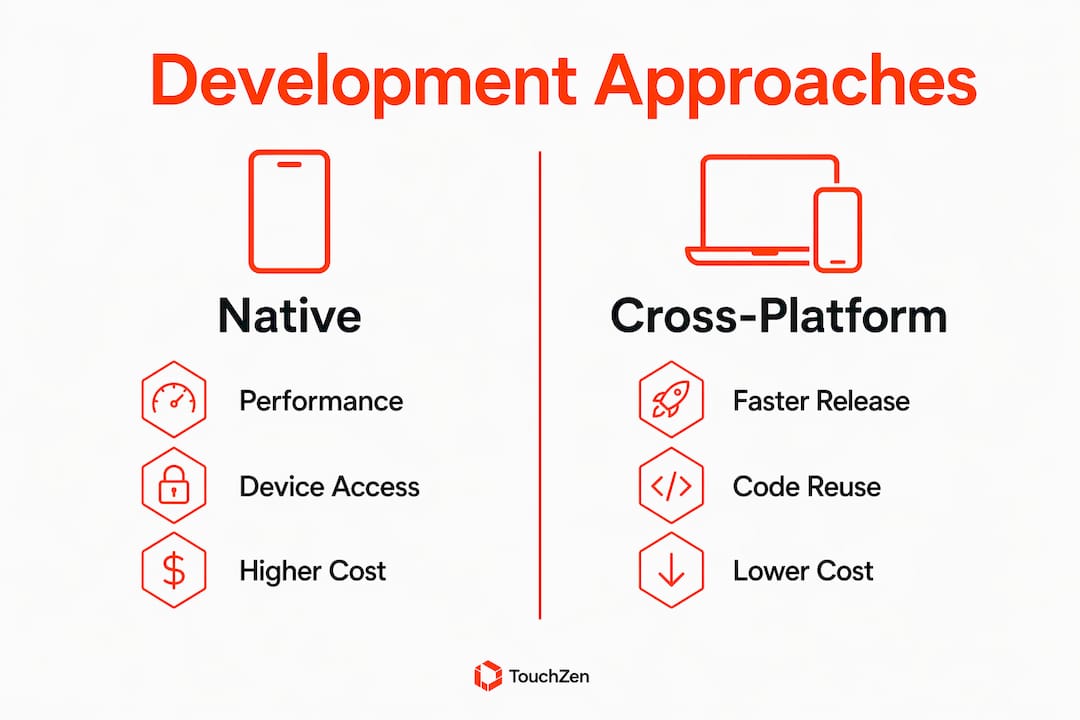
Cross-platform frameworks like Flutter and React Native let you write one codebase that runs on both Android and iOS. That cuts time to market significantly. Flutter, backed by Google, compiles to native ARM code and delivers near-native performance for most business use cases. React Native, maintained by Meta, uses a JavaScript bridge that can introduce latency in performance-heavy scenarios. Neither framework matches the ceiling of a fully native app, but for most business apps, the gap is narrow enough that cross-platform is the smarter economic choice.
Architecture matters as much as the framework you pick. Android architecture recommendations call for a clearly defined data layer housing most business logic, a UI layer built with Jetpack Compose, and unidirectional data flow using ViewModels with coroutines and flows. This separation keeps your codebase maintainable and makes adding new features safer over time.
Native (Kotlin/Java): Best performance, full SDK access, higher cost, single platform per codebase
Flutter: Near-native performance, single codebase, strong Google support, growing ecosystem
React Native: Large developer community, JavaScript-based, some performance limits on complex UIs
Architecture pattern: Data layer + UI layer + ViewModels is the Google-recommended structure for all approaches
Pro Tip: Choose your development approach before writing a single line of code. The framework you pick shapes your entire architecture, and switching mid-project is one of the most expensive mistakes a business can make.
How do Android core app quality guidelines influence the choice of development approach?
Google's core app quality guidelines for 2026 set measurable performance targets that directly affect which development approach makes sense for your app. These are not suggestions. They are the baseline your app must meet to retain users and pass Google Play review.
Startup performance: Your app must show feedback within 2 seconds of launch. Users who wait longer abandon the app before it even loads. This target pushes teams toward native development or well-optimized Flutter builds, where startup time is easier to control.
Frame rendering: The UI must render frames every 16ms to achieve 60 FPS. Dropped frames create a janky experience that users associate with low-quality products. React Native apps with heavy JavaScript bridges can struggle here without careful optimization.
Permission minimization: Minimizing requested permissions reduces security risk and improves user trust. If a permission is not required for core functionality, it should not appear in your manifest. This is both a security practice and a growth lever. Overly-permissioned apps see lower install conversion rates.
Adaptive layouts: Your app must support all device screen sizes, including multi-window modes, foldables, tablets, and desktop environments. Using window size classes is the recommended approach. This requirement favors frameworks with strong responsive layout support, which includes both Jetpack Compose and Flutter.
Testing coverage: Google expects testing across phones, tablets, foldables, and emulators before submission. Multi-window behavior, lifecycle transitions, and orientation changes must all be verified. Skipping this step is the fastest way to generate one-star reviews on launch day.
Pro Tip: Treat the 2-second startup target and 60 FPS rendering as your acceptance criteria, not just developer goals. Build them into your QA checklist from sprint one so they never become a last-minute scramble.
Using Jetpack Compose for UI development directly supports the unidirectional data flow pattern and makes state management far simpler during iterative feature upgrades. If you are building natively, Compose is the right UI toolkit for 2026.
What are the best practices for testing and releasing Android business apps?
Google Play's release process follows a staged progression, and skipping any stage creates real risk. Closed testing requires a minimum of 12 testers over 14 days before you can move to production. That timeline is not optional. Build it into your project plan from the start.
A well-structured release plan covers these checkpoints:
Internal testing: Share your app with your core team to catch critical bugs before external eyes see it. This stage has no minimum tester count or duration, so move through it quickly but thoroughly.
Closed testing: Recruit at least 12 real users who represent your target audience. Run this phase for a minimum of 14 days. Collect structured feedback and fix issues before opening wider.
Open testing: Release to a broader audience before production. This stage surfaces edge cases that internal teams miss, particularly around device diversity and network conditions.
Data safety form: Complete Google Play's data safety declaration accurately. Misrepresenting data collection practices is a common reason for app rejection.
Privacy policy: Every app that collects user data must link to a publicly accessible privacy policy. This is non-negotiable for approval.
Content rating: Complete the content rating questionnaire honestly. Incorrect ratings trigger review flags that delay your launch.
Crash-free experience: Your app must function correctly across the device types you declare support for. A crash rate above Google's threshold at launch will suppress your app's visibility in search results.
The launch definition of done must include performance tests, adaptive layout verification, and lifecycle behavior checks. Skipping these tests creates fragmented device state problems that erode retention after launch. A solid pre-launch testing process catches these issues before they reach your users.
How to decide on the right Android development approach for your business
The right development approach for your business comes from matching your goals, resources, and technical requirements against the real tradeoffs of each option. Use this framework to make the call.
Start with your business objectives. If you need to reach both Android and iOS users quickly with a limited budget, cross-platform frameworks like Flutter give you the fastest path to market. If your app requires deep hardware integration, complex animations, or real-time data processing, native Kotlin development gives you the control you need.
Assess your team's strengths. A team fluent in JavaScript will move faster with React Native than with Kotlin. A team with no mobile experience at all should consider outsourcing to specialists who already know the mobile development workflow for Android. Forcing a team to learn a new language while building a production app is a reliable source of scope creep and missed deadlines.
Plan for long-term maintenance. The framework you choose today is the one your team maintains for the next three to five years. Early architectural decisions about permission scope affect your UX, manifests, testing, and compliance layers. Choosing a framework with strong community support and active maintenance reduces that long-term risk.
Development approach | Best for | Performance | Time to market | Maintenance cost |
|---|---|---|---|---|
Native Kotlin/Java | Complex, high-performance apps | Highest | Slower | Higher |
Flutter | Cross-platform with near-native speed | High | Fast | Moderate |
React Native | JavaScript teams, rapid prototyping | Moderate | Fast | Moderate |
Hybrid (WebView) | Simple content apps | Lower | Fastest | Low |
For types of mobile apps that require deep device integration, native development is the clear winner. For most business apps focused on user engagement, data display, and transactional workflows, Flutter delivers the best balance of speed and quality.
Key Takeaways
Choosing the right Android development approach requires matching your framework, architecture, and testing process to measurable quality benchmarks and your specific business goals.
Point | Details |
|---|---|
Framework choice drives architecture | Decide between native Kotlin, Flutter, or React Native before writing code to avoid costly rework. |
Performance targets are non-negotiable | Apps must show startup feedback within 2 seconds and render frames every 16ms to meet Google's 2026 standards. |
Permission scope affects growth | Requesting only necessary permissions builds user trust and directly improves install conversion rates. |
Staged testing is required | Google Play requires closed testing with at least 12 testers over 14 days before production release. |
Adaptive layouts are mandatory | Apps must support phones, tablets, foldables, and multi-window modes to pass quality review. |
What I've learned about Android development decisions that most articles skip
Most articles on Android app development for business focus on frameworks and ignore the decision latency problem. Business leaders spend weeks debating Flutter versus React Native while their architecture goes undefined. By the time the framework debate ends, the team has already made implicit architectural choices through early code commits. Those choices are expensive to undo.
The more important early decision is your data layer design. A clean separation between your data layer and UI layer, using ViewModels and Jetpack Compose, protects you from the most common form of technical debt in business apps. Features get added, requirements change, and if your business logic is tangled inside your UI code, every new feature becomes a rework project.
Security and permission scope deserve the same early attention. Most teams treat permissions as a checklist item at the end of development. That is backwards. Permission decisions affect your UX flows, your manifest, your testing matrix, and your compliance documentation. Scoping permissions correctly from the start saves weeks of rework and prevents the kind of user trust damage that tanks app ratings at launch.
My honest observation after watching dozens of app launches: the teams that ship great apps are not the ones with the best framework debate. They are the ones that defined their architecture, their permission model, and their launch criteria before writing a single line of UI code. That discipline is what separates a 100,000-download launch from a quiet failure.
— Cyrus
How TouchZen approaches Android app development for business
TouchZen works directly with business leaders to define the right development approach before a single line of code is written. The team has launched over 75 apps across industries, with results including a 10x increase in user subscriptions and 100,000 downloads within the first year of launch.
TouchZen's senior developers build to Google's 2026 quality benchmarks from day one, covering startup performance, adaptive layouts, permission scoping, and staged testing. Every project includes direct communication with the developers building your app, not a junior team working from a brief. If you are ready to build an Android app that meets the quality bar your users expect, see how TouchZen builds mobile apps that perform and scale. You can also review TouchZen's track record as one of the top-ranked app development agencies in the USA.

FAQ
What is the best Android development approach for a business app?
Flutter is the best starting point for most business apps because it delivers near-native performance with a single codebase for Android and iOS. Native Kotlin development is the better choice when your app requires deep hardware integration or maximum performance.
How long does Android app development take for a business?
Timeline depends on complexity, but Google Play's staged testing requirements add a minimum of 14 days for closed testing alone. Most production-ready business apps require three to six months from kickoff to launch.
What are the core quality standards Android apps must meet in 2026?
Apps must show startup feedback within 2 seconds, render frames every 16ms for 60 FPS performance, support adaptive layouts across all device sizes, and minimize requested permissions. These are Google's published core app quality benchmarks.
Why does permission scope matter for business app adoption?
Apps that request unnecessary permissions see lower install conversion rates because users distrust them. Requesting only permissions required for core functionality is both a security best practice and a direct driver of user adoption.
What testing does Google Play require before a production launch?
Google Play requires internal testing, then closed testing with at least 12 testers over a minimum of 14 days, followed by open testing before production deployment is approved.