Joy Foroughi
Executive Assistant


Deep Linking for Mobile Apps: What It Is and Why You Need It
Discover how deep linking can boost user engagement and conversion rates in your mobile app. Learn why it's essential for success today.

A deep link is a URL that routes a user directly to a specific screen or state inside your mobile app, bypassing the home screen entirely. If your app handles any kind of marketing, re-engagement, or paid acquisition, deep linking is infrastructure you need now, not later.
Conversion lift: Users who land on the exact screen they clicked to see convert at a materially higher rate than users dropped on a generic home screen.
Re-engagement: Push notifications and email campaigns that carry deep links bring dormant users back to the precise content that motivated the tap.
Ad performance: Google Ads reports that advertisers see increased conversion rates when ad clicks land in-app versus on mobile web.
Prioritize deep linking from day one if your app supports marketing campaigns, social sharing, or referral flows. Delay only if your app is a pure utility with no acquisition or re-engagement funnel.
Key Takeaways
Deep linking is the single highest-leverage technical change you can make to improve conversion, attribution, and retention across every channel your app touches.
Point | Details |
|---|---|
Use verified https:// links | App Links (Android) and Universal Links (iOS) eliminate disambiguation dialogs and improve security over custom URI schemes. |
Deferred links preserve campaign context | They carry destination and metadata through the install, enabling accurate attribution for paid acquisition. |
Google Ads has specific link requirements | Web to App Connect requires App Links or Universal Links as final URLs and does not support redirect-based third-party links. |
Test in-app browsers explicitly | Instagram and TikTok embedded browsers do not honor App Links or Universal Links; always provide a web fallback. |
Align app and web content | Only deep link to app screens with equivalent web content to protect organic search performance. |
How a deep link actually resolves at runtime
The path a deep link takes depends on whether the app is installed. If it is, the operating system can open the intended app screen. If it is not installed, a verified HTTPS link normally opens its web destination. Sending the user to the app store and restoring the original destination after installation requires a deferred-linking setup.
A single canonical https:// URL can resolve to three different surfaces. On a device with the native app installed, the OS opens the app. On a device with the PWA installed and no native app, the URL opens inside the PWA. On a device with neither, the browser loads the web page. Deepclick's deep-linking guide describes this as a "best available surface" model, where the canonical URL always resolves to the richest experience the device supports.

Context travels through the URL itself. A link like https://example.com/product?id=42&utm_campaign=spring carries both the destination path (/product) and campaign metadata (utm_campaign=spring). The app picks this up on launch via getInitialURL() in React Native or the equivalent intent extras on Android, then routes the user and logs the attribution data.
Custom URI schemes (myapp://product/42) work differently. They call the app directly but have no web fallback and no domain verification, which is why platform-verified https:// links have largely replaced them for production use.
Which type of deep link should you use?
Deepclick's guide defines three canonical types, each suited to a different stage of the user journey.
Standard (direct) deep links open a specific in-app screen when the app is already installed. They are the simplest form and cover most re-engagement use cases: push notifications, email CTAs, and internal navigation between surfaces.
Deferred deep links preserve the destination across an install. A user clicks a link, gets sent to the App Store or Google Play, installs the app, and on first launch arrives at the screen the link originally pointed to. Adjust's deep-linking guide identifies deferred links as the core tool for acquisition campaigns, where the install itself breaks the direct URL chain.
Contextual deep links extend the deferred model by carrying additional metadata through the install, such as referral codes, A/B test variants, or personalized onboarding parameters. They are the right choice for referral programs, influencer campaigns, and any flow where post-install personalization matters.
Type | App installed? | Fallback | Analytics fidelity | Best for |
|---|---|---|---|---|
Standard / direct | Required | None by default | High | Re-engagement, email, push |
Deferred | Not required | Store redirect | Medium (fingerprint or SDK) | Paid acquisition, referrals |
Contextual | Not required | Store redirect | High (metadata preserved) | Campaigns, onboarding personalization |
Platform naming: iOS calls its verified https:// links Universal Links. Android calls its equivalent App Links. Firebase Dynamic Links shut down on August 25, 2025. Teams that need deferred linking must now use App Links and Universal Links alongside another provider or custom infrastructure.
Platform implementation checklist for iOS, Android, and web
iOS: Universal Links
Host
apple-app-site-association(AASA) athttps://yourdomain.com/.well-known/apple-app-site-associationwith no file extension.Add the
applinks:yourdomain.comentitlement under Associated Domains in your Xcode project.Handle the incoming URL in
application(_:continue:restorationHandler:).Common pitfall: the AASA file must be served with
Content-Type: application/jsonand must be reachable without redirects.
Android: App Links
Android's App Links documentation explains that App Links open immediately in the app without a disambiguation dialog, unlike standard intent-based deep links. The required steps:
Add an intent filter in
AndroidManifest.xmlwithandroid:autoVerify="true", schemehttps, and your domain.Host
assetlinks.jsonathttps://yourdomain.com/.well-known/assetlinks.jsonwith your app's package name and SHA-256 fingerprint.Verify via Play Console under Grow users > Deep links, which also lets you manage or disable link paths post-release.
A minimal intent filter looks like this:
Web and PWA
Once a PWA is installed, URLs within its declared scope open the PWA instead of the browser. Host both assetlinks.json and the AASA file at /.well-known/ on your canonical domain. For cross-platform React Native apps, wire Linking.addEventListener('url', handler) for foreground links and Linking.getInitialURL() for cold-start launches — but the native verification files still need to be in place for the OS handoff to work.
How to test deep links and fix what breaks
A reliable test matrix covers five scenarios before you ship.
Scenario | Expected outcome | Verification method |
|---|---|---|
App installed, foreground | Opens target screen directly | Manual tap + log inspection |
App installed, background | Resumes and routes to screen |
|
App not installed | Opens the web fallback, or the app store when a deferred-link flow is configured. | Test on a clean device or simulator. |
PWA installed, no native app | Opens in PWA | Chrome DevTools, installed PWA |
In-app browser (Instagram, TikTok) | Falls back to web or store | Manual test in each browser |
Embedded browsers can handle verified links differently from Safari and Chrome. Test each campaign channel and make sure a usable web fallback is available.
Debugging tools:
adb logcat | grep IntentFilterfor Android intent resolutionApple's AASA validator to confirm your file is served correctly
Play Console's Deep Links page to verify Android App Links status
xcrun simctl openurl booted "https://yourdomain.com/path"to test Universal Links in the iOS Simulator
Pro Tip: Version your deep-link routes in your app's router. When you remove a content page, add a redirect rule in the router before releasing, so old links don't land on a 404 screen. Play Console's deep-link management page lets you turn off Android paths without a new app release.
Measuring deep-link performance and attribution
The metrics that matter most after rollout are conversion rate on deep-linked sessions, install-to-first-action rate for deferred links, and retention at 7, 30, and 90 days for users acquired through contextual links versus organic installs.
Conversion rate: compare sessions that started from a deep link against sessions that started from the home screen. The gap is your deep-link lift.
Install-to-first-action: for deferred links, measure how many users who installed via a campaign link completed the target action within 24 hours.
Session-start route %: what share of daily sessions begin from an external deep link versus organic app open.
Retention at 7/30/90 days: users who arrive at the right screen on first launch tend to retain better; track cohorts by entry point.
For Google Ads Web to App Connect, App Links or Universal Links must be used as final URLs, and redirect-based third-party links are not supported. Google reports an average 2.8× conversion lift when eligible ad traffic lands in-app rather than on mobile web, although results vary by campaign and implementation.
Attribution partners like Branch and AppsFlyer handle the fingerprinting and probabilistic matching that makes deferred-link attribution possible when device-level identifiers are restricted. For mobile app analytics beyond deep-link attribution, integrate an event-tracking SDK alongside your link infrastructure from the start.
Security and privacy considerations you can't skip
The most common security risk with deep links is accepting URL parameters without validation. If your app reads an incoming userId or token parameter and acts on it without server-side verification, an attacker can craft a malicious link that impersonates a user or triggers unintended actions. Vaadata's security research on deep links identifies unvalidated deep-link parameters as a direct attack surface.
Practical mitigations:
Validate and sanitize every incoming parameter before use.
Never embed PII (email, phone, user ID) in query strings; pass a short-lived token instead and resolve it server-side.
Use nonce or expiry patterns for any link that grants access or triggers a transaction.
Avoid open redirects: never use a deep-link parameter as a raw URL to redirect to.
Universal Links and App Links improve security over custom URI schemes because the OS verifies domain ownership before handing the link to the app. Custom schemes (myapp://) can be claimed by any app on the device, creating a spoofing risk.
For mobile app security more broadly, deep-link input validation belongs in the same security review as API authentication and data storage. One policy note: Google Ads prohibits server-side redirects on deep links used in App campaigns, so your link must resolve directly without a redirect chain.
Best practices that save you from common mistakes
Use canonical
https://URLs for all deep links in production. Custom URI schemes are acceptable for internal navigation only.Implement App Links (Android) and Universal Links (iOS) rather than relying on intent-only or custom-scheme links.
Always provide a graceful web fallback. A user without the app should land on a useful web page, not a broken URL.
Test every link type in in-app browsers before launch. Instagram, TikTok, and LinkedIn all have embedded browsers that behave differently from Safari and Chrome.
Implement deferred and contextual linking for any paid acquisition or referral campaign where install attribution matters.
Hold the destination in memory through login flows. If a user taps a deep link and must log in first, forward them to the intended screen after authentication, not the home screen.
Pro Tip: Only deep link to app screens that contain content equivalent to the corresponding web page. Google Search Central explicitly recommends this to avoid misleading search snippets and damaging your organic search performance. Aligning your mobile SEO strategy with your deep-link architecture pays dividends in both app and web traffic.
Should you build deep linking in-house or hire an agency?
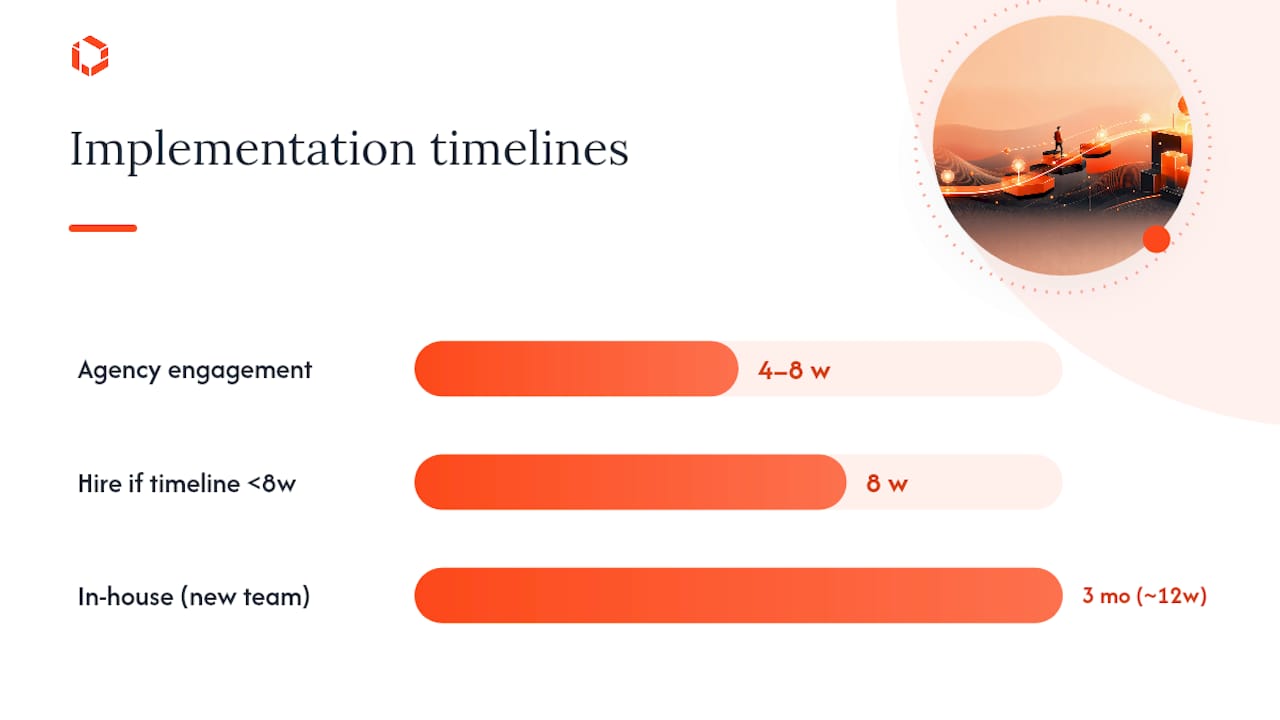
Hire an agency when your team lacks platform-specific experience with AASA and assetlinks.json verification, when your timeline is under eight weeks, or when your strategy spans multiple surfaces (iOS, Android, PWA) with campaign-level attribution requirements.
Criteria to evaluate:
Engineering capacity: do you have a mobile engineer who has shipped App Links or Universal Links before? First-time implementations routinely take two to three times longer than expected.
Timeline: a typical agency engagement covering discovery, implementation across both platforms, QA, and rollout runs four to eight weeks. Internal timelines for teams new to the domain often stretch to three months.
Analytics needs: if you need deferred and contextual linking with attribution reporting tied to ad spend, the integration complexity justifies outside expertise.
Campaign complexity: multi-channel campaigns with personalized post-install flows require contextual link infrastructure that most in-house teams have not built before.
An agency like TouchZen can handle verification-file setup, cross-platform routing, deferred-link configuration, testing, and analytics integration. TouchZen has shipped more than 75 apps across industries, contributing to products with over 20 million downloads.
Agency onboarding checklist:
App Store Connect and Google Play Console access
Domain and DNS access to host
/.well-known/filesApp signing certificates and SHA-256 fingerprints
Analytics platform credentials (Firebase, Amplitude, or equivalent)
Campaign UTM taxonomy and attribution window definitions
A perspective on deep linking from the TouchZen team
Most teams treat deep linking as a feature to add after launch. That is the wrong order. The teams that get the most out of deep links are the ones that wire the routing architecture during the initial build, before the first campaign goes live. Retrofitting link handling into a mature codebase means touching navigation logic, authentication flows, and analytics instrumentation simultaneously, which creates scope creep and QA risk.
At TouchZen, we recommend planning deep-link routes alongside navigation, authentication, analytics, and fallback behavior before launch. After rollout, track the install-to-first-action rate to confirm that campaign traffic reaches the intended experience.
Ready to implement deep linking the right way? TouchZen's senior engineers handle the full stack: platform verification, cross-surface routing, deferred and contextual link setup, and attribution integration. Talk to the team and get your deep-link architecture right from day one.
Sources
Use platform documentation first, then vendor guides for deferred and contextual link infrastructure.
FAQ
What is a deep link in a mobile app?
A deep link is a URL that opens a specific screen or state inside a mobile app rather than the app's home screen. On iOS it uses Universal Links; on Android it uses App Links or intent filters.
What is the purpose of deep linking?
Deep linking connects external surfaces (ads, emails, push notifications, social posts) directly to relevant in-app content, improving conversion rates, attribution accuracy, and user retention.
Are deep links safe to use?
Yes, when implemented correctly. App Links and Universal Links are safer than custom URI schemes because the OS verifies domain ownership. Always validate incoming parameters and avoid embedding PII in query strings to prevent injection attacks.
How do I remove or disable a deep link?
On Android, use the Play Console Deep Links page to turn off specific paths without a new app release. On iOS, update the AASA file on your server to remove the path pattern; the OS re-fetches it periodically.
Recommended
Mobile App Deep Linking and SEO: How to Send Google Search Traffic Straight to an App Screen
Designing for All: The Importance of Accessibility in Mobile App Development
What Is a Mobile Backend? The Key to Launching Apps 30% Faster
Mobile App Technical Debt: When to Refactor, When to Rewrite, and When to Leave It Alone