

Joy Foroughi
Executive Assistant


Founders: Require a Proof of Concept for Photo to Video Features
Hire a senior-led development team and run a two-week technical discovery before you sign anything. The mix of rendering pipelines, EXIF handling, and privacy-sensitive uploads that a real photo-to-video feature demands is not junior-developer territory. Ask any shortlisted agency for a sample pipeline or proof-of-concept render as part of that discovery, not after you have already paid a deposit.

Before committing to development, run a focused technical discovery to test the riskiest parts of the feature. Photo-to-video features involve rendering pipelines, EXIF handling, and privacy-sensitive uploads, so a sample pipeline or proof-of-concept render can help validate the approach before full development begins.
TL;DR:
A common production approach uses hybrid rendering: quick previews on-device, with cloud or server fallback for higher-quality final renders.
Teams should correctly handle native video processing and EXIF orientation tags to prevent sideways or upside-down output.
An MVP for photo-to-video features often takes 8 to 12 weeks when native modules and cloud infrastructure are already understood; scale and quality improvements can add time and cost.
Ask for a proof-of-concept render before signing to validate the approach, including native fallback, EXIF data, and device fragmentation.
Privacy policies should specify encrypted storage and clear retention periods for uploaded photos.
Best Photo to Video Apps in 2026 Turn Your Camera Roll Into Content: What Buyers Actually Need
Before you compare vendors, get clear on what a custom-built feature has to do at the interface level. A photo-to-video rendering pipeline needs to account for how images are selected, processed, rendered, and exported.
The user flow is simple to describe and hard to build well: a person selects photos, picks a template, adjusts positioning and scale, previews the result, renders it, then shares or exports. Each step hides engineering decisions that separate a demo from a shippable product.
A proposal worth taking seriously covers this feature checklist:
A template library with distinct pacing and transition styles, not one generic slideshow
Gesture-based photo transforms (pinch, drag, crop) that feel native, not clunky
Motion effects like Ken Burns pans and parallax depth, which do most of the emotional lifting
Caption placement with legible typography across different photo backgrounds
Audio and voiceover support, including AI-generated narration where relevant
Aspect ratio presets tuned for social platform exports like Reels, TikTok, and Shorts
One split matters more than any single feature: the gap between an instant low-res preview and a slower, high-quality final render. Users expect to see a rough cut in seconds. They will tolerate a longer wait for the polished export, but only if the app sets that expectation clearly.
On-Device, Cloud, or Hybrid: Which Rendering Model Fits?
This architecture decision affects your app's speed, privacy posture, and ongoing cloud costs.
On-device rendering processes video directly on the phone using native video-processing tooling. It can be fast, work offline, and keep photos on the device, which matters for privacy-conscious users. The tradeoff is additional engineering effort: custom native builds are often needed, and teams should plan for conditional module loading so unsupported builds remain stable.
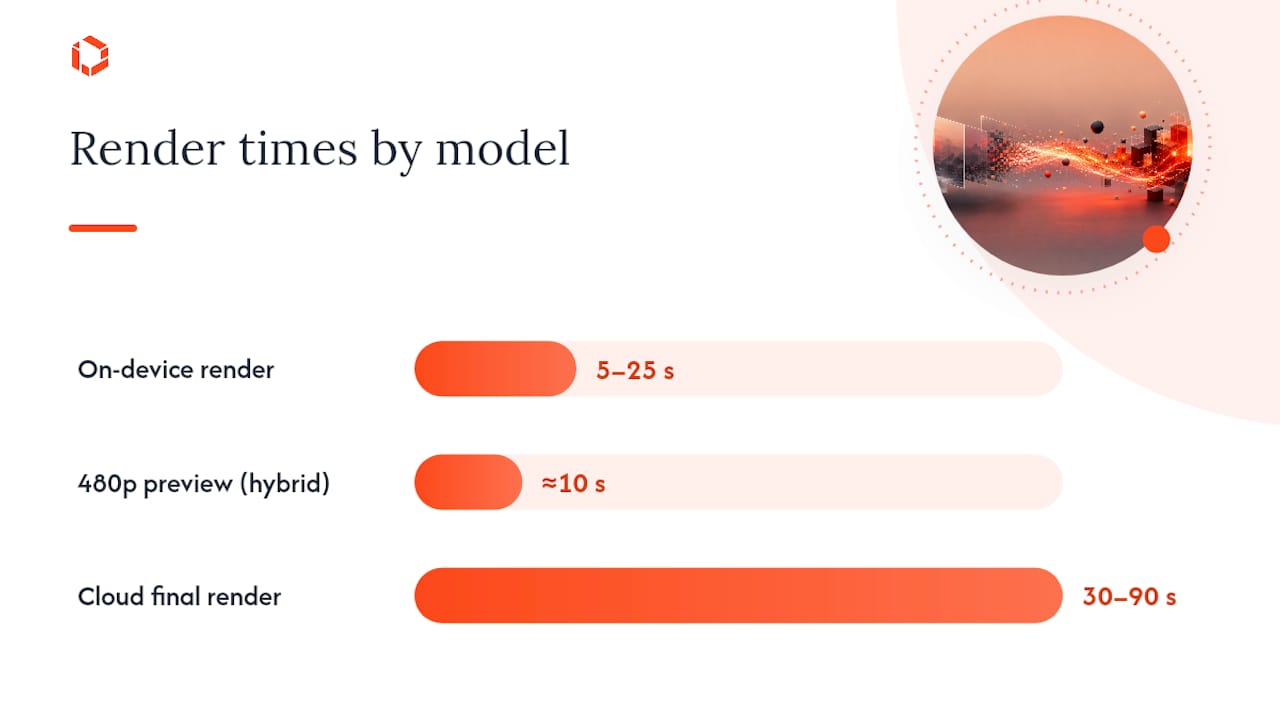
Cloud rendering delivers consistent output quality backed by GPU horsepower, regardless of the user's device. It costs you network latency and raises privacy questions about where uploaded photos live, even briefly.
Hybrid rendering splits the difference. A common pattern renders a fast preview locally and hands off the polished final render to the cloud. Ask any agency how they route jobs between the two:
Is routing based on file size, device capability, or both?
What happens when a Lambda function times out mid-render?
Do they use presigned uploads to avoid holding raw photos on their own servers longer than necessary?
Is job status delivered through polling or webhooks, and how often does the client check in?
Engineering Checks to Discuss With Your Agency
Ask about these implementation details in the interview, rather than after the contract is signed. The answers can help you understand the team's relevant experience and approach.
EXIF orientation is a common implementation issue in photo-to-video apps. Phones can store rotation data as metadata rather than baking it into pixels. If a team does not correctly parse those tags before encoding, users may receive sideways or upside-down videos.
Beyond orientation, look for competence in:
FFmpeg filter chains for chromakey backgrounds, blurred background splits, zoompan motion, and crossfade transitions between clips
Codec choices that default to H.264 video with AAC audio for broad device compatibility
Format conversion handling for HEIC and PNG inputs, converting to JPEG for consistent processing, while respecting FFmpeg's LGPL licensing terms
A dimension check that rounds width and height to even numbers, since H.264 encoding fails on odd dimensions
File-size routing and resilient upload handling for larger image files
Pro Tip: If your app charges credits for renders, ask for transactional credit handling: deduct the credit, call the render API, and commit only on success. This helps prevent users from losing paid credits to a failed job.
What an MVP Actually Costs You in Time
An MVP scope can cover a working template library, live preview, basic rendering, and export to social formats. This often takes 8 to 12 weeks, assuming the team already has experience with native video processing and is not learning native module integration from scratch.
Production-grade launches add real cost and time on top of that baseline:
Native FFmpeg integration across iOS and Android, tested against a device fragmentation matrix rather than just a simulator
GPU-backed cloud rendering for consistent final-render quality at scale, plus the infrastructure to route jobs intelligently
Service-level commitments for render turnaround time and uptime, which matter once you have paying users depending on the feature
Monetization plumbing, including the transactional credit logic mentioned above, and receipt validation for in-app purchases
Budget conversations should center on engineering hours for native modules, cloud GPU costs per render hour, and QA time across device tiers, not a flat number pulled from a competitor's pricing page.
What to Ask Before You Sign: Interview Script and Deliverables
Treat the first agency call as an opportunity to understand the team's technical approach. The right engineering stack decision early on can help avoid costly changes later.
Ask directly:
"Walk me through how you've handled on-device FFmpeg rendering before."
"What's your fallback when the native module isn't available on a device?"
"How do you handle HEIC photos and EXIF rotation data?"
"What's your retry strategy when a render job fails midway?"
"How long do you retain uploaded photos, and where are they stored?"
Require these deliverables before any development sprint starts:
An architecture diagram showing the render pipeline and data flow
A sample pipeline or working proof-of-concept render, not just slides
Stated performance targets for preview speed versus final render time
A written test plan covering device fragmentation and failure states
Pro Tip: Consider asking whether a senior engineer will join the kickoff call, how the team handles EXIF orientation, and how failed paid renders are rolled back before you sign.
Contract Terms That Protect Your App and Your Users
Privacy and support terms belong in the contract, not a verbal promise. Uploaded photos should live in ephemeral storage with a defined retention window, encrypted both in transit and at rest. Ask exactly how long photos persist after a render completes, because "we delete them eventually" is not an answer.
On the integration side, confirm the app supports current aspect presets for major social platforms, ships working share endpoints, and that the team has reviewed FFmpeg's LGPL licensing implications for your distribution model.
Post-launch, require:
Ongoing monitoring for render failures and latency spikes
A device QA matrix that gets retested with each OS update
A written SLA covering bugfix turnaround and feature iteration cadence
What to Look for in a Provider
Three useful factors to evaluate are output quality, customization depth, and how the architecture scales under load.
Output quality shows up in the small details: smooth transitions instead of jarring cuts, motion effects that feel intentional rather than templated, and audio that syncs cleanly with visual pacing. One insight from a comparable AI storytelling project treats the AI layer as a creative director, shaping narration, mood, and pacing so the result feels curated rather than automated. That distinction is what makes users share a video instead of deleting it.
Customization depth helps your product differentiate itself. Consider whether a provider can build a flexible template engine instead of relying only on hardcoded effect sequences.
Scalability matters as usage grows. A pipeline that renders well for a small test group may need additional cloud GPU routing, job queuing, and timeout handling at higher traffic volumes. Ask providers how their architecture behaves at higher volume, not only in a demo.
The strongest providers tend to specialize in one workflow done well, rather than promising every feature at once. One practitioner account of building an image-to-video tool in a tight timeline noted that prioritizing a single core workflow with two quality tiers, fast and premium, beat spreading effort across many half-finished options.
Matching Provider Selection to Your Business Size and Industry
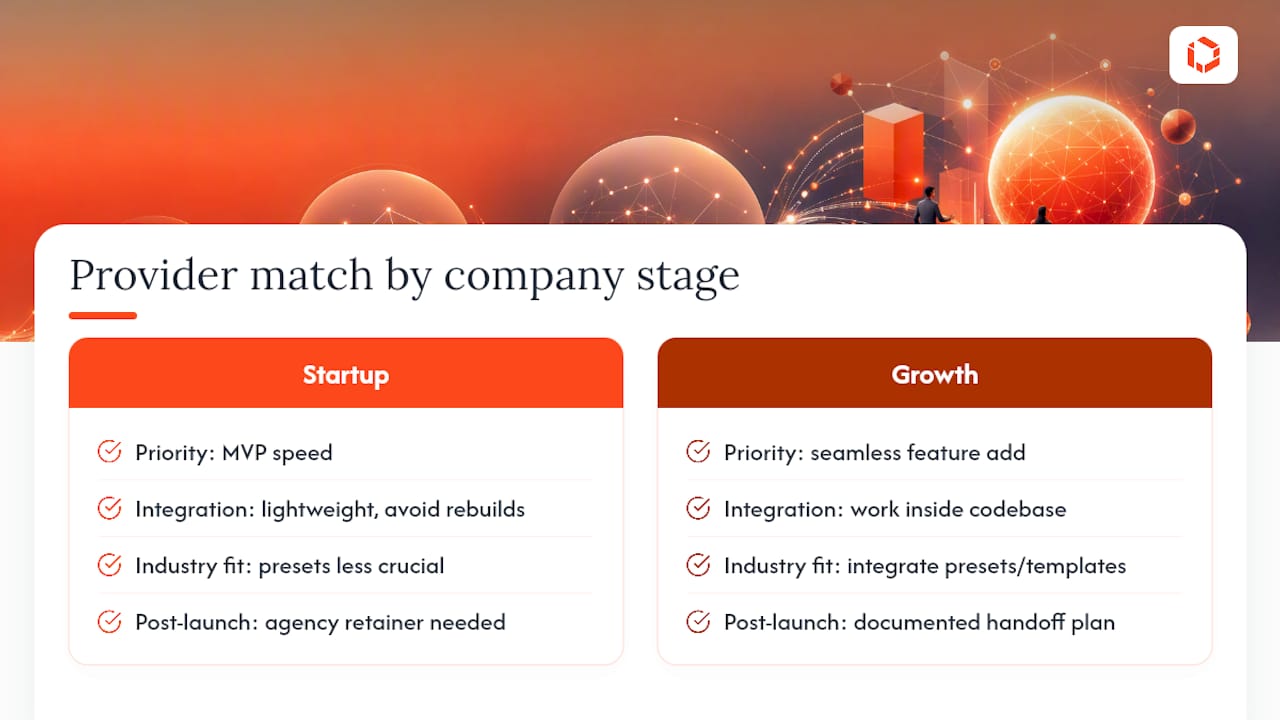
The right agency for a five-person startup looks different from the right agency for an established brand adding a photo-to-video feature to an existing app with millions of users.
Early-stage startups should prioritize speed of iteration and MVP-focused delivery over enterprise-grade infrastructure they don't yet need. A team experienced with rapid MVP development can validate demand before you invest in GPU-backed cloud rendering you may not use for months.
Growth-stage companies adding this as a new feature to an existing app need an agency comfortable working inside your current codebase and design system, not one that wants to rebuild everything from scratch. Ask how they handle integration with your existing content management or social publishing tools, since a photo-to-video feature rarely lives in isolation.
Industry context also shapes provider fit. A social or creator-focused app needs heavy investment in export presets and sharing integrations. A retail or e-commerce app using photo-to-video for product content cares more about batch processing and brand-consistent templates than viral-style transitions. Media and publishing apps often need tighter integration with existing asset libraries and stricter licensing review, given how much licensed photography they handle.
Company size also affects how much support infrastructure you need post-launch. A five-person team benefits from an agency retainer that covers ongoing iteration, since you likely lack in-house engineers to maintain a native rendering pipeline. A larger product team may only need the agency for the initial build, with a documented handoff plan for internal maintenance afterward.
What Successful Implementations Have in Common
Photo-to-video features that actually retain users share a few traits, regardless of industry. They ship a narrow, well-executed workflow first rather than a bloated feature set, they treat preview speed as a core UX metric, and they build monetization logic that never punishes users for a failed render.
Teams that shipped AI-assisted photo animation products from scratch found that polling job status with visible progress percentages materially reduces perceived wait time for renders that take more than a few seconds. That single UX decision, showing a progress bar instead of a spinner, came up repeatedly as a lesson learned after launch, not something planned from day one.
Another recurring pattern involves credit systems tied to paid renders. Products that coupled credit deduction to the render request inside a single transaction, rolling back on any failure, avoided the support tickets and refund requests that plague apps where users lose paid credits to a crashed job.
The shipping speed angle matters too. Teams that used Expo alongside React Native for faster iteration cycles still had to build custom native modules for FFmpeg, since that library doesn't run inside a stock Expo Go build. The pattern that worked: prototype fast in Expo, then invest engineering time specifically in the native rendering layer once the product direction is validated. Long-running render jobs were handled with a simple submit, get a job ID, then poll pattern rather than trying to hold a live connection open.
How TouchZen Approaches Discovery for Photo-to-Video Builds
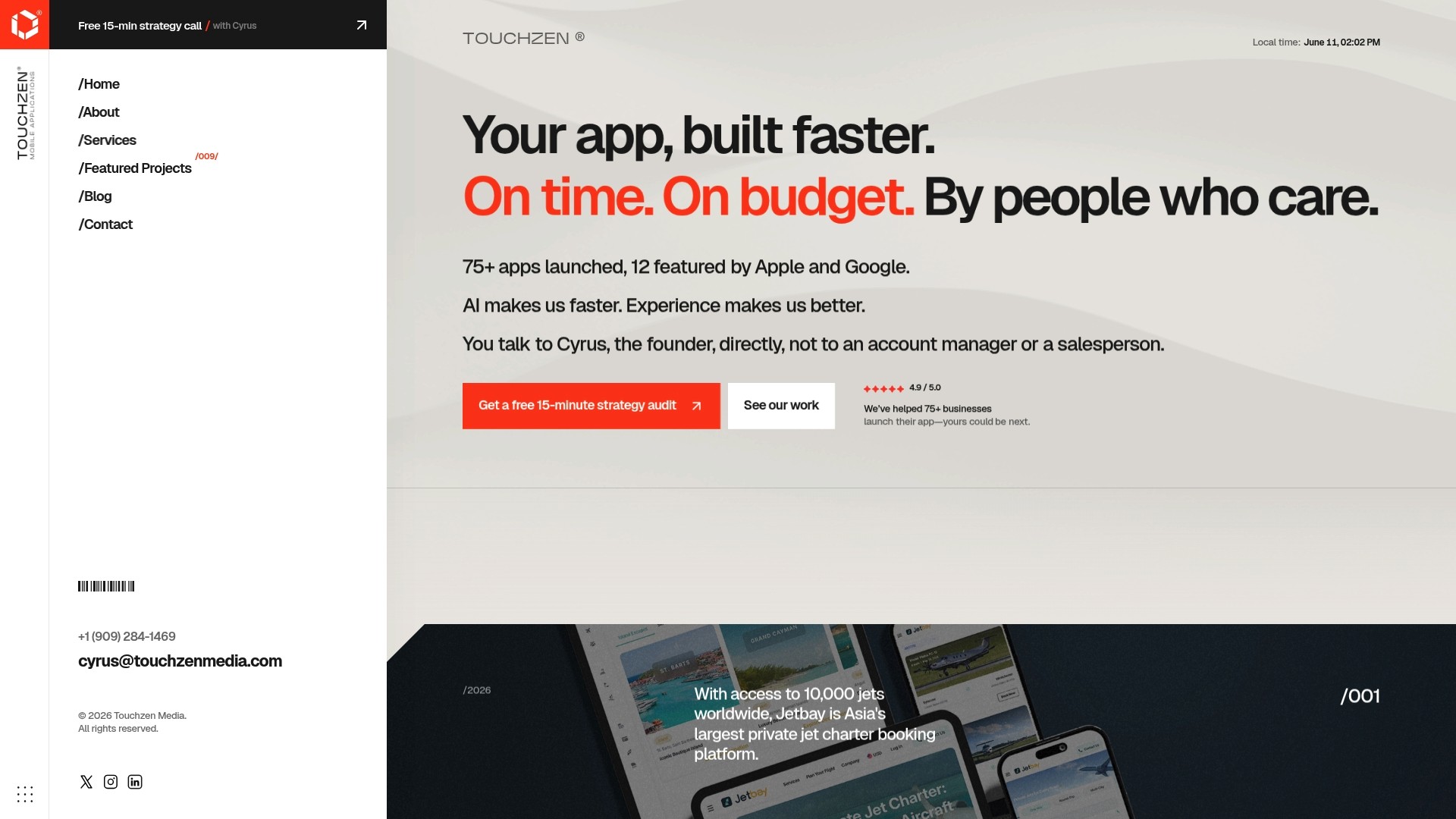
Having launched more than 75 apps, TouchZen runs discovery the way this guide recommends: senior engineers on the call from day one, a technical spike to test the riskiest assumptions first, an architecture diagram you can actually read, and a proof-of-concept render before full development begins.
That sequence helps surface risks such as EXIF bugs and render timeouts early, while they are still easier to address.
Ready to Scope Your Photo-to-Video Feature?
TouchZen builds custom photo-to-video capabilities the way this guide describes: senior developers and designers on your project from kickoff, not handed off to junior staff after the sales call ends. That direct access is what shortens the distance between "we have an idea" and a working render pipeline in production.
If you're evaluating whether to build this feature in-house, bolt it onto an existing app, or hand it to an agency, start with a scoped mobile app development engagement rather than a full commitment. TouchZen's team can run the technical discovery outlined above, complete with an architecture diagram and a sample render, before you decide on full production scope. For features that lean on AI narration or generative image-to-video models, the AI-powered app development track covers that ground specifically. Reach out to schedule a discovery call and see what a working pipeline looks like before you commit budget.
FAQ
What Is the Difference Between On-Device and Cloud Rendering?
On-device rendering processes video on the user's phone for speed and privacy, while cloud rendering handles the work on remote servers for consistent, GPU-backed quality regardless of device. A hybrid model can combine both approaches.
How Long Does a Photo-to-Video MVP Take to Build?
An MVP covering templates, preview, basic rendering, and social export often takes 8 to 12 weeks with a team experienced in native video processing.
Why Do Videos Come Out Sideways or Upside Down?
This almost always traces back to unhandled EXIF orientation metadata; the fix requires reading orientation tags and applying transpose or vflip before encoding, not after.
Should I Ask an Agency for a Proof-of-Concept Render Before Signing?
Yes. A working sample render or demo pipeline reveals far more about an agency's actual capability than a slide deck, and TouchZen includes this step in its standard technical discovery process.
What Should I Look for in an Agency's Privacy Practices?
Confirm photos are stored in ephemeral, encrypted storage with a defined retention window, and ask exactly how long uploaded content persists after a render completes.


