

Joy Foroughi
Executive Assistant


6 Subsystems Product Teams Use to Pick Android Video Editors in 2026
Most product teams building an in-app video editor for Android should start by evaluating a commercial SDK or API, since it delivers the six core editing subsystems in days instead of months. Building in-house makes sense only when your product's differentiation is the editing engine itself. Hiring an agency fits teams that want the SDK integrated correctly, tested across mid-range Android devices, and shipped without pulling your engineers off the roadmap. The comparisons below use engineering acceptance tests, not marketing feature lists, to show why.
Most product teams building an in-app video editor for Android should begin by evaluating a commercial SDK or API alongside the cost of building the capability in-house. Building internally can make sense when the editing experience is central to the product's differentiation. Working with an experienced development partner can suit teams that need an SDK integrated, tested across representative Android devices, and delivered without diverting their core engineers from the roadmap. The comparisons below focus on engineering acceptance tests rather than marketing feature lists.
TL;DR:
Using a commercial SDK or API allows most teams to integrate a full-featured video editor in days, while building from scratch can take several months.
Test the SDK on multiple device tiers, especially mid-range Android phones, measuring scrub latency, preview accuracy, and export consistency to avoid deployment issues.
Licensing costs vary widely, with MAU-based pricing potentially becoming expensive at scale; ongoing maintenance and support costs often outweigh initial licensing fees.
Only support 4K and HDR if it aligns with your target audience’s capture source and export destinations, considering platform compression and file size implications.
In-house development makes sense only if your product’s core value is the editing engine itself; otherwise, an agency or SDK is usually the fastest and most efficient choice.
Build vs. Buy vs. Agency for Android Video Editors
Building an in-app video editor for Android is not a question of choosing the best consumer app. It is a product and engineering decision: whether to license a video-editing SDK, build the core editing systems in-house, or work with an experienced development partner to integrate and harden the right solution.
Each path solves the same problem (capture, cut, effect, export video inside your app) with wildly different cost curves and risk profiles. A team of four engineers with six months to spare has different math than a two-person founding team trying to ship an MVP before a fundraising deadline.
Integration speed and time to ship
Vendors like Banuba report that basic wiring of a video-editing API can take a few hours, with a full content-creation suite assembled in one to two days. Teams building from scratch typically measure in months, not days, because they have to solve encoding, GPU compositing, and timeline state management before writing a single feature.
Customization, performance, and licensing trade-offs
SDKs trade some UI flexibility for speed. In-house builds trade speed for total control. Licensing itself varies by vendor: some charge per license, some by feature tier, some flat, and some by monthly active users, according to Banuba's pricing overview. Get clarity on which model matches your growth curve before signing anything.
Dimension | SDK / API | In-House Build | Agency |
|---|---|---|---|
Time to ship | Days to weeks | 4 to 9 months | 6 to 14 weeks |
Platform support | Native Android, often Flutter/React Native wrappers | Whatever you build for | Matches your chosen stack |
Customization | UI skinning, some engine-level control | Full control | Full control, vendor-informed |
Preview performance (mid-range Android) | Vendor-tuned, needs your own device testing | Depends entirely on your team's GPU expertise | Tuned and benchmarked as part of delivery |
Licensing / pricing | Per-license, per-feature, or MAU-based fees | No license fee, but full engineering cost | Project fee plus optional maintenance retainer |
Maintenance burden | Vendor patches core engine; you maintain integration | Entirely on you | Handled during build; optional ongoing support |
Three decision rules cut through most of the debate:
If your app's core value is the editing experience itself (a professional color-grading tool, for example), building in-house protects your differentiation.
If editing is a feature that supports a bigger product (a fitness app with clip sharing, a marketplace app with listing videos), an SDK almost always wins on speed and cost.
If you have the budget for an SDK but not the engineering bandwidth to integrate, test, and maintain it, an agency closes that gap without hiring full time.
What Subsystems Does a Production-Ready Editor Need?
Every credible in-app video editor, regardless of how it's built, needs six subsystems working together: capture, timeline and non-destructive editing, real-time effects, audio, rendering/preview, and export. Skip one and the product feels unfinished, no matter how polished the UI looks.
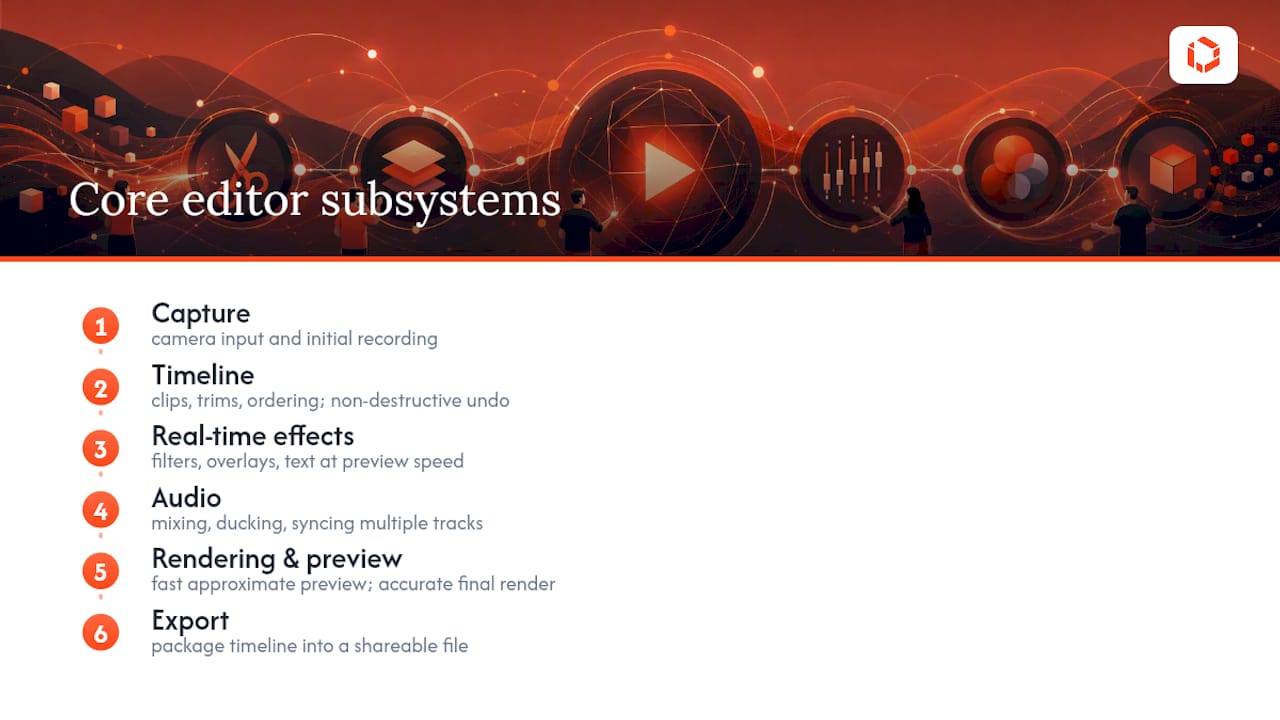
Capture handles camera input and initial recording. The timeline manages clips, trims, and ordering without permanently altering source files, which is what "non-destructive" means in practice: users can undo a crop three edits later without losing the original footage. Real-time effects (filters, overlays, text) need to render at preview speed, not just at export time, or the app feels broken during editing. Audio handling covers mixing, ducking background music under dialogue, and syncing multiple tracks. Rendering and preview are often treated as one subsystem but behave as two: preview has to be fast and approximate, while final rendering has to be accurate and complete. Export packages the finished timeline into a file the user can actually share.
A commercial video-editing API, as Banuba's integration guide describes, typically ships all six as integrated components rather than separate libraries you have to stitch together yourself. That's the real value proposition: not one clever feature, but six subsystems that already talk to each other correctly.
Which SDK and API Integration Shapes Actually Exist?
Not every SDK integrates the same way, and the shape you choose affects how much custom UI work your team still has to do after licensing anything.
Editor SDKs ship a near-complete interface: timeline UI, effect panels, export screens, all built for you. Img follows this model on Android, organizing projects around a scene-and-track structure with a starter kit that gives you an interactive timeline out of the box. You skin it, you don't rebuild it.
Engine APIs go the other direction, exposing programmatic control (add a clip, apply a filter, render a frame) with no bundled interface at all. CE.SDK offers this route too, through its Engine APIs, for teams that want to build a fully custom UI on top of a licensed rendering engine.
Component libraries, visible in open-source projects like the Faditor mini architecture, sit somewhere in between: multi-track timeline support and GPU compositing are provided, but you assemble the surrounding product yourself.
The practical question isn't "which vendor is best" but "how much UI do I want built for me versus how much control do I need over the rendering pipeline." Teams chasing a fast MVP usually want the first option. Teams building a differentiated editing product usually want the second.
Pro Tip: Ask any SDK vendor for a working sample app before signing a contract, not just documentation. How the sample handles preview lag on a mid-range device tells you more than any spec sheet.
How Do You Test Performance on Mid-Range Android Devices?
Flagship phones lie to you. An editor that scrubs smoothly and exports instantly on a $900 device can stutter badly on the $200 to $350 phones that make up a large share of the global Android install base. Testing exclusively on your own dev phone is the single most common mistake teams make before launch.
IMG.LY's own Android documentation recommends testing codecs, resolutions, frame rates, memory usage, and export settings specifically on Android, because codec and hardware behavior differ meaningfully across the device ecosystem. A codec that decodes cleanly on a Snapdragon 8-series chip can drop frames on a MediaTek mid-ranger.
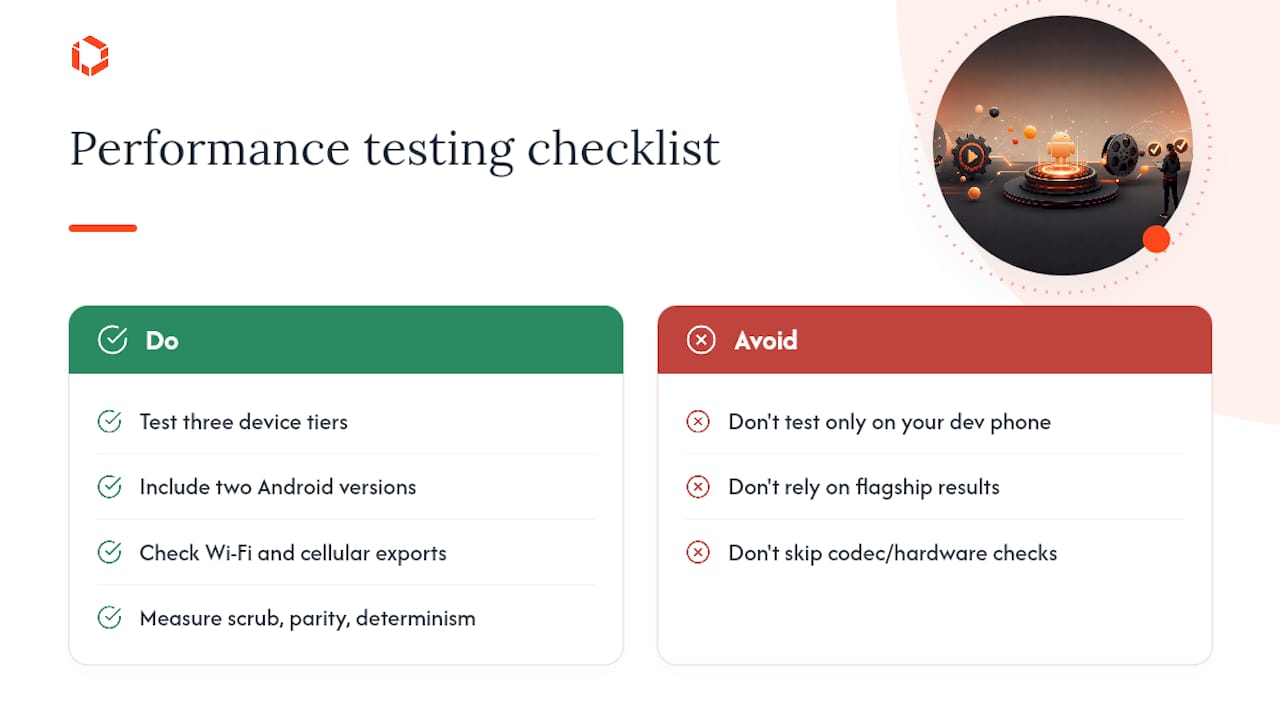
A defensible test matrix covers at least three device tiers (budget, mid-range, flagship), two Android OS versions, and both Wi-Fi and cellular export conditions. Beyond hardware, measure three specific things: scrub latency (how long between a timeline drag and the preview updating), preview-to-export parity (does what you see match what you get), and export determinism (does the same project export identically every time). Production-grade open-source editors, including the React Native Ultra Video Editor project, hit smooth 60fps previews on mid-range hardware using GPU compositing with Skia overlays, virtualized timeline rendering, and background export through deterministic pipelines, often built on native decoders and frameworks like Media3/ExoPlayer.
Turn those three metrics into pass/fail acceptance tests before you evaluate any vendor demo. It reduces procurement to a checklist instead of a gut feeling.
What Do Licensing and Long-Term Maintenance Actually Cost?
Licensing structures vary enough between vendors that "how much does it cost" has no single answer until you know your growth trajectory. Some SDKs charge a flat license fee, others price by feature tier, and others scale with monthly active users, according to Banuba's breakdown of common models. An MAU-based model that looks cheap at 10,000 users can become the most expensive option at 500,000.
Maintenance burden is the cost teams underestimate most. An SDK vendor patches the core engine, but your team still owns the integration layer: the wrapper code, the UI skin, the edge cases specific to your app. Building in-house means you own every layer, forever, including every new Android OS release and every new device chipset that ships. That ongoing cost rarely shows up in a launch budget, but it shows up in every roadmap afterward.
Before signing with any vendor, get clear answers on three things: what happens to your app if the vendor is acquired or shuts down, whether export rights and file formats are portable if you switch providers later, and what the support SLA actually guarantees versus what it implies. A scoped MVP engagement is often the cleanest way to test a licensing model at small scale before committing to a multi-year contract.
How Do You Handle Security and Privacy in Video Editing?
Video is one of the most sensitive data types your app will ever handle, since a single clip can capture faces, locations, documents, and background audio a user never meant to share. That raises the security bar well above what a text-based app needs to clear.
On-device processing should be the default wherever possible. Sending raw footage to a cloud server for effects processing adds latency, cost, and a data-handling liability your legal team will have opinions about. If cloud processing is unavoidable for compute-heavy effects, footage needs encryption in transit and at rest, plus a clear deletion policy once processing finishes.
Metadata is the quiet risk most teams miss. Video files routinely carry GPS coordinates, device identifiers, and timestamps embedded in EXIF-style data. Decide explicitly whether that metadata gets stripped before export, kept for your own analytics, or passed along when a user shares a file, because each choice carries different privacy exposure. Temporary files matter too: editing generates cache files and render previews that should be purged from device storage after export, not left sitting in an app's sandbox indefinitely. If your editor touches minors' content or operates in a regulated market, treat consent and retention policy as a design requirement from day one, not a legal afterthought bolted on before launch.
What UX Patterns Make Mobile Editors Feel Fast?
Users judge a mobile video editor by how it feels during scrubbing, not by how many effects it offers. A cluttered timeline with laggy previews will lose users faster than a stripped-down editor with instant feedback.
Three UX principles separate editors that feel professional from ones that feel like a tech demo. First, preview responsiveness has to be near-instant. Any gap between a gesture and a visual update reads as broken, even if the final export is technically fine. Second, undo/redo has to be reliable enough that users trust it completely. The snapshot/memento pattern that backs up full project state as JSON in a sliding-window cache is a pragmatic way to guarantee consistency, because tracking every granular change independently tends to produce inconsistent states over long editing sessions. Third, the interface has to scale down gracefully to small screens without hiding core controls behind menus three taps deep.
Architecturally, teams that keep editors maintainable tend to lean on MVVM with a unidirectional data flow and a single source of truth for UI state, an approach documented in BestHub's writeup on redesigning a mobile editor's undo/redo system. Modularizing business logic into discrete use cases also makes it possible to gray-release new editing panels without destabilizing the whole app, a detail that matters more once you have real users depending on the product daily.
How Do Popular Third-Party Editing Apps Compare on Features?
When benchmarking your own build, it helps to study feature categories rather than any single competitor's marketing page. Consumer editing apps on Android generally cluster into three tiers.
Entry-level editors focus on quick trims, basic filters, and one-tap social exports, prioritizing speed of use over depth of control. Mid-tier apps add multi-track timelines, keyframe animation, and audio ducking, targeting users who want more polish without a full desktop-grade toolset. Advanced tiers introduce color grading curves, motion tracking, and layered compositing, aimed at creators who treat mobile editing as a serious production step rather than a convenience feature.
The pattern worth studying isn't any single app's button layout. It's how each tier trades simplicity for control, and where they draw the line on what stays hidden behind an "advanced" toggle versus what sits on the main screen. For a closer look at how these tiers translate into actual product decisions, TouchZen's breakdown of top mobile editing apps and its analysis of short-form editing UX for Reels, TikTok, and Shorts both walk through specific interface choices worth benchmarking against. Reviews of AI-driven editing features, like this evaluation of AI video editors for Android, are also useful for gauging how far automated tools (auto-captioning, auto-clipping) have moved from novelty to expectation.
Does Your Editor Need to Support 4K and HDR?
Whether your app needs 4K and HDR support depends entirely on your capture source and your audience's export destination, not on chasing spec-sheet completeness for its own sake.
If your app captures footage directly from a phone's camera, most modern Android devices already record in 4K, which means your editing pipeline has to handle that resolution even if you never advertise "4K support" as a feature. HDR is trickier: it requires careful tone-mapping during preview so colors don't look washed out or oversaturated on non-HDR screens, and export pipelines need to preserve the wider color gamut without ballooning file size.
The practical trap is optimizing for formats your users will never actually use. If your audience exports primarily to Instagram Stories or TikTok, both platforms recompress footage aggressively on upload, which means investing engineering time in pristine HDR export pipelines may deliver little visible benefit to the end viewer. Test your actual export destination's compression behavior before treating 4K/HDR support as a must-have feature rather than a nice-to-have.
Should Your Editor Work Offline?
Offline editing capability isn't optional for most use cases. Users expect to trim a clip on a subway with no signal and have it just work, which means your capture, timeline, and preview subsystems need to function entirely without a network connection.
Where connectivity matters is in three specific areas: cloud-based effects that require server-side processing, syncing project state across a user's devices, and uploading the final export. Design these as separate, optional layers rather than baking network dependency into the core editing loop. A project saved locally first, then synced opportunistically when connectivity returns, avoids the frustrating failure mode where a user loses an edit because their connection dropped mid-save.
For sync specifically, decide early whether you're syncing raw source files (expensive in bandwidth and storage) or just the timeline's edit instructions referencing files already on each device (far lighter, but requires the source footage to exist locally on every synced device). Most consumer-grade editors choose the second approach for exactly that reason.
What Analytics Should You Track in a Video Editor?
Editing behavior data tells you far more about product friction than support tickets ever will, but only if you're tracking the right signals from the start.
The highest-value events to instrument are the ones that reveal abandonment: how often users start a project but never export it, which timeline actions get undone repeatedly (a strong signal that a UI control is confusing), and where in the editing flow sessions get abandoned entirely. Export success and failure rates by device model are equally critical, since a spike in export failures on one chipset can flag a codec compatibility issue you'd otherwise miss until reviews start piling up.
Time-to-first-export is one of the more underused metrics: it measures how long a new user takes to complete their first successful edit, and it correlates strongly with retention in most editing products. If that number creeps up after a feature release, it's usually a sign the new feature added friction rather than value. Build these events into your analytics layer from the first release, not as a retrofit after launch, because reconstructing that behavioral history later is rarely possible once the data simply wasn't captured.
What This Article's Research Actually Tells You
The conventional advice on this topic treats "best video editing app" as a feature checklist: does it have filters, does it have text overlays, does it export fast enough. That framing is almost useless for a product team, because it ignores the actual cost driver, which is integration and maintenance, not feature count.
What the research here actually supports is a narrower, more useful judgment: the six-subsystem checklist (capture, timeline, effects, audio, rendering, export) is the real unit of comparison, and it matters more which integration shape a vendor offers, editor UI versus engine API, than which vendor has the longer feature list. Teams that skip acceptance testing on mid-range Android hardware are the ones who ship an editor that looks great in a demo and falls apart in the App Store reviews three weeks later.
If you take one thing from this, prioritize the device-testing matrix before you prioritize the vendor comparison. A cheaper SDK that fails on a $250 phone costs you more in support tickets and churn than a pricier one that passes every acceptance test on day one. That's not a feature debate. It's an engineering discipline most teams skip because it isn't visible in a sales pitch.
— Cyrus
Get a Scoped Build Plan for Your Android Editor
Some specialized development partners provide senior developers who have integrated commercial editing engines into multiple shipped apps, offering direct access to the engineers writing your code rather than intermediaries.
A scoping call with TouchZen typically covers your target device range, sample clips representative of what your users will actually upload, and the specific editing workflow you want (quick social clips versus multi-track professional cuts). Bring those three things and you'll get a realistic timeline and cost range in the first conversation, not after weeks of discovery. TouchZen's mobile app development service covers everything from SDK integration and device testing to post-launch maintenance, so the editor keeps working correctly as new Android devices and OS versions ship. If you're earlier in the process and still validating whether an editing feature belongs in your MVP at all, TouchZen also structures lean MVP engagements built to test that assumption before you commit to a full build. Reach out to scope your project and get a build plan back within days.
Sources
FAQ
What's the fastest way to add video editing to an Android app?
Integrating a commercial video-editing SDK or API is the fastest route, with basic wiring often completed in hours and a full editing suite assembled within one to two days, according to Banuba's integration data.
Should I build my own video editor or license an SDK?
License an SDK unless the editing experience itself is your product's core differentiator; building from scratch typically takes four to nine months versus days for SDK integration.
How do I test video editing performance on Android?
Build a device matrix covering budget, mid-range, and flagship hardware, then measure scrub latency, preview-to-export parity, and export determinism, since codec behavior varies significantly across the Android ecosystem.
Do I need HDR and 4K support in my editor?
Only if your capture source or target audience actually needs it; many social platforms recompress footage on upload, which can make investing in pristine HDR pipelines low-impact for that use case.
When does hiring an agency make sense over building in-house?
An agency fits teams that want an SDK integrated, tested across real devices, and maintained without pulling engineers off the core product roadmap, which is the gap some specialized development partners aim to close.


