Joy Foroughi
Executive Assistant


Custom App vs No-Code: A Founder's Scale Breakpoints
Discover when to shift from no-code platforms to custom apps as your business scales. Learn the key signs and improve performance today.

Use no-code or low-code platforms like Bubble, Webflow, Airtable, and Retool to validate an idea and run internal workflows fast. Move to custom development once your business logic, compliance obligations, or performance requirements push past what those platforms were built to handle.
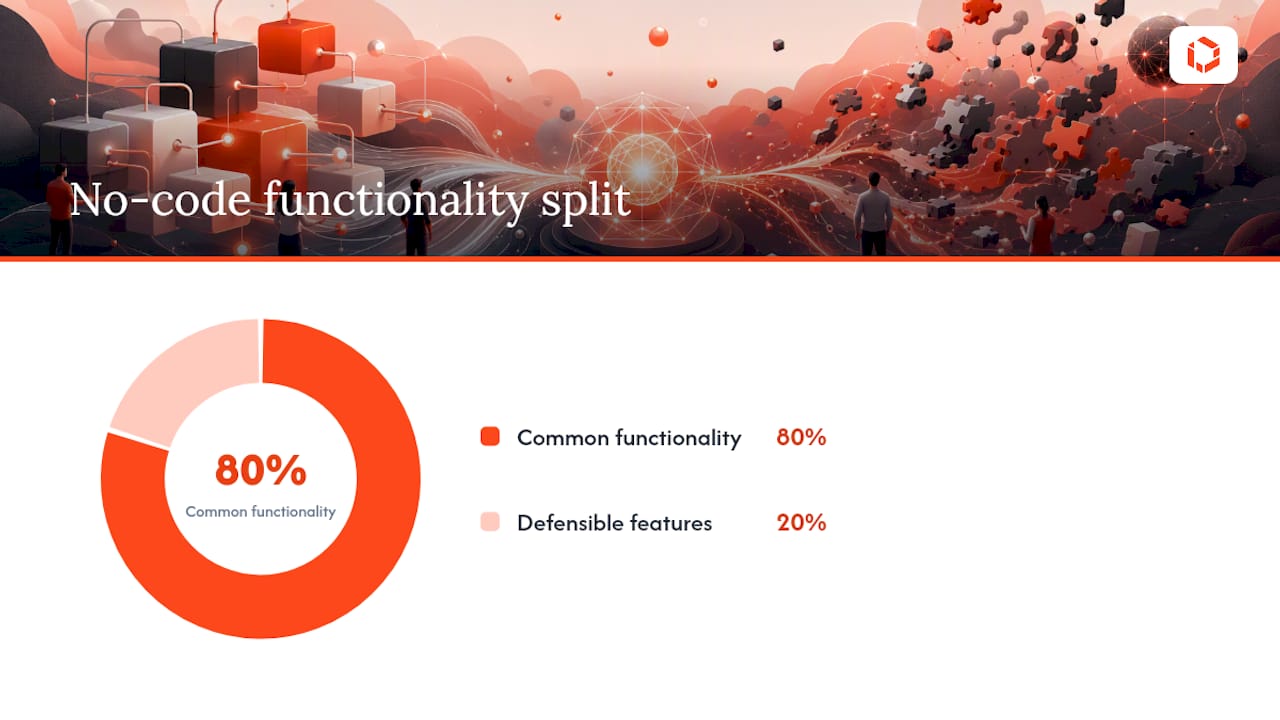
That handoff point is predictable, not mysterious. Visual builders reliably deliver the common 80% of standard app features, then hit a structural ceiling on the remaining 20% where your actual differentiation lives: proprietary logic, custom integrations, and performance tuning at scale. Watch for concurrency climbing past several thousand simultaneous users, database queries that start timing out as record counts grow, a customer contract that requires SOC 2 or HIPAA-level audit controls, or an integration your platform's connector simply can't express. Any one of those is a forcing function.
Here's what to do about it in the next 30 days. If you're pre-revenue, stay on no-code and spend your energy on customer validation, not infrastructure. If you're seeing early growth and one of the breakpoints above is on the horizon, start architecting a hybrid: keep the parts of your product that don't differentiate you on the platform, and start scoping custom development for the part that does.
Pre-validation: Stay on no-code. Don't touch custom code yet.
Early growth, one breakpoint visible: Start a hybrid architecture plan now, before the breakpoint hits.
Breakpoint already hit: You're in migration territory. Scope a strangler-pattern rewrite, not a full stop-and-rebuild.
Pro Tip: Set a calendar reminder to re-run your platform ceiling check every quarter. The breakpoints in this article don't announce themselves. They show up as a support ticket, a failed enterprise deal, or a 3 a.m. page from a query that used to run in milliseconds.
Key Takeaways
The single most important rule in this comparison: validate on no-code, migrate to custom the moment proprietary logic, compliance, or performance passes a platform's structural ceiling.
Point | Details |
|---|---|
Watch the 80% ceiling | Visual builders handle common features well but structurally cannot express the differentiating final 20%. |
Monitor concrete thresholds | Concurrency near 10,000 users, slow queries, and compliance demands like SOC 2 signal it's time to migrate. |
Migrate with the strangler pattern | Route traffic away from your no-code app feature by feature instead of rewriting everything at once. |
Run the TCO math before committing | Compare platform fees plus hidden migration cost against custom engineering and ops overhead before locking in a path. |
Sequence with TouchZen | TouchZen validates ideas fast on lean builds, then leads custom migrations once product-market fit and scale demand it. |
Custom App vs No-Code: Where Each Option Breaks as You Scale
Before mapping the breakpoints, it helps to know exactly what you're comparing. The terms get used loosely, and that looseness is what leads founders to pick the wrong tool for the wrong stage.
No-code means a visual, drag-and-drop builder with a hosted runtime you don't control. Bubble and Webflow are the clearest examples: you assemble screens and workflows visually, and the platform manages the server, the database, and the deployment pipeline behind the scenes. Airtable extends this into structured data and light automation, functioning as a database with a friendly interface.
Low-code sits one step closer to engineering. Retool is the standard example here: it still gives you visual components and pre-built connectors, but it lets you drop in custom JavaScript, SQL queries, and API calls where the visual layer runs out of expressiveness. It's the middle ground between "no engineers needed" and "full custom stack."
Custom development means you own the entire stack: the codebase, the infrastructure, the database schema, the deployment pipeline, and the scaling configuration. Nothing is hidden behind someone else's abstraction layer.
For this article, "scale" refers specifically to:
Concurrent users and request volume in meaningful scale
Data size and query complexity
Number and depth of third-party integrations
Latency and uptime requirements
Compliance and audit obligations
It does not refer to team headcount, funding stage, or market size on their own. Those factors matter for business strategy, but they don't dictate which one of Bubble, Webflow, Airtable, Retool, or a custom stack will hold up technically. A well-funded team can still get stuck on a platform's hosted database with limited indexing options and a closed set of connectors, because money doesn't unlock architecture that was never built to scale in the first place.
How Do No-Code and Custom Apps Compare at Scale?
The comparison below maps the eight dimensions that actually determine whether a platform choice survives contact with real growth. Use generic tiers, not specific products, because the same platform can behave like an "entry-level" tool for one workload and an "enterprise" one for another, depending on how it's configured.
Dimension | Entry-level field apps | Departmental low-code | Enterprise custom |
|---|---|---|---|
Scalability limits | Hundreds of users, simple data | Thousands of users, moderate data | Millions of users, complex data |
Performance | Hosted runtime, limited tuning | Some caching, connector latency | Full control over caching, DB, CDN |
Extensibility | Fixed plugin ecosystem | Custom code blocks, API calls | Unlimited, native code and infra |
Ownership / lock-in | High lock-in, hard export | Moderate lock-in | Full ownership |
Compliance support | Limited or platform-dependent | Partial, varies by vendor | Full control (SOC 2, HIPAA achievable) |
Cost over time | Low upfront, rises with seats/usage | Moderate, connector and seat fees | High upfront, flattens over time |
Time-to-market | Days to weeks | Weeks | Months |
Team skill needs | Minimal, ops-focused | Some engineering literacy | Full engineering team |
Three red flags tell you a platform ceiling is approaching before it actually breaks anything. First, your monthly platform bill is climbing faster than your user count, usually a sign you're paying per-seat or per-workflow fees that don't scale linearly. Second, your team has built more than two or three "workaround" automations to force the platform to do something it wasn't designed for. Third, a prospective enterprise customer has asked about SOC 2 or HIPAA compliance and your platform can't produce a straight answer.
Where Exactly Do No-Code Platforms Break as You Scale?
No-code and low-code platforms fail along seven well-documented dimensions: they lose depth and flexibility, hit scaling walls, trap you in vendor lock-in, introduce security risk, and offer insufficient testing support, among other failure modes. These aren't hypothetical. They show up in a specific, repeatable order as usage grows.
The technical breakpoints usually surface first:
Complex queries slow down as record counts grow, because hosted databases in tools like Airtable and Bubble often lack the indexing options a custom Postgres or MySQL instance would give you.
Inefficient joins across large tables become a bottleneck the platform's query builder can't optimize around.
Hosted runtimes suffer cold-start delays under bursty traffic, since you don't control the underlying compute.
Business rules with more than a few conditional branches become difficult to express visually, forcing awkward workarounds with duplicate workflows.
Third-party connectors break silently when an external API changes its schema, and you often can't patch the connector yourself.
Multi-tenancy at real scale, meaning isolated data and permissions for hundreds of distinct customer accounts, pushes past what most visual data models were designed to handle.
Integrating a custom or fine-tuned AI model rather than a pre-built connector is often flatly unsupported.
Governance gaps compound the technical ones. Academic reviews of low-code and no-code adoption identify vendor lock-in, security risk, and limited scalability as recurring, structural inhibitors, not occasional bad luck. Testing support is often the first hard wall teams hit once they need real uptime guarantees, since most platforms weren't built with CI/CD pipelines or automated test suites in mind.
A platform that gets you to your common 80% of standard functionality quickly is, by the same design, the platform that cannot express the 20% that makes your product defensible. That tradeoff isn't a bug. It's the business model.
Three traps catch founders off guard here. The sunk-cost fallacy keeps teams building deeper into a platform long after the signs point to migration, because six months of workflow logic feels too valuable to abandon. Data egress is harder than it looks: exporting years of records and relational structure out of a hosted platform can take weeks of engineering effort you didn't budget for. And the "workaround" fixes your team builds to patch platform limitations often become hidden technical debt, quietly increasing your eventual migration cost.
When Does a Custom App Become the Wrong Call?
Custom development has its own failure modes, and they're just as costly as platform lock-in when the timing is wrong. The most common mistake is building a fully custom app before you've validated that anyone wants the product. Founders sink months into infrastructure that a Bubble prototype could have tested in two weeks, and by the time the app ships, the market has moved or the assumption was wrong.
Time-to-market risk compounds this. A custom MVP realistically takes 8 to 16 weeks longer to reach a first release than an equivalent no-code build, and every one of those weeks is a week competitors could use to find product-market fit first.
Architecture mistakes are the second failure category. Teams that over-engineer for scale they don't have yet often build:
A monolith with no clear module boundaries, making later changes riskier than they should be
Premature microservices split before the team understands its own domain boundaries
Infrastructure sized for traffic that never materializes, burning cash on idle capacity
Custom authentication, billing, or admin tooling that a mature SaaS tool would have handled for less
The third category is ongoing: maintenance and staffing. A custom stack needs engineers who understand it, and that specialized knowledge doesn't scale the way a no-code hire does. Losing a single senior engineer who built your core architecture can stall a roadmap for months while a replacement gets up to speed. Technical debt from early shortcuts accumulates quietly and often surfaces as an outage at the worst possible moment, usually right when traffic spikes.
The most expensive mistake in this whole category is building custom before you've proven anyone wants the product. No case study will validate a market for you. A two-week no-code prototype will.
What's the Real Cost Math Behind Custom vs No-Code?
Run the numbers before you commit to either path for more than a year. A workable total-cost-of-ownership comparison looks like this:
No-code TCO = platform subscription fees + per-seat or per-workflow charges + hidden migration cost (estimated, since you'll eventually pay it) + productivity loss from workarounds
Custom TCO = upfront build cost + ongoing engineering salaries + infrastructure and hosting + operational overhead (monitoring, security, compliance audits)
Two scenarios make this concrete.
High-growth SaaS product. A startup on Bubble paying $500 to $1,500 per month in platform and connector fees at 5,000 users can see that bill scale sharply as usage climbs, while a custom build with a fixed engineering team's monthly cost stays comparatively flat once past the initial development spend. The break-even point tends to arrive once user growth outpaces the platform's per-seat pricing curve, typically somewhere in the first 12 to 18 months of aggressive growth.
Stable internal automation. An internal tool built on Retool or Airtable that serves 50 employees and never needs to scale past that has almost no reason to migrate. The platform fee stays predictable, the workflow logic is simple, and a custom rebuild would cost more than it ever saves. This is the case where staying on low-code for years is financially the correct decision.
The variables that move the break-even point the most are concurrency-driven platform costs, per-seat pricing as headcount or customer count grows, and the sheer complexity of eventually migrating your data model out. Before running this math for your own product, gather four numbers: active users, average API calls per user per month, your current monthly platform fee, and the number of external integrations you depend on. Those four figures will tell you which side of the break-even line you're actually on.
How Do You Migrate From No-Code to Custom Without Breaking Everything?
Migration decisions get triggered by one of four signals: accumulating technical debt that slows every new feature, a compliance requirement you can't meet on your current platform, a performance SLA you're breaching, or clear revenue impact from platform limitations. Once you see one of these, the question changes from "should we migrate" to "how do we migrate without losing momentum."
Three migration patterns cover most real-world cases:
Strangler fig pattern. Build new functionality in a custom service that sits alongside your existing no-code app, gradually routing traffic away from the old system feature by feature. This is the lowest-risk path because you never have a moment where the old and new systems both need to work perfectly at once. It takes longer than a rewrite but rarely causes an outage.
Hybrid approach. Keep a custom core engine handling your business logic and data, while the user interface stays on a low-code layer like Retool for internal tools or admin panels. This works well when your core differentiation is in backend logic, not the UI.
Full rebuild from first principles. Rare, and usually only justified when the existing architecture is so tangled that incremental extraction costs more than starting over. This is higher risk and should be a last resort, not a default.
Your first 90 days after deciding to migrate should follow this sequence:
Audit data exportability: confirm you can actually get your data out in a usable format
Extract and document your current API surface and business logic
Write tests for the critical paths before touching any code
Build the new custom service in parallel, not as a replacement on day one
Set up traffic routing so you can shift load gradually
Define a rollback plan before you need one
Migrate your core, differentiating business logic first. Leave non-differentiating flows, like a basic admin dashboard or an internal reporting view, on the platform during the transition. There's no reason to rebuild what customers never see just because you're rebuilding what they do.
What Decision Checklist Should Founders Use Right Now?
A reproducible checklist beats a gut call every time, especially when engineering, legal, and finance all have a stake in the outcome. Run through these before locking in either path:
Validation stage: Have you confirmed product-market fit, or are you still testing the core assumption?
Competitive differentiation: Does your defensibility live in proprietary logic, or in speed of execution?
Expected scale: What's your realistic concurrent user count in 12 months, not your optimistic one?
Compliance needs: Does your target customer segment require SOC 2, HIPAA, or similar audit-level controls?
Exit cost: If you had to migrate off your current platform tomorrow, how long would data export and API reconstruction take?
Team skills: Does your current team have the engineering depth to build and maintain a custom stack, or would you need to hire?
Surface these questions with the right stakeholders early. Product should weigh in on differentiation and roadmap risk. Engineering should estimate real migration cost, not a hopeful guess. Legal should flag compliance requirements before a deal is on the table, not after a customer asks. Finance should model the TCO scenarios from the section above before either path gets rubber-stamped.
Three red flags mean you should start migration planning immediately rather than waiting: your platform can't produce a SOC 2 report a customer is demanding, your monthly platform costs have doubled in a quarter without a matching jump in revenue, or your engineering team has built more than three significant workarounds to bypass platform limitations in the last six months.
Pro Tip: Bring engineering into the decision before you sign an annual platform contract, not after. The cheapest time to plan a migration is before you've committed a year of budget to the thing you might need to leave.
What Architecture Patterns Delay or Prevent Breakage?
Several architecture moves extend the useful life of a no-code build, or harden a custom app well before you hit a wall. None of these require abandoning your current platform overnight.
Headless-backed approach: Keep your no-code front end, but route data through a custom backend API instead of the platform's native database. This gets you real query performance without a full rewrite.
API façade: Wrap your platform's connectors in a custom API layer you control, so a broken third-party integration doesn't take down your whole workflow.
Microservices for core logic only: Extract just the business logic that needs to scale independently, not your entire application, into a separate service.
Read replicas and purpose-built indexes: If you've moved to a custom database, replicate for read-heavy workloads and index the fields your slowest queries actually filter on.
Event-driven queues for bursty workloads: Tools like KEDA let you scale compute based on actual event volume rather than constant provisioning, which is documented in detail in Azure Container Apps' scaling configuration and in Google Kubernetes Engine's autoscaling guidance. AWS offers a comparable model, letting you register custom resources as scalable targets with programmatic min and max capacity controls.
CDN and edge caching for static assets: Offload anything that doesn't change per request, cutting latency without touching your core logic.
A deeper technical walkthrough of event-driven autoscaling with KEDA is worth reading if your workload is spiky rather than steady, since the trade-offs between cost and responsiveness differ meaningfully from a constantly-provisioned setup.
Combining managed autoscaling with a custom backend service is often the pragmatic middle ground: you extend the life of a no-code front end significantly without committing to a full rewrite before you actually need one.
Operationally, three practices matter more than any single architecture choice: define clear SLIs and SLOs before you scale, not after an incident forces you to; invest in observability tooling early, since debugging a black-box platform failure is far harder than debugging code you wrote; and build automated tests for your critical paths regardless of which side of the no-code line you're on.
What Do Real Migrations From No-Code to Custom Look Like?
Two patterns show up repeatedly in agency work, and both map directly to the decision framework above.
The first is the classic validate-then-migrate path. A startup built its MVP on a visual no-code platform, ran it through several months of real customer usage, and confirmed product-market fit before writing a line of custom code. Once growth accelerated and query performance started to degrade under real load, TouchZen led a phased migration, replatforming the core business logic to a custom stack while keeping non-critical admin flows in place during the transition. The result mirrors what founders should expect from this sequencing: faster page loads, a data model that could finally support the integrations customers were asking for, and no downtime during the cutover.

The second is the "stay put" case, which matters just as much. An internal automation tool serving a mid-size operations team never needed to leave its low-code foundation. The workflow logic was simple, the user count was fixed, and a custom rebuild would have cost far more than it saved. TouchZen's role there was advisory: confirm the platform ceiling wasn't close, and recommend the team invest its engineering budget elsewhere.
Across more than 75 app launches, this sequencing habit shows up consistently in the outcomes TouchZen tracks, including cases where a validated MVP scaled toward 100,000 downloads in its first year after moving off its original no-code foundation. The pattern isn't unique to any one industry. It's a sequencing discipline: prove the idea cheaply, then invest in ownership once ownership actually pays off.
What's the Right Path for Your Company's Stage?
Match your next move to your actual stage, not your ambition for where you'll be in two years.
Pre-seed, pre-validation: Stay on no-code. Use Bubble or a similar visual builder to test your core assumption with real users before writing custom code.
Post-product-market-fit, scaling: Move to a hybrid architecture. Keep non-differentiating flows on low-code, and invest custom engineering hours in the logic that makes you defensible.
Enterprise or regulated business: Invest in custom development now. If SOC 2 or HIPAA compliance is a customer requirement, a hosted no-code platform will not get you there on its own timeline.
For the next 30 days, run the decision checklist above and gather your four cost-math inputs. For the next 90 days, if you're past validation, start scoping a strangler-pattern migration for your highest-risk breakpoint. For the next 180 days, if you've committed to custom, have your architecture reviewed for the patterns in the section above before you scale traffic further.
An Agency's View on Sequencing and When to Push Back
The biggest mistake founders make isn't picking no-code or custom. It's picking one and treating it as permanent. The teams that do this well treat the platform choice as a sequence, not a decision made once at incorporation. They validate cheap, watch for the specific breakpoints outlined here, and move deliberately when the signals appear rather than waiting for an outage to force the issue.
TouchZen pushes back on custom builds more often than founders expect. A founder walks in wanting a fully custom app on day one, and the honest answer is often: not yet. Spend the two weeks on Bubble first. Prove someone wants this before committing six figures to infrastructure. The opposite conversation happens just as often: a team that's outgrown Airtable months ago, still patching workarounds, convinced the platform bill is a temporary annoyance rather than a signal. Neither instinct is wrong on its own. Both are wrong if they never update as the business changes.
What's underrated in this entire conversation is how rarely the technical breakpoint and the business readiness arrive at the same moment. Sometimes the platform ceiling hits before you have the revenue to justify a custom migration, and the right move is a scrappy hybrid architecture that buys you six more months. Sometimes you have the budget for custom before you've actually proven the product, and the discipline is saying no to your own engineering team's enthusiasm.
How Does TouchZen Fit Into Your Build Decision?
If you've read this far, you already know the sequencing: validate cheap, watch the breakpoints, migrate deliberately. What most founders lack isn't the framework. It's a team that can execute both ends of it without the six-week ramp-up a new agency relationship usually requires.
TouchZen puts you in direct contact with senior developers and designers from day one, not a junior team routed through account managers, which is the single biggest reason projects stall at agencies.
If you're validating an idea right now, TouchZen's MVP development service is built for exactly this stage, fast, scoped, and designed to tell you quickly whether the idea holds up. If you're past that point and staring down a migration, TouchZen's mobile app development team handles the discovery, architecture, and engineering work of moving core logic off a platform that's hit its ceiling, with ongoing support once you've launched. Book a discovery call to walk through your specific breakpoint and get a scoped recommendation for your stage.
Sources
No-Code vs Custom Development: When to Choose What (2026 Guide) - Techradiant
7 reasons low-code and no-code tools fail to deliver | InfoWorld
Scalable applications - Scaling | Google Kubernetes Engine (GKE) | Google Cloud Documentation
FAQ
What is the main difference between no-code and custom app development?
No-code platforms like Bubble and Webflow give you a hosted, visual runtime with no infrastructure control, while custom development gives you full ownership of the codebase, database, and deployment pipeline.
At what user count do no-code platforms typically break?
There's no universal number, but concurrency near 10,000 simultaneous users, combined with growing query complexity, is a common point where hosted runtimes and database indexing limits start causing real performance problems.
Is Retool considered no-code or low-code?
Retool is low-code: it provides visual components and pre-built connectors, but also lets you write custom JavaScript and SQL where the visual layer isn't enough.
How do I know if I should migrate using the strangler pattern versus a full rewrite?
Use the strangler pattern when your existing app is generally stable and you need to reduce risk during migration; reserve a full rewrite for cases where the architecture is too tangled to extract incrementally.
Does TouchZen help with migrating from no-code to a custom app?
Yes. TouchZen leads phased migrations that move core business logic to a custom stack while non-critical flows stay on the existing platform during the transition, minimizing downtime risk.
What compliance requirements typically force a move to custom development?
SOC 2 and HIPAA are the two most common triggers, since most no-code and low-code platforms have limited or vendor-dependent support for the audit trails and controls those standards require.