

Joy Foroughi
Executive Assistant


Mobile App Development Outsourcing Without Losing Control
Learn how to manage Mobile App Development Outsourcing Without Losing Control. Maintain ownership and rights with these five essential steps.

TL;DR:
Controlling mobile app outsourcing requires owning your repositories, pipelines, and accounts before work begins to prevent dependency. Implement milestone-driven payments, a pilot project, and strict contractual controls to maintain oversight and ownership. TouchZen specializes in senior-led development that keeps clients in full control from start to finish.
Retain control of your outsourced mobile app by owning your GitHub organization, CI/CD pipeline, app store developer accounts, and signing identities before you sign a single vendor contract. Control is often lost during the setup phase—if the vendor holds the keys to your repositories and pipelines, you risk losing operational control of the product.
Apply these five controls in the next 72 hours:
Create an org-owned GitHub repository and grant the vendor contributor access, never admin or ownership rights.
Set up your CI/CD pipeline under your organization's account — the vendor writes code, your pipeline ships it.
Register the Apple Developer and Google Play accounts under your company’s ownership and give the vendor only the necessary permissions.
Reserve production signing certificates and keystores inside your pipeline, not on the vendor's machines.
Define acceptance criteria tied to live demos before the first sprint starts — no demo, no payment.
Pro Tip: Demand NDA, IP assignment, milestone demos, and code escrow language in the RFP stage, not after the contract is signed. Vendors who resist these terms at the proposal stage are telling you something important.
Why do U.S. startups outsource mobile app development?
Mobile app development outsourcing means contracting an external team — whether a dedicated agency, a staff augmentation firm, or a project-based vendor — to design, build, test, and sometimes maintain your mobile product. The scope can range from a single feature sprint to a full-product build across iOS and Android.
U.S. startups turn to outsourcing for three primary reasons: cost reduction, specialized expertise, and faster time to market. In 2026, buyers also prioritize innovation and agility alongside cost, which means the best outsourcing partners now act as extensions of product teams rather than pure execution vendors. A team with deep experience in AI/ML, AR, or complex payment integrations can compress a six-month internal build into two months — if the engagement is structured correctly.
The honest pros and cons:
✅ Lower development cost compared to full-time U.S. hires
✅ Access to specialized skills your internal team lacks
✅ Faster time to market with a team already ramped up
✅ Flexible scaling — add capacity for a launch, reduce after
❌ IP risk if contracts and repo ownership are not locked down
❌ Communication overhead across time zones and cultures
❌ Quality variance when acceptance criteria are vague
❌ Vendor dependency if you don't own the pipeline and accounts
The most common failure trigger is not a bad vendor — it's a founder who skips planning, writes vague requirements, and hands over account access on day one. Outsourcing works when you treat it as a structured partnership, not a delegation.
What are the real benefits and risks — and how do you mitigate each?
The upside of outsourcing is real: lower burn rate, access to senior engineers you couldn't afford full-time, and a team that already knows the mobile release cycle. The risk is equally real, and it concentrates in three areas.
Risk | Concrete Mitigation |
|---|---|
IP loss / code theft | IP assignment clause + work-for-hire language + org-owned GitHub repo |
Vendor lock-in | CI/CD ownership under your org + code escrow clause in contract |
Signing identity exposure | Never share production credentials; sign builds in your pipeline only |
Cultural / timezone mismatch | Require 3–4 hours of daily overlap; define async communication norms in writing |
Scope creep | Milestone-gated payments tied to demoed deliverables |
Rework cost spiral | Automated test coverage thresholds + QA gates before each milestone payment |
Cultural incompatibility and communication failure are among the most frequently cited contributors to failed outsourcing projects. The fix is not to avoid offshore teams — it's to build overlap hours and communication rituals into the contract before work begins.
Quality issues can create high rework costs when acceptance criteria and QA gates are weak. Budget a contingency of 20–30% specifically for rework, then use acceptance-based payments to reduce the probability you'll need it.
Pro Tip: The single non-obvious control for the first 90 days: require the vendor to commit code to your org-owned repo daily, even for work-in-progress branches. Daily commits make it nearly impossible for a vendor to walk away with a proprietary codebase, and they give you a real-time signal of velocity.
Which outsourcing model gives you the most control?
Not all engagement models carry the same control trade-offs. Here's how the common ones stack up:
Fixed-price: The vendor delivers a defined scope for a set fee. Predictable cost, but scope changes are expensive and the vendor controls the internal process. Best for well-defined MVPs with stable requirements.
Dedicated team: You rent a team that operates under your direction. High control over process, communication, and priorities — but you need a product owner on your side to direct the work. Requires additional contract controls: internal repo maintainer, defined sprint ceremonies, and your CI/CD pipeline.

Staff augmentation: Individual engineers join your existing team. Maximum control over day-to-day work, but you carry the management overhead. Works well when you have a technical lead internally.
Managed services / project-based: The vendor owns delivery end-to-end. Lowest day-to-day overhead, but highest dependency risk. Requires the strongest contract protections: code escrow, IP assignment, and SLA with acceptance tests.
Model | Best For | Control Level | Extra Contract Controls Needed |
|---|---|---|---|
Fixed-price | Defined MVP, stable scope | Medium | IP assignment, milestone demos |
Dedicated team | Long-term product, scaling | High | Internal repo maintainer, CI/CD ownership |
Staff augmentation | Feature add-ons, rapid scaling | Very high | Standard NDA, access revocation clause |
Managed services | Non-technical founders, full outsource | Low-Medium | Code escrow, SLA, IP assignment, escrow |
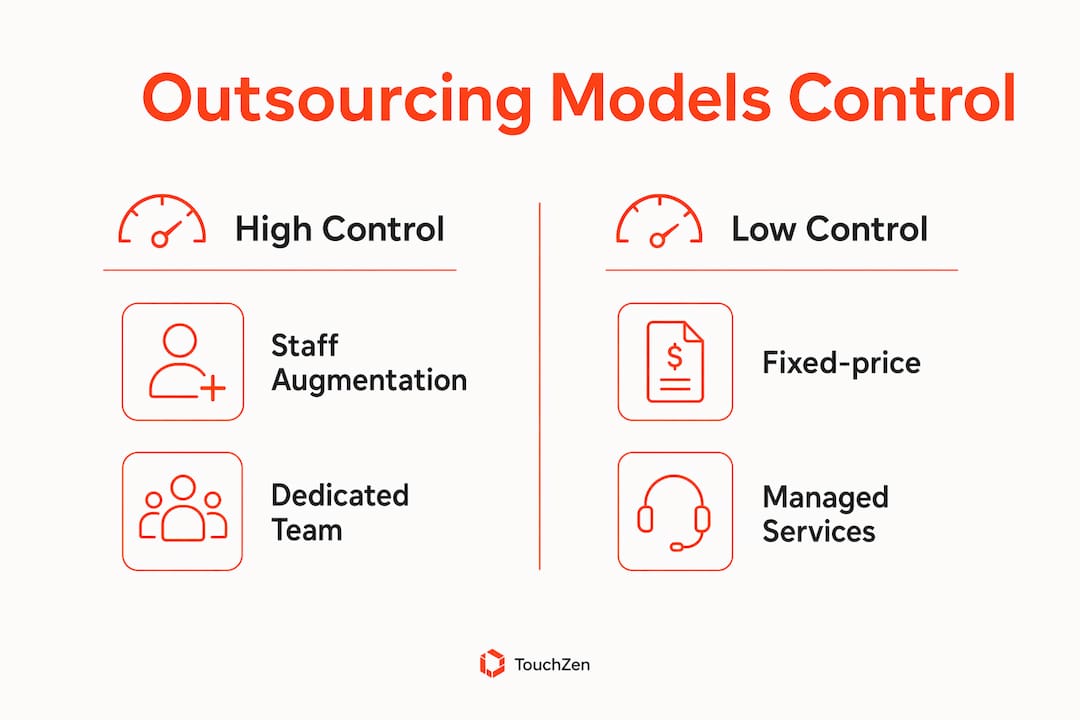
For most U.S. startups building a first product, a dedicated team model with client-owned repos and a defined sprint cadence gives the best balance of speed and oversight.
How do you run a controlled outsourcing process from goals to launch?
A reproducible process removes ambiguity and gives you leverage at every stage. Follow this sequence:
Define goals and success metrics — write a one-page product brief with measurable outcomes (e.g., 10,000 active users in 90 days, sub-2-second load time).
Write a Product Requirements Document (PRD) — include functional requirements, non-functional requirements (performance, security, accessibility), and explicit acceptance criteria.
Make architecture decisions early — choose your tech stack, cloud provider, and third-party services before vendor selection, not after.
Document security requirements — data handling, encryption standards, compliance needs (HIPAA, SOC 2, COPPA), and third-party library approval process.
Shortlist vendors — use the scorecard in the next section; target three to five candidates.
Run a pilot project — a small, well-defined pilot reveals communication style, code quality, and problem-solving before large funds are committed.
Kick off the full engagement — establish sprint cadence, communication channels, and access controls on day one.
Gate each milestone on a live demo — no demo, no payment release.
Launch with staged rollout — use TestFlight and Play Store internal tracks before full release; app store review cycles, device matrix testing, and staged rollouts are non-negotiable for mobile.
Sprint cadence example (two-week sprints):
Monday: sprint planning — review backlog, assign stories, confirm acceptance criteria
Daily: async standup in Slack (written update, blockers flagged)
End of sprint: live demo to product owner — acceptance or rejection logged in Jira
Sprint retrospective: 30-minute sync on process, not product
Acceptance criteria template for each milestone: functional requirements met, automated test coverage above agreed threshold, security scan passing, performance benchmarks hit, and delivery artifacts (code, tests, runbooks) committed to the org-owned repo.
Pro Tip: Starting with a small technical spike or pilot reduces long-term rework and clarifies communication expectations before larger funds are committed. Budget two to three weeks and a fixed fee for the pilot — treat it as a paid interview.
How do you evaluate and interview outsourcing vendors objectively?
Use a scorecard to remove gut-feel bias from vendor selection. Rate each vendor 1–5 on these axes:
Evaluation Axis | What to Assess |
|---|---|
Technical fit | Stack alignment, mobile platform depth, CI/CD maturity |
Delivery process | Sprint methodology, documentation standards, code review culture |
Communication | Response time, English fluency, overlap hours available |
Security / compliance | SAST/DAST tools used, data handling practices, NDA willingness |
References | Two verifiable client references, code sample review |
Pricing | Model transparency, milestone structure, change-order process |
Interview questions that reveal real capability:
"Show me a GitHub repository from a past project — walk me through your branching strategy."
"Describe your CI/CD setup. Who owns the pipeline — you or the client?"
"How do you handle a sprint where the demo fails acceptance criteria?"
"What's your process for releasing to the App Store and Play Store?"
"Can you provide two client references I can call this week?"
Red flags to walk away from immediately:
Vendor insists on holding the GitHub organization or app store accounts
No senior engineer available for direct communication — only a PM layer
Unwilling to commit code to a client-owned repo
References are unavailable or vague
Opaque pricing with no milestone structure
Validate code samples by reviewing commit history, test coverage, and documentation quality — not just the UI. Ask for a repository link, not a ZIP file. If confidentiality prevents the vendor from sharing a previous repository, request an anonymized code sample or a live technical walkthrough instead.
Pro Tip: When checking references, ask the reference specifically: "Did the vendor ever request admin access to your app store accounts?" The answer tells you more than any portfolio.
What contract clauses actually protect your control?
Contracts are your last line of defense, but they're also your first lever. Get these clauses in writing before work starts:
NDA: Covers all proprietary information, trade secrets, and product concepts shared during the engagement.
IP assignment and work-for-hire: The contract should clearly assign all applicable rights to the client and specify when ownership transfers. Have qualified legal counsel review this clause.
Repo access rules: Vendor has contributor access to org-owned repositories; vendor never holds admin or ownership rights.
CI/CD and signing identity clause: Production signing credentials remain in the client's pipeline; vendor uses development identities only.
SLA with acceptance tests: Defines uptime, response times, bug-fix windows, and the acceptance criteria that trigger milestone payments.
Warranty and bug-fix window: Vendor is responsible for defects discovered within 60–90 days post-launch at no additional cost.
Termination and code escrow: Upon termination, vendor delivers all code, credentials, and documentation within five business days; code escrow with a neutral third party is an option for high-value engagements.
The IP assignment clause is the most negotiated and the most important. Many vendors will push for "license" language instead of "assignment" — meaning they retain ownership and grant you a right to use the code. Never accept this. Work-for-hire with full assignment means you own the code outright, with no strings attached, from the first commit.
For early-stage startups, a practical alternative to formal code escrow is requiring the vendor to commit all code to your org-owned GitHub repo daily. This gives you continuous access to the full codebase without the cost of a third-party escrow service.
On payment terms: in early-stage deals, vendors often need a deposit (20–30% upfront is common). Accept this, but tie every subsequent payment to a milestone demo and acceptance sign-off. Never pay the final 20% until you have received all delivery artifacts and confirmed CI/CD ownership transfer.
How do you govern a remote vendor without micromanaging?
Governance is about visibility, not control for its own sake. The goal is to know what's happening without slowing the vendor down.

Roles and responsibilities:
Role | Owner | Responsibility |
|---|---|---|
Product owner | Client (you) | Backlog prioritization, acceptance sign-off, milestone approval |
Release owner | Client (you or designee) | Controls production signing, app store publishing, release approval |
Tech lead | Client-side or senior vendor engineer | Architecture decisions, code review standards, escalation point |
Vendor PM | Vendor | Sprint coordination, status reporting, blocker resolution |
QA owner | Client-designated or shared | Test plan ownership, acceptance criteria verification |
Meeting cadence:
Daily: Async Slack standup — written update, blockers flagged, no meeting required unless a blocker needs a call
Weekly: Live sprint demo — product owner reviews deliverables against acceptance criteria
Bi-weekly: Sprint planning and retrospective
Monthly: Strategy sync — roadmap review, vendor performance, contract health
Tool stack for transparency:
GitHub: All source code, pull requests, and code reviews — org-owned
Jira: Issue tracking, sprint boards, and milestone logging
Slack: Async communication, dedicated channels per workstream
Figma: Design collaboration and handoff — client-owned workspace
CI/CD dashboard: Build status, test results, and deployment logs visible to the client at all times
For remote technical teams, the most effective governance pattern is visibility by default: every build, test run, and deployment is logged and accessible to the client without asking.
Escalation path: Issue identified → vendor PM notified in writing → 48-hour remediation window → tech lead escalation → formal SLA breach notice → remediation plan required within five business days → escrow or termination clause activated if unresolved.
What technical controls keep your code inspectable and shippable?
Technical controls are the governance layer that doesn't depend on trust. They work even when communication breaks down.
Automated quality gates:
Minimum test coverage threshold (e.g., 70% unit test coverage) enforced in CI before any pull request merges
Branch protection rules: no direct commits to main; all changes require a reviewed pull request
Signed commits required for all contributors
Dependency scanning on every build (tools like Snyk or Dependabot flag vulnerable libraries)
Security linting integrated into the CI pipeline
CI/CD flow that preserves signing control:
Vendor commits code to a feature branch in the org-owned GitHub repo
CI pipeline runs automated tests, security scans, and linting on every push
Pull request requires approval from a client-designated reviewer before merging
Merge to main triggers a build in the client-controlled CI/CD environment
Production signing happens inside the pipeline using credentials the vendor never sees
Release owner approves the deployment to TestFlight or Play Store internal track
Staged rollout proceeds — 10% of users first, then full release after monitoring
Security checklist for every release:
SAST (static application security testing) scan passing
DAST (dynamic application security testing) on staging environment
Third-party library audit — no libraries with known critical CVEs
Penetration testing at least once per major release cycle
Test data handling rules documented — no production data in test environments
Mobile app security best practices include requiring audit logs for every build artifact so you can trace exactly what was built, when, and by whom. This traceability is your protection if a vendor dispute arises.
How should you structure payments to preserve leverage?
Payment structure is one of the most direct levers you have. Use it deliberately.
Four practical structures:
Milestone-based: 20–30% deposit, then payments tied to demoed deliverables. Each milestone requires a live demo, test results, and acceptance sign-off before funds release.
Blended retainer + milestone: Monthly retainer covers ongoing work; milestone bonuses tied to major feature releases. Works well for dedicated team models.
Time-and-materials with capped sprints: Vendor bills hourly, but each sprint has a fixed budget cap. Prevents runaway costs while maintaining flexibility.
Partial escrow: A portion of each milestone payment (10–15%) is held in escrow and released only after a 30-day post-delivery warranty period.
Milestone acceptance template:
Deliverable list: specific features or components, defined in the PRD
Demo evidence: screen recording or live session with the product owner
Test results: automated test report showing coverage and pass rate
Sign-off: written approval from the product owner in Jira or email
When to use retainers versus fixed-price: retainers suit ongoing product evolution where scope changes frequently; fixed-price suits well-defined MVPs where scope is locked. The control trade-off is real — fixed-price gives cost predictability but reduces your ability to redirect the team mid-sprint.
Never release the final payment until you hold all delivery artifacts: full codebase in your org-owned repo, environment credentials, runbooks, and confirmed CI/CD ownership transfer.
What should the first 30 days of vendor onboarding look like?
The first 30 days set every default that will govern the rest of the engagement. Get them right.
Onboarding checklist (complete before development starts):
Org-owned GitHub repo created; vendor granted contributor access
CI/CD pipeline configured under client account; vendor has no pipeline admin access
Test environments provisioned and documented
Figma workspace shared (client-owned); vendor has editor access, not ownership
Slack workspace set up with dedicated channels: #general, #dev, #qa, #releases, #escalations
Jira project created; vendor PM and engineers added with appropriate roles
RACI matrix documented and shared with all stakeholders
First 30 days timeline:
Week 1: Environment setup, access provisioning, architecture review, and communication norms agreed in writing.
Week 2: Architecture spike or technical proof-of-concept completed; vendor demonstrates understanding of requirements.
Week 3: Pilot sprint demo — product owner reviews first working increment against acceptance criteria.
Week 4: Acceptance sign-off on pilot, sprint 0 retrospective, and full engagement kickoff.
Knowledge transfer best practices: require the vendor to produce architecture diagrams, API documentation, and runbooks as part of sprint 0 deliverables. Identify at least one client-side maintainer who understands the codebase before sprint 1 begins.
Vendor onboarding speed is itself a signal. A vendor who takes two weeks to set up a development environment or can't share a working build in week three is showing you their delivery velocity before you've committed significant budget.
What does post-launch support look like when you retain control?
Go-live is not the end of the engagement — it's the beginning of a different one. Structure post-launch support before you launch, not after.
SLA tiers for post-launch support:
Critical (P1): App down or data loss — response within 1 hour, resolution target within 4 hours
High (P2): Major feature broken — response within 4 hours, resolution target within 24 hours
Medium (P3): Minor bug or UI issue — response within 24 hours, resolution target within 5 business days
Transition checklist for handover:
Final code export confirmed in org-owned GitHub repo
All environment credentials (cloud, database, third-party APIs) transferred to client
Runbooks for deployment, rollback, and incident response documented
CI/CD ownership formally transferred — vendor removed from pipeline admin
App store release ownership confirmed under client account
For mobile product support at scale, the most resilient model combines a vendor on a defined SLA for bug fixes with client-owned monitoring and alerting. This means you see incidents before the vendor does.
Long-term maintenance contracts give predictability; ad-hoc support gives flexibility but creates response-time risk. For a live consumer app, a defined SLA contract is worth the cost.
Pro Tip: Use feature flags and staged rollouts for every post-launch release. A feature flag lets you disable a broken feature in minutes without a full app update — your most powerful rollback tool.
What do mobile app outsourcing costs and timelines actually look like?
Cost and timeline vary significantly by complexity, platform count, and vendor region. Here are realistic ranges for U.S. founders:
App Type | Offshore Cost | U.S.-Based Agency Cost | Typical Timeline |
|---|---|---|---|
Mid-complexity (iOS + Android) | $50,000–$150,000 | $150,000–$300,000 | 4–9 months |
Enterprise / complex integrations | $150,000+ | $300,000+ | 9 months |
These ranges reflect typical cost structures by region and complexity, with offshore teams (Eastern Europe, Latin America, Asia) at the lower end and U.S.-based agencies at the upper end. For a detailed breakdown of how to choose between team locations, the US-based vs. offshore comparison covers the trade-offs directly.
Primary cost drivers to plan for:
Platform count: iOS-only is cheaper than iOS + Android by 30–50%
Third-party integrations: payment gateways, mapping APIs, and analytics add cost and timeline
Security and compliance requirements: HIPAA or SOC 2 compliance adds significant QA and documentation overhead
QA matrix: device fragmentation on Android increases testing cost
Design complexity: custom UI/UX versus template-based design
Budget a 20–30% contingency for rework, scope changes, and app store review delays. Founders who skip this contingency consistently overspend.
How TouchZen helps startups outsource without losing control
TouchZen's process is built around the exact controls this guide describes. Every engagement starts with a rapid product discovery session where the client retains ownership of all accounts before a single line of code is written.
How TouchZen operationalizes control:
Client-owned GitHub repositories from day one — TouchZen engineers work as contributors, never owners
CI/CD governance under the client's pipeline — production signing stays with the client
Direct access to senior developers and designers, not a junior team behind a PM layer
Release owner pattern: TouchZen designates a named release owner who coordinates with the client before any app store submission
Ongoing support with defined SLA tiers, so clients have a clear escalation path after launch
TouchZen has launched over many apps across industries, with client outcomes including a 10x increase in user subscriptions and a substantial number of downloads within the first year of launch. The team's approach to mobile app development treats every engagement as a long-term product partnership, not a one-time delivery.
Before contacting TouchZen, prepare:
A one-page product brief with goals and success metrics
A list of must-have features for your MVP
Your target platform (iOS, Android, or both)
Any compliance or security requirements (HIPAA, PCI, etc.)
Your timeline and budget range
Key Takeaways
Retaining control in mobile app development outsourcing requires owning your repositories, pipelines, and accounts before the vendor writes a single line of code.
Point | Details |
|---|---|
Own repos and pipelines first | Create org-owned GitHub repos and CI/CD pipelines before vendor onboarding begins. |
Never share production signing credentials | Keep signing identities inside your pipeline; vendors use development identities only. |
Tie every payment to a demo | Milestone-based payments with live demo acceptance criteria are your primary leverage tool. |
Run a pilot before full commitment | A short, fixed-fee pilot reveals communication quality and code standards before large spend. |
TouchZen builds inside your structure | TouchZen operates with client-owned repos, senior dev access, and defined SLAs from day one. |
TouchZen: senior-led mobile development with built-in client control
If you want to outsource your mobile app without rebuilding governance from scratch, TouchZen is built for exactly that situation. Unlike agencies that route you through account managers and junior teams, TouchZen gives you direct access to senior developers and designers from the first call — the people who actually build your product.
Every TouchZen engagement includes client-owned repositories, CI/CD governance under your account, and a named release owner who coordinates every app store submission with you. The team has launched over many apps, with results including 10x subscription growth and 100,000 downloads in year one. Whether you need a full iOS and Android development team or a fractional product team to augment your existing staff, the engagement starts with a discovery call and a clear pilot scope.
Schedule your discovery call at TouchZen.ai and come prepared with your product brief, platform targets, and compliance requirements.
FAQ
How do I outsource a mobile app without losing IP ownership?
Include an IP assignment and work-for-hire clause in your contract, and keep all source code in an org-owned GitHub repository where the vendor has contributor access only. IP assignment means ownership transfers to you at the moment of creation, not upon final payment.
What is the biggest risk of outsourcing mobile app development?
Vendor lock-in caused by handing over account ownership — GitHub, app store accounts, and CI/CD pipelines — is the most common and most costly risk. Retaining these accounts under your own organization is the single most important control.
How much does outsourcing a mobile app cost in 2026?
A mid-complexity iOS and Android app typically costs $50,000–$150,000 with offshore teams and $150,000–$300,000 with U.S.-based agencies, depending on scope, integrations, and compliance requirements.
Should I run a pilot project before committing to a vendor?
A short, well-defined pilot project is one of the most effective ways to validate a vendor's communication style, code quality, and delivery velocity before committing significant budget to a full engagement.
How does TouchZen handle code ownership for outsourced projects?
TouchZen operates with client-owned repositories from day one, with vendor engineers working as contributors rather than account owners. Production signing and CI/CD governance remain under the client's control throughout the engagement.


