Joy Foroughi
Executive Assistant


Startups: Three MVP Budget Tiers, the Cost Levers, and Senior Teams
A realistic MVP lands somewhere between $8,000 for a clickable prototype and $120,000 for a launch-ready product with backend infrastructure and testing built in. The biggest levers you control are feature scope, team seniority, and timeline, each one can swing your final number by tens of thousands of dollars. Store fees, hosting, and ongoing maintenance sit outside this range and need their own line item.

For planning purposes, a clickable prototype might cost $8,000 to $20,000, while a functioning MVP could range from $25,000 to $120,000 or more, depending on scope. These are illustrative budget ranges, not fixed quotes or universal market benchmarks. The biggest levers you control are feature scope, team seniority, and timeline; each can materially affect your final number. Initial infrastructure setup may be included in the build estimate, while recurring hosting, maintenance, developer account fees, and applicable transaction fees need separate budget lines.
TL;DR:
Use happy-path flows to validate a prototype first; a public MVP still needs essential error handling, secure access, and recovery for critical failures.
Real-time sync can require substantially more engineering than basic record management, while payments, data feeds, and offline support also raise testing costs.
Cross-platform frameworks use one codebase for iOS and Android, while native apps require separate builds and low-code can become costly as usage grows.
A fixed-price model suits stable scope, while a time-and-materials model works better when early user feedback may change requirements during development.
Budget separately for hosting, which often costs $50 to $200 monthly, plus Apple’s $99 annual developer fee and Google Play’s $25 one-time fee.
Cost Ranges and Sample Budgets for Three Common MVP Types
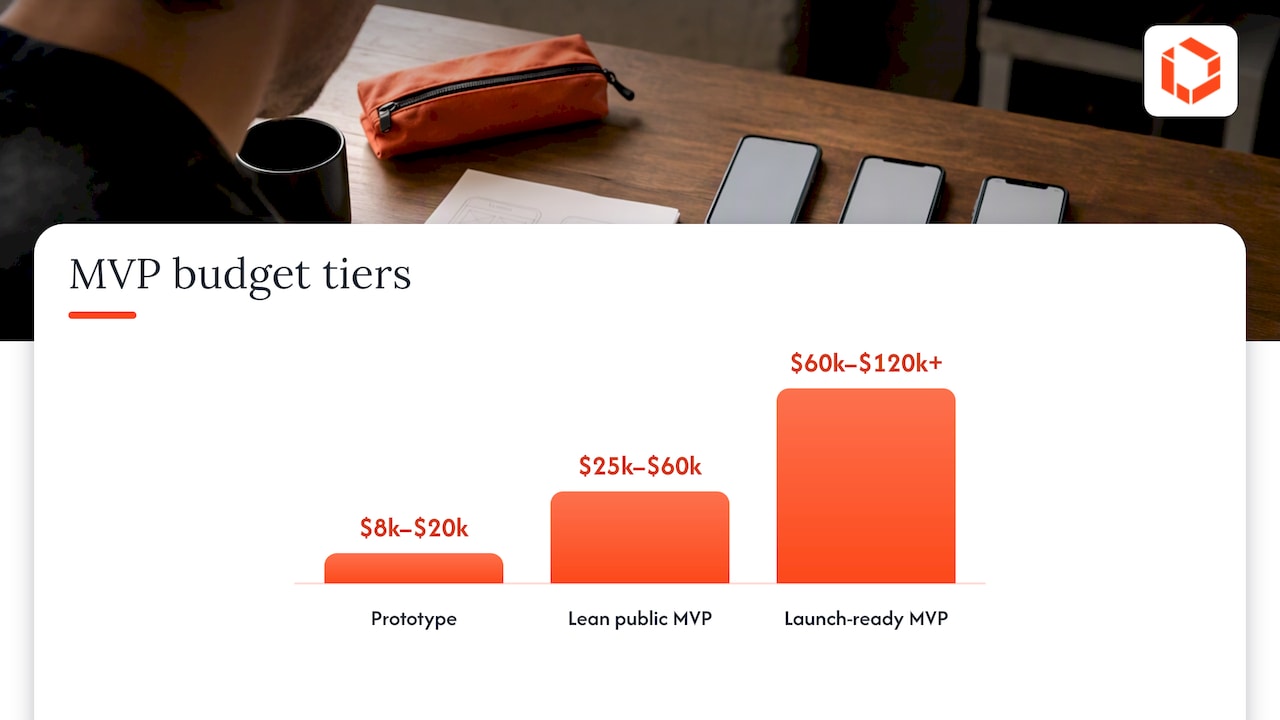
The following three illustrative budget tiers can help you match spending to your validation goal and avoid overbuilding or underbuilding your first release. A clickable prototype tests an idea; a functioning MVP lets users experience the actual product. Actual quotes depend on scope, delivery location, and team rates.
Prototype ($8,000 to $20,000): A clickable design built in Figma with no working backend, used to pitch investors or run early user interviews.
Lean public MVP ($25,000 to $60,000): A functioning app with core flows, basic backend, and enough polish to put in front of real users and collect usage data.
Launch-ready MVP ($60,000 to $120,000+): Production infrastructure, payment processing, security basics, and QA cycles that support a public app store release.
What pushes a project from one tier to the next usually comes down to a handful of decisions: adding real-time features, supporting two platforms instead of one, or requiring compliance work like HIPAA or SOC 2 readiness. Launch costs matter here too. A lean MVP budget should include initial hosting (often $50 to $200 a month on a service like AWS or Render) and app store developer fees, which run $99 a year for Apple and a $25 one-time fee for Google Play.
The jump between tiers rarely comes from one big feature. It comes from several small additions—a login flow here, a notification system there—that each add engineering time. Mapping your must-have features against these three tiers before you talk to a development team gives you a much sharper starting budget than guessing at a lump sum.
Scope and Feature Complexity: Which Features Cost the Most
Not all features cost the same, and treating them as if they do is the fastest way to blow a first-release budget. A login screen and a real-time chat feature might look like similar line items on a feature list, but they are not close in engineering effort.
A practical way to slice scope is to separate your app into three layers:
Core flows: The one or two actions your app must perform for a user to get value (think: book an appointment, place an order).
Happy path: The expected successful version of that flow, useful for early prototype validation before mapping failure scenarios.
Failure and edge cases: Failed payments, lost connections, empty states, and less common scenarios. Critical failures need handling before public launch; lower-priority scenarios can be phased into later releases.
Building the happy path first can keep prototype validation focused and affordable. Before releasing a public MVP, add essential handling for failed payments, lost connections, secure access, and data integrity. Less common, lower-risk scenarios can wait for later releases, with the savings depending on the actual scope.
On relative cost, simple CRUD features (create, read, update, delete a record) are often a lower-complexity baseline for estimation. Real-time sync (live chat, live location, collaborative editing) can require substantially more engineering because of the infrastructure needed to keep data consistent across users. The added cost depends on scale, architecture, and the services used. Features involving payments, third-party data feeds, or offline support also carry a meaningful multiplier because they require more testing and more failure handling, not just more code.
Pro Tip: Before scoping a feature, ask whether it supports your core user value or is essential for safe, reliable use. If it does neither, consider moving it to a later release.
Design and UX: When to Invest in Polish vs Speed
Design decisions shape engineering cost more than most founders expect, because every visual choice becomes a technical requirement once a developer has to build it.
Wireframes are the cheapest starting point: low-fidelity sketches that confirm layout and flow without locking in visual details. High-fidelity UI in Figma adds real typography, spacing, and interaction states, which takes longer to design but gives engineers a precise target. Production-ready components—fully built and tested UI elements ready to drop into code—cost the most upfront but reduce rework later.
Certain design choices quietly create engineering dependencies: custom animations, non-standard navigation patterns, and pixel-perfect spacing all require extra development time that a simpler, standard pattern would avoid.
A few tactics keep design costs down without sacrificing quality:
Build a shared component library in Figma so one button style, once approved, gets reused everywhere instead of redesigned per screen.
Use established UI patterns (standard tab bars, familiar form layouts) instead of custom interactions for your first release.
Design only the screens your core flow needs, and use placeholder states for everything else until you have user feedback.
Team Structure and Pricing Models Founders Will Pay For
Labor is usually the largest line item in any MVP budget, so understanding who you are paying for and how matters as much as the total number.
A typical MVP team includes a product or project lead, one to two engineers, a designer, and part-time QA support. US-market hourly rates for these roles vary widely depending on seniority and location, which is why two agencies can quote very different totals for the same scope.
On pricing models:
Fixed-price works best when scope is well-defined and unlikely to change. It gives you budget certainty but less flexibility.
Time-and-materials fits better when you expect scope to evolve as you learn from early users, though it requires more active budget tracking on your end.
Hybrid models—a fixed price for discovery and design, followed by time-and-materials for engineering—are common and often the most realistic fit for a first release.
Senior hires change the math in a way that is easy to underestimate. A senior developer costs more per hour but tends to make fewer costly mistakes, write code that needs less rework, and move through ambiguous requirements faster. A junior-heavy team can look cheaper on a quote and still end up more expensive once you account for revisions and missed edge cases.
Technology Stack Choices: Custom, Cross-Platform, and Low-Code Trade-Offs
Your stack decision affects not just your launch budget but every dollar you spend after launch, so it deserves more thought than "what's fastest right now."
Custom native development (separate Swift and Kotlin codebases) gives you direct platform control and can suit demanding performance requirements, but separate iOS and Android builds often raise development and maintenance costs. Cross-platform frameworks like Flutter or React Native let one codebase serve both iOS and Android, potentially reducing initial build time and cost while still producing a solid native-feeling app for most MVP use cases. Low-code platforms can get a simple MVP live fastest and cheapest, but they often create higher costs later if you need custom features the platform does not support well.
A few trade-offs worth weighing before you commit:
Cross-platform frameworks have large developer communities, which makes hiring and maintenance easier than with niche custom stacks.
Low-code tools carry licensing fees that scale with usage, so what looks cheap at launch can grow expensive as your user base grows.
Integrations add cost regardless of stack: payment processing, authentication providers, and third-party APIs (maps, analytics, messaging) each add setup time and ongoing per-transaction or per-call fees.
Testing, Security, and Launch Costs Including App Store and Payment Fees
Skipping QA and security to save money upfront is one of the most common ways founders end up spending more later, through bug fixes, lost users, or security incidents that require emergency rework.
Manual QA—a tester working through your app by hand—is cheaper to start but slower to scale. Automated testing costs more to set up initially and can reduce repetitive work once you are shipping updates regularly, since it catches regressions without repeating manual work every release. For a first MVP, a hybrid approach (manual testing on core flows, automated tests on critical backend logic) usually gives the best return.
Security essentials worth budgeting for even at MVP stage include encrypted data storage, secure authentication, and basic penetration testing before a public launch, especially if you handle payment or health data.
App store transaction fees apply to eligible digital purchases and vary by region, product type, billing method, and program eligibility. Under Google Play’s current fee schedule, eligible first-$1-million transactions and auto-renewing subscriptions in the US use a 10% service fee, with an additional 5% when Google Play Billing applies. Other transactions and markets can have different rates. Apple’s standard terms list a 30% commission for digital goods and services, with 15% rates for qualifying programs and subscriptions; regional alternative terms can differ. Web checkout may change the fee mix, but applicable platform rules, service fees, and payment-processing costs still need to be checked for your target market. That makes your billing strategy a real budget decision, not an afterthought.

Timeline and Urgency: How Schedule Compresses Cost
Compressing your timeline can raise cost, because getting the same scope done faster usually means paying for more people working in parallel, and more people means more coordination overhead.
Normal timeline (4 to 6 months): Allows for proper discovery, iterative design feedback, and a smaller core team, generally the most cost-efficient path.
Compressed timeline (90 days): For the same scope, may require more parallel design and engineering work, raising labor and coordination costs even though the calendar time shrinks. A narrowly scoped MVP may fit this timeline with a small team.
Phased approach: Launch a narrower core MVP on a normal timeline, then add features in planned follow-up releases rather than cramming everything into one deadline.
A 90-day plan can work well when you have outside pressure, such as an investor deadline or a seasonal market window, and a tightly scoped feature set. A 4 to 6 month plan fits better when you are still validating assumptions and want room to adjust based on early feedback.
Spending more time in discovery—clarifying requirements and mapping flows before writing code—often extends your calendar slightly but reduces total cost by avoiding expensive mid-build pivots.
Budgeting Worksheet: Line-Item Breakdown and Copy-Paste Estimate
A simple worksheet turns a vague "how much will this cost" question into a plan you can actually act on. Each line item below is expressed as an illustrative percentage range, which lets you scale it to your own number. Choose allocations that total 100%; the ranges are guides, not percentages to add together unchanged.
Discovery and planning: 5 to 10% of total budget, covers requirements, competitive research, and scope definition.
Design (UX/UI): 15 to 20%, wireframes through high-fidelity screens and a basic component library.
Engineering: 45 to 55%, the largest share, covering core flows, backend, and integrations.
QA and testing: 10 to 15%, manual and automated testing across core flows.
Infrastructure and launch: 5 to 10%, hosting setup, app store submission, and initial monitoring tools.
Here is how that breaks down on a $50,000 mid-range MVP budget:
Line item | Percent of budget | Dollar amount | What it covers |
|---|---|---|---|
Discovery and planning | 8% | $4,000 | Requirements, scope, competitive review |
Design (UX/UI) | 20% | $10,000 | Wireframes, high-fidelity UI, component library |
Engineering | 50% | $25,000 | Core flows, backend, integrations |
QA and testing | 12% | $6,000 | Manual and automated testing |
Infrastructure and launch | 10% | $5,000 | Hosting setup, store submission, monitoring |
Total | 100% | $50,000 |
To adapt this worksheet to a smaller prototype budget, shrink the engineering and QA lines and shift more weight toward design, since a prototype's job is to communicate an idea, not run in production. For a launch-ready tier, add a dedicated security review line and increase QA to account for app store compliance checks.
Cost Reduction Tactics That Protect Validation
Cutting cost without cutting your ability to learn from real users is the real skill in MVP budgeting, and a few frameworks make that easier.
Use a RICE score (reach, impact, confidence, effort) or a MoSCoW list (must-have, should-have, could-have, won't-have) to rank features before you ever talk to a developer about estimates.
Build a clickable prototype first and test it with real users before committing to engineering; it is far cheaper to change a Figma screen than to rewrite backend code.
Release features in gated stages (to a small user group first) rather than all at once, which limits the cost of fixing problems you did not anticipate.
Low-code tools are a reasonable short-term trade-off when your MVP is simple, your timeline is tight, and you expect to rebuild on a custom stack once you have validated demand. They are a poor fit when your product depends on complex logic, heavy customization, or features the platform cannot support, since you will likely pay to rebuild sooner than planned.
Pro Tip: Run your feature list through a RICE or MoSCoW filter before your first call with a development team. A scoped list gets you a far more accurate quote than a feature wish list.
When to Hire an Agency vs Freelancers vs In-House
The right delivery model depends less on budget alone and more on how much predictability and ongoing support you need.
Choose freelancers when your scope is small, well-defined, and you have the product management bandwidth to coordinate multiple independent contractors yourself.
Choose an agency when you need a coordinated team, predictable timelines, and support that continues after launch without having to rehire.
Choose in-house when you are building a long-term product with recurring feature work that justifies full-time salaries.
A senior-led agency model tends to reduce the hidden costs that freelancer arrangements often carry: miscommunication between independently hired specialists, inconsistent code quality, and gaps in accountability when something goes wrong after launch.
A short discovery engagement—a paid scoping phase before the full build—is one of the most reliable ways to measure whether a vendor actually understands your product before you commit to a full contract. It costs a fraction of the full build and tells you a great deal about how that team communicates under real project conditions.
Why Senior-Led Teams Change the Cost Equation
The biggest hidden cost in MVP development is not a line item; it is rework caused by miscommunication between founders and the people writing the code. Every round of "that's not quite what I meant" costs real engineering hours, and it compounds fast on a tight first-release budget.
Direct access to senior developers and designers throughout a build, rather than routing requests through account managers to junior staff, tends to catch misunderstandings before they turn into wasted sprints. That is the structural bet behind our MVP development for startups service: senior people on the work from kickoff to launch, not just at the proposal stage.
Our team has launched numerous apps across various industries, including releases with significant user growth and download numbers. Those outcomes came from teams that stayed engaged past launch day, which matters because an MVP's cost story does not end at release. Our Agile app development approach is built around shorter feedback loops specifically to catch scope misunderstandings early, before they become expensive to fix.
Budgeting for a first release is as much about who builds it as what gets built.
Get a Scoped MVP Estimate Before You Commit a Budget
Budgeting on paper only gets you so far. The real number depends on your specific feature list, your stack preferences, and your timeline, which is exactly what a scoping conversation is for.

Our team works directly with founders from the first product strategy and consulting conversation through MVP development and into ongoing support and growth after launch, with senior developers and designers on the work the entire way, not handed off to junior staff once the contract is signed. That continuity is what keeps a budget from drifting once building starts.
Ready to see what your idea actually costs to build? Start with a scoped estimate and get real numbers instead of guesses.

FAQ
What does MVP stand for in software development?
MVP stands for minimum viable product, the smallest version of an app that delivers real value and lets you test core assumptions with actual users. It typically includes only the core flows needed to prove demand, not every feature on a founder's long-term vision.
How do I determine my startup's development budget?
Start by mapping your must-have features against the three MVP tiers (prototype, lean public MVP, launch-ready MVP) and matching your goal to the appropriate cost bracket. From there, apply a line-item worksheet that splits the total across discovery, design, engineering, QA, and launch costs so each dollar has a purpose.
How much does it cost to build an MVP?
A clickable prototype typically costs several thousand dollars, a lean public MVP with a working backend costs tens of thousands, and a launch-ready MVP with full infrastructure and testing costs more, potentially over one hundred thousand dollars. The exact number depends heavily on feature complexity, team seniority, and how compressed your timeline is.
How do I launch my MVP?
Launching involves finalizing core flows, running QA on your happy path and key edge cases, and submitting to the app stores, which carry a $99 annual fee for Apple and a $25 one-time fee for Google Play. Budget separately for ongoing hosting and applicable store transaction fees. Rates depend on market, purchase type, billing method, and program eligibility, so use the current Apple and Google fee schedules when estimating post-launch revenue.
Should I choose a native app or a web-based app for my first release?
The right choice depends on your use case, budget, and how much offline or device-specific functionality you need. Comparing progressive web apps (PWAs) with native apps can help clarify which fits your situation. Native apps generally offer better performance and app store presence, while progressive web apps can launch faster and cheaper for simpler use cases.