Joy Foroughi
Executive Assistant


App Launch Checklist: What to Check Before You Ship
Ensure your app's success with our App Launch Checklist. Discover what you should check before launching your mobile app for maximum impact!

TL;DR:
Careful preparation before launching a mobile app helps ensure technical readiness, compliance, and effective marketing. The first 30 days post-launch are crucial for building momentum through active monitoring, prompt responses, and rapid updates. Treat launch as a coordinated operation, not just a deadline, to maximize visibility and long-term growth.
A mobile app launch checklist is a structured, phase-by-phase verification system that confirms your app is technically sound, store-compliant, and market-ready before it reaches users. Most founders treat launch as a finish line. It is actually the starting gun for your app's public lifecycle, and the first 30 days determine whether you build momentum or lose it permanently. Successful app launches require 4–6 weeks of preparation covering pre-launch validation, launch day execution, and post-launch iteration. Apple and Google each grant new apps a 7–30 day visibility boost at launch. Waste that window on bugs or a weak store listing, and you cannot get it back.
What should you check before launching your mobile app?
Technical readiness is the foundation of every mobile app release checklist, and platform compliance is where most first-time founders get blindsided. Before you submit to App Store Connect or Google Play Console, you need your app record fully configured: Bundle ID, pricing, territories, age rating, and category all set correctly. These are not optional fields you fill in later.

Apple enforces strict compliance requirements in 2026. The most commonly missed item is the in-app account deletion button. Missing it causes rejection delays that can push your launch back by days or weeks. If your app offers Sign in with Apple, every other sign-in method must offer equivalent functionality. Your privacy policy, terms of service, and EULA must be hosted at a live URL before submission, not a placeholder.
Your store metadata deserves the same attention as your code. Write your app title with your primary keyword in the first 30 characters. Your subtitle and description must communicate your value proposition clearly, not just describe features. Screenshots must meet exact pixel dimensions for each device size on both platforms. App preview videos follow separate specs for iOS and Google Play.
Crash monitoring and analytics must be live before you submit. Analytics events including app_open, signup, activation, purchase, and churn must be wired and tested at least two weeks before launch. Fixing data collection errors after your app is live is far more costly than getting it right beforehand.
Set up App Store Connect and Google Play Console app records completely
Configure Bundle ID, pricing, territories, and age rating
Add in-app account deletion and verify Sign in with Apple parity
Host privacy policy, terms of service, and EULA at live URLs
Write keyword-rich title, subtitle, and description metadata
Prepare screenshots and icons at exact platform-specified dimensions
Upload app preview videos for iOS and Google Play
Configure crash monitoring with dSYM upload for symbolicated iOS reports
Wire and validate all analytics events in your development environment
Pro Tip: Set up Sentry or an equivalent crash monitoring tool at least two weeks before launch. Symbolicated crash reports are dramatically more useful than raw stack traces when you are triaging a live issue under pressure.
How do you validate your app through beta testing before launch?
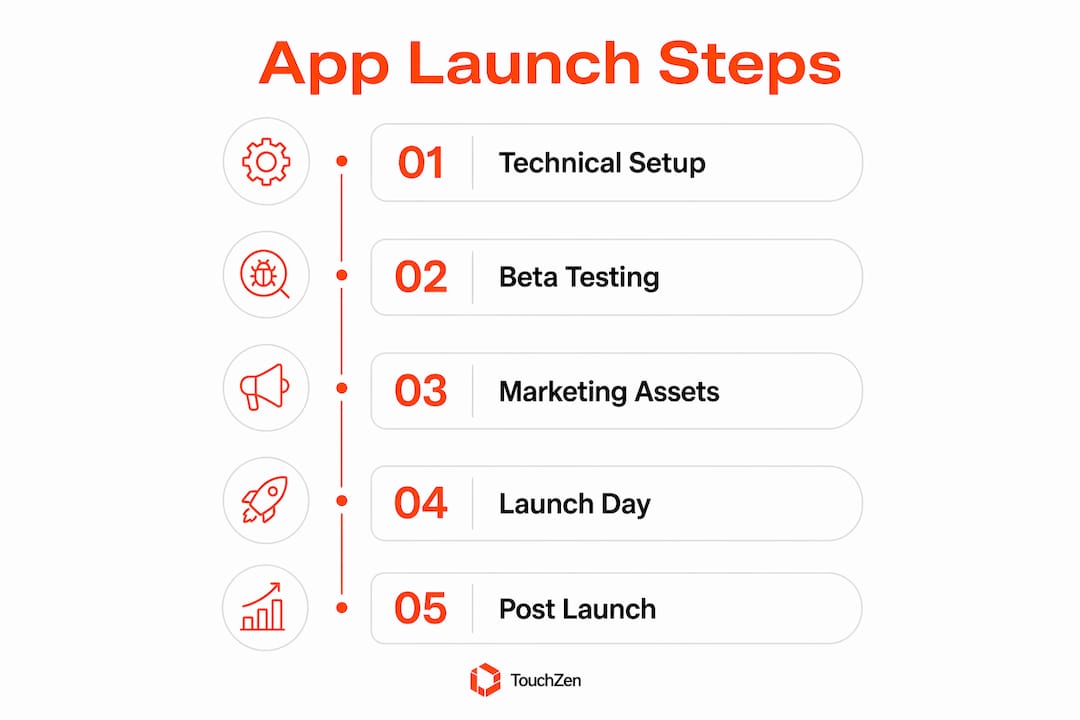
Beta testing on real devices is the single most effective way to prevent user churn on launch day. A controlled test with real users catches the bugs your internal team missed because you already know how the app works. Your users do not.
Recruit 20–50 dedicated beta testers 5–7 days before your planned launch date. Use TestFlight for iOS and Google Play's closed testing track for Android. Do not rely solely on simulators. Real device behavior on low-RAM Android phones or an iPhone SE 3 will surface edge cases that never appear in your development environment.
Recruit 20–50 beta testers from your target audience, not just friends and colleagues
Distribute builds via TestFlight (iOS) and Google Play closed testing (Android)
Test on diverse devices including small screens and budget Android models
Walk testers through the complete core user journey from signup to key action
Collect structured bug reports and usability feedback daily
Triage issues by severity: crashes and broken flows first, cosmetic issues last
Run a final QA pass on login, payment, onboarding, and error recovery before going public
Validating the core user journey end-to-end on real devices is the most critical item on any pre-launch checklist. Broken signup flows, failed network error handling, and confusing onboarding are the top causes of immediate user churn. Fix these before launch, not after your first wave of one-star reviews.
Pro Tip: Set up a private Slack channel or group chat with your beta testers. Real-time communication during the beta phase accelerates issue identification and builds a community of early advocates who will leave your first reviews on launch day.
For a deeper look at structuring an effective closed beta, the pre-launch testing guide from TouchZen covers device diversity and onboarding validation in detail.
What marketing assets do you need for a high-impact app launch?
Marketing preparation runs in parallel with technical work, and most founders start it too late. Your store listing, landing page, and social presence must be ready before your app goes live. You cannot build momentum after launch if you have nothing to point people to on day one.
Landing page: Include your value proposition, screenshots, and App Store and Google Play download badges. The page must be live before launch day.
Store screenshots: Consider adding concise value-proposition overlays to your screenshots where they improve clarity. Screenshots are the single highest-converting element on your store listing.
App icon: Test your icon on light backgrounds, dark backgrounds, and against competing apps in your category. It must read clearly at small sizes.
App preview video: Create separate videos for iOS and Google Play. Each platform has different length and format requirements.
Press kit: Prepare a downloadable kit with your logo, screenshots, founder bio, and a one-paragraph app description. Send it to niche publications 5–7 days before launch.
Waitlist: Build and segment your waitlist before launch. Email this list on launch day with a direct download link.
Social accounts: Create and warm up accounts on X (formerly Twitter) and LinkedIn. Schedule pre-launch content to build awareness before the release date.
Understanding App Store Optimization metadata is critical before you finalize your creative assets. Your title and keyword field directly affect which searches surface your app. Lock your metadata before you create screenshots so your visual messaging matches your discoverability strategy.
Asset | Platform | Key Requirement |
|---|---|---|
Screenshots | App Store | Exact pixel dimensions per device size |
Screenshots | Google Play | JPEG or PNG, 16:9 or 9:16 ratio |
App preview video | iOS | 15–30 seconds, device-framed |
App preview video | Android | YouTube link or direct upload |
App icon | Both | Tested on multiple backgrounds |
Press kit | External | Logo, screenshots, founder bio, one-paragraph description |
Pro Tip: Plan your Product Hunt launch for a Tuesday, Wednesday, or Thursday. Launching at 12:01 AM PT gives you the full 24-hour voting window. Prepare your gallery, tagline, and first comment in advance so you can respond to early supporters immediately.
What are the critical launch day steps to maximize impact?
Launch day is an operational event, not just a marketing moment. Treat it like a coordinated product release with a clear timeline, assigned roles, and real-time monitoring from the first hour.
Confirm your app is live on both stores and all flows are functional before sending any outreach
Post on Product Hunt at 12:01 AM PT and respond to every comment within the first two hours
Send your email blast to waitlist and beta users with a direct download link
Post across X, LinkedIn, and any niche forums or communities where your users spend time
Activate crash monitoring alerts and assign one team member to watch the dashboard for the first four hours
Open a dedicated Slack channel for your dev, design, and support team to communicate in real time
Monitor server load alongside crash rates. Traffic spikes can expose infrastructure issues that never appeared in testing.
Phased rollout on Android is one of the most underused tools in a founder's launch kit. Google Play lets you release to a percentage of users first, which means you can catch a critical bug and halt the rollout before it reaches your full audience. iOS does not offer this option, so your pre-launch testing on Apple devices must be thorough.
Avoid launching on Fridays or around public holidays. App store review teams operate on reduced capacity, and press coverage is minimal. A Tuesday or Wednesday launch gives you the best combination of reviewer availability, media attention, and user engagement.
How do you sustain growth after your app goes live?
Post-launch is where most startups lose the gains they worked weeks to build. The first 30 days after launch require daily attention to reviews, crash logs, and key performance metrics.
Review responses: Reply to every App Store and Google Play review within 24 hours. A thoughtful response to a one-star review often converts a frustrated user into a loyal one.
Bug fix releases: Ship at least one bug fix update in the first week. This signals to both users and the app stores that your team is active and responsive.
KPI tracking: Monitor installs, activation rate, Day 1 and Day 7 retention, and conversion to paid daily. These numbers tell you where users drop off.
A/B testing: Run A/B tests on your screenshots, description, and metadata over the first 30 days. Small copy changes can produce significant conversion lifts.
Release notes: Write release notes that communicate real changes in plain language. "Bug fixes and performance improvements" tells users nothing.
Localization: After your initial launch stabilizes, add localized metadata and creative variants for your top non-English markets.
Pro Tip: Set up a weekly review cadence: pull your crash logs, review ratings, and retention data every Monday morning. This rhythm prevents small issues from compounding into serious problems before your next release.
The mobile app architecture decisions you made during development will directly affect how fast you can ship post-launch updates. Apps built with modular, well-documented codebases iterate faster and accumulate fewer technical debts over time.
Key Takeaways
A successful mobile app launch depends on completing technical, testing, and marketing preparation before your app goes live, then executing a coordinated launch day and iterating rapidly in the first 30 days.
Point | Details |
|---|---|
Start preparation early | Allow 4–6 weeks for pre-launch validation, store setup, and marketing asset creation. |
Lock analytics before launch | Wire and test all tracking events at least two weeks before release to avoid live data gaps. |
Beta test on real devices | Recruit 20–50 testers and cover small screens and low-RAM models to catch edge case bugs. |
Treat launch day as an operation | Assign monitoring roles, open a war room channel, and use Android phased rollout to limit risk. |
Iterate fast post-launch | Respond to reviews daily, ship a bug fix in week one, and run A/B tests on store assets within 30 days. |
What I've learned from watching founders burn their launch window
The most painful pattern I see is a founder who spent eight months building a great product, then rushed the last two weeks before launch. They skipped beta testing on Android devices, never set up crash monitoring, and sent their press outreach the morning of launch day. The app went live with a broken signup flow on Android. By the time they shipped a fix, the algorithmic boost had faded and the early reviews had set a tone that took months to recover from.
The 7–30 day visibility window that app stores grant new apps is not a marketing concept. It is a real algorithmic event, and it is not renewable. You get one shot at it per app. Founders who treat launch as a deadline to hit, rather than a phase to execute, consistently underperform founders who treat it as a coordinated campaign.
The other thing I would push back on is the assumption that beta testing is just about finding bugs. It is also your first opportunity to build a community of advocates. The 30 people who tested your app and gave you feedback are the same people who will leave your first reviews, share your Product Hunt post, and tell their networks about you. That relationship is worth more than any paid acquisition channel in your first month.
Post-launch iteration is not optional maintenance. It is the primary growth lever for early-stage apps. The teams that ship weekly updates, respond to every review, and run continuous A/B tests on their store listings are the ones that compound their initial momentum into sustained growth.
— Cyrus
How TouchZen helps startups launch with confidence
Launching a mobile app without experienced guidance is one of the most common reasons startups lose their launch window to avoidable mistakes. TouchZen's iOS and Android development services cover every phase of the checklist described here, from App Store Connect setup and analytics instrumentation to beta testing coordination and store listing optimization.
TouchZen has helped launch more than 75 apps across industries, with results including 100,000 downloads in the first year and a 10x increase in user subscriptions for clients. The team works directly with senior developers and designers, not junior staff, so your launch preparation gets the attention it requires. If you are preparing for a release and want a team that has done this before, talk to the TouchZen team about your project.
FAQ
How long does it take to prepare for a mobile app launch?
A thorough app launch requires 4–6 weeks of preparation covering technical setup, beta testing, store listing creation, and marketing asset production, followed by 30 days of active post-launch monitoring.
What causes Apple to reject an app before launch?
Apple commonly rejects apps for missing the in-app account deletion button, broken demo account credentials, incomplete privacy policy URLs, and Sign in with Apple parity issues.
How many beta testers do you need before launching?
Recruit 20–50 dedicated beta testers and run testing for at least 5–7 days before launch, covering a range of devices including small screens and low-RAM Android models to catch edge case bugs.
What analytics events should you track before launch?
Wire and validate events for app_open, signup, activation, purchase, and churn at least two weeks before launch. Fixing live data collection errors after release is far more disruptive than setting up tracking correctly in advance.
Should you use a phased rollout on Android?
Yes. A phased rollout on Android lets you release to a subset of users first, catch critical bugs, and halt the rollout before they reach your full audience. iOS does not offer this option, making thorough pre-launch testing on Apple devices non-negotiable.