
Cyrus Kiani
Founder / CEO



Google Stitch vs Figma: Accelerate Startup Design in 2026
Choosing the right design tool is one of those decisions that quietly shapes how fast your product moves. Startups face relentless pressure to ship UI quickly, validate ideas, and iterate without burning runway. Google Stitch, an AI-native UI design tool from Google Labs powered by Gemini models, entered the scene around 2025 and immediately sparked debate: can it challenge Figma's decade-long dominance? This article breaks down the real differences, practical tradeoffs, and the smartest workflow for startup founders and product managers who need speed, quality, and team alignment, all at once.
Key Takeaways
Point | Details |
|---|---|
Stitch speeds early design | Google Stitch’s AI capabilities cut UI ideation time by up to 70% for startups. |
Figma for production polish | Figma excels in finalizing, refining, and collaborating on complex, enterprise-grade designs. |
Best results: use both | Combining Stitch for brainstorming and Figma for refinement yields the fastest, highest-quality product design. |
Mind the limitations | Stitch lacks real-time collab, plugin ecosystem, and scalability—factor these into your workflow. |
Google Stitch and Figma: Core differences explained
Now that you know what's at stake, let's break down what really sets Google Stitch and Figma apart.
At their core, these two tools are built on completely different philosophies. Google Stitch is centered around instant UI generation from text prompts, voice input, or uploaded sketches. You describe what you want, and Stitch generates a working screen layout in seconds. This makes it genuinely accessible to founders, product managers, and engineers who have never opened a design tool before. If you want to understand AI-driven app design workflows more broadly, this shift toward natural-language input is a major trend worth tracking.
Figma, on the other hand, is the industry standard for collaborative, pixel-precise design. It supports deep customization, a rich plugin ecosystem, shared component libraries, and real-time multi-user editing. For teams managing mature design systems, Figma is essentially irreplaceable today. Understanding what UI design means in apps helps clarify why Figma's structural depth matters so much at scale.
Here's a quick feature comparison:
Feature | Google Stitch | Figma |
|---|---|---|
Input modes | Text, voice, image, sketch | Manual drawing, components |
Collaboration | Async only | Real-time, multi-user |
Prototyping | Basic, instant | Advanced, interactive |
Cost | Free (with limits) | From $15/user/month |
Plugin ecosystem | Minimal | 1,000+ plugins |
Export options | Code, assets | Dev handoff, assets, code |
According to a detailed Stitch review, the tool is best suited for rapid ideation rather than production-ready design.
Key strengths at a glance:
✔ Google Stitch: Instant screen generation, zero design experience needed, free to start, fast prototyping for pitches and hackathons.
✔ Figma: Design system management, real-time collaboration, accessibility tools, developer handoff, enterprise-grade reliability.
Both tools have a place in a modern startup's toolkit. The question is knowing when to reach for which one.
Speed vs depth: When does each tool shine?
Having looked at fundamental differences, let's see where each tool fits best in a real-world workflow.
Time is the most valuable resource a startup has. Google Stitch is built to compress ideation cycles dramatically. Stitch reduces ideation time by up to 70%, making it ideal for early-stage concepts, but it is not built for advanced design systems. That's a meaningful number when you're trying to validate three different product directions in a single sprint.
To put it in concrete terms: building a settings page from scratch takes roughly 12 seconds in Stitch versus approximately 45 minutes in Figma. That's not a knock on Figma. It's a reflection of what each tool optimizes for. Figma's 45-minute process produces a polished, annotated, developer-ready screen. Stitch's 12-second version gives you a functional starting point to react to.
Keeping up with AI-powered UI trends means recognizing that speed of ideation is now a competitive advantage, not just a convenience.
Workflow phase | Best tool | Why |
|---|---|---|
Concept generation | Google Stitch | Instant screens from prompts |
User flow mapping | Figma | Flexible, connectable frames |
Visual refinement | Figma | Precise control, components |
Stakeholder review | Both | Stitch for speed, Figma for polish |
Developer handoff | Figma | Code annotations, specs |
Hackathon/pitch | Google Stitch | Fast, good-enough fidelity |
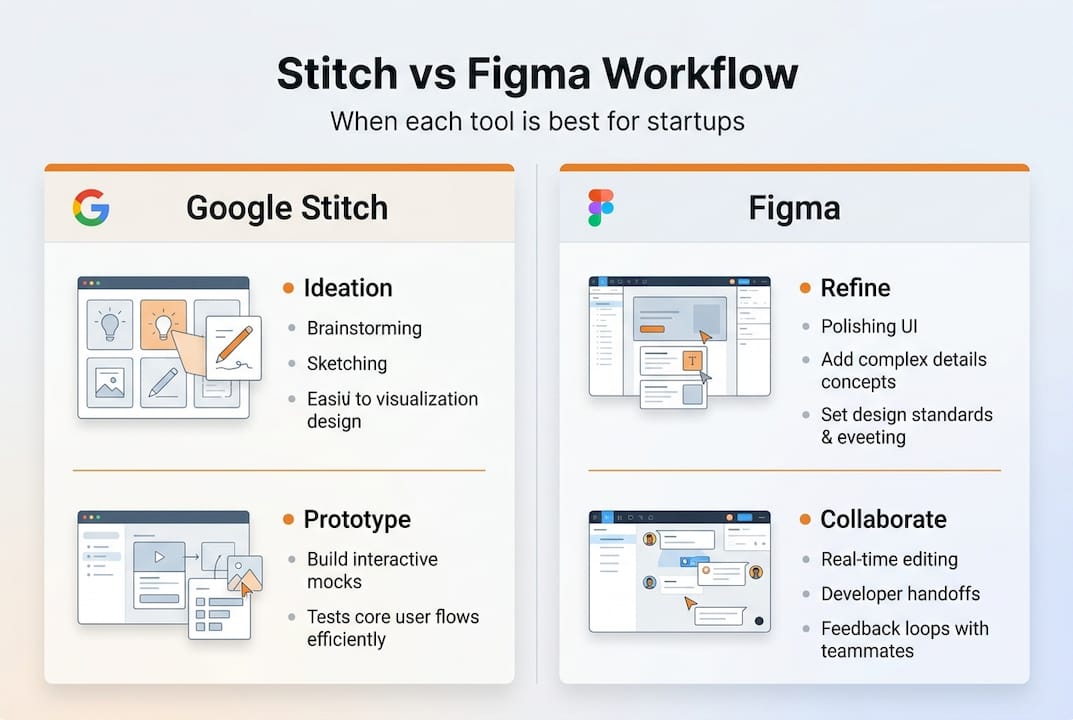
For UI design best practices, the smartest teams are not picking one tool over the other. They're sequencing them strategically.
According to Stitch update findings, the tool has matured enough to produce export-ready assets that can drop directly into a Figma file for refinement.
📌 Pro Tip: Use Stitch during brainstorming and early client conversations. Once you've aligned on direction, export those assets into Figma for design system integration and developer specs. This two-step approach can cut your total design cycle by nearly half.
Nuances and limitations: What most startups miss
While speed and depth matter, the devil is in the details, especially for startup teams scaling quickly.
The surface-level comparison makes Stitch look like an obvious win for lean teams. But there are real limitations that can cost you time and credibility if you're not prepared for them.
First, Stitch's AI is trained heavily on Material Design patterns. That means outputs tend to look similar across different prompts, which creates a risk of homogenous design. If your brand identity is a differentiator, you may find Stitch's default outputs feel generic. Stitch lacks real-time collaboration, plugins, and struggles with complex UX flows and brand consistency, which is a significant gap for growing teams.
"Stitch is an accelerator, not a replacement. Teams that treat it as a full design solution will hit a wall the moment they need to scale their design system or onboard a senior designer."
This is the nuance most startup founders miss when they first encounter the tool.
Here's what you need to factor into your decision:
🚫 No live collaboration: Stitch does not support simultaneous multi-user editing, which limits its usefulness for distributed design teams.
🚫 Limited plugin support: Figma's 1,000+ plugins handle accessibility audits, content population, and developer handoff. Stitch has almost none of that.
💰 Cost comparison: Stitch is free with limits of 350 standard and 50 experimental generations per month. Figma's business plan runs approximately $13,000 per year for a 20-person team.
📊 Scaling risk: As your product matures, Stitch's output may require significant rework to meet production standards.
For a deeper look at UI design for startups, understanding these tradeoffs early prevents expensive rework later.
The community discussion around Stitch on Reddit reflects a consistent pattern: designers love it for speed, but quickly return to Figma when precision and collaboration become priorities.
Workflow in practice: The new startup stack
Given these strengths and pitfalls, here's how forward-thinking teams are combining Google Stitch and Figma for optimal results.
The most effective flow today is to use Stitch for initial design generation, then export to Figma for refinement and developer handoff. This is not just a workaround. It's a deliberate strategy that maximizes the strengths of both tools.
Here's the step-by-step approach we recommend for startup teams:
Ideate in Stitch. Use natural language prompts to generate 3 to 5 screen variations in minutes. Involve your product manager or even a founder directly. No design background required.
Review and select. Share Stitch outputs with stakeholders for fast alignment. This replaces lengthy wireframing sessions.
Export assets. Pull the selected screens and assets out of Stitch in code or image format.
Import into Figma. Drop assets into your Figma workspace and begin refining typography, spacing, and component consistency.
Build your design system. Use Figma's component libraries to ensure brand consistency across all screens.
Finalize and hand off. Use Figma's developer mode to generate specs, annotations, and exportable assets for your engineering team.
This workflow also empowers non-designer team members to contribute meaningfully before a senior designer is involved. That's a real advantage for early-stage startups where every hour counts.
For more UI workflow tips tailored to startup teams, understanding this handoff process is essential.
📌 Pro Tip: Use Stitch specifically for hackathons and pitch deck mockups where speed matters most. Reserve Figma for investor demos and developer specs where precision and polish directly affect credibility.
Handoff checklist before moving from Stitch to Figma:
✔ Screens reviewed and direction confirmed by stakeholders
✔ Assets exported in correct resolution and format
✔ Brand colors and fonts documented for Figma setup
✔ User flows mapped before component-level design begins
✔ Developer annotations added in Figma before handoff
Our take: Why Stitch and Figma work better together
You've seen the evidence and practicalities. Here's an honest perspective you rarely hear in clickbait debates.
The narrative that Google Stitch will kill Figma is exciting for headlines but misleading for decision-makers. We've worked with enough startup teams to know that tool debates are almost never about which tool is objectively better. They're about which tool fits your current stage, team composition, and workflow.
Stitch is genuinely valuable. Experts agree Stitch lacks depth and full design control, but it's invaluable for resource-constrained teams who need speed in zero-to-one workflows. That's a fair and accurate summary. For a pre-seed founder trying to build a prototype before a pitch next week, Stitch is a game-changer. For a Series A team with a full design system and three designers, Figma remains the backbone.
The smarter question is not "which tool wins" but "how do we use both to move faster without sacrificing quality." Combining Stitch for speed with Figma for polish is not a compromise. It's a strategy. It saves money on early-stage design hours while preserving the flexibility to scale your design system properly.
If you're debating AI vs human app design more broadly, the same logic applies: AI accelerates, humans refine.
Need help with mobile app design? We can accelerate your project
If you want to move even faster and build with best-in-class expertise, working with a team that already knows how to blend AI tools and human design insight can make a significant difference.

At TouchZen Media, we help startup founders and product managers move from concept to polished, developer-ready UI without the typical back-and-forth delays. Whether you're using Stitch to prototype or need a full Figma design system built from scratch, our team integrates the right tools for your stage and budget. We've been recognized among the top UX designers and as a leading UI/UX agency for startups. Let's talk about your workflow and find the fastest path to a product your users will love.
Frequently asked questions
Is Google Stitch free to use for startups?
Yes, Google Stitch is currently free with limits of 350 standard and 50 experimental generations per month, making it accessible for early-stage teams on tight budgets.
Can Google Stitch replace Figma for full product design?
No. Stitch is built for rapid ideation, but it cannot replace Figma for production design, complex UX flows, real-time collaboration, or mature design systems.
How much does Figma cost for a startup team?
Figma's business plan runs approximately $13,000 per year for a 20-person team, which is a meaningful budget consideration for early-stage startups.
What is the ideal workflow using both Google Stitch and Figma?
The most effective approach is to ideate and generate screens in Stitch, then export those assets into Figma for refinement, design system integration, and developer handoff.
Does Google Stitch support collaboration?
Stitch currently lacks real-time collaboration features, which means Figma remains the stronger choice for distributed teams working on shared design files simultaneously.