
Cyrus Kiani
Founder / CEO



Stripe vs PayPal for Mobile Apps: Best App Payment System in 2026
Choosing a payment processor for your mobile app feels straightforward until you actually sit down to decide. Most founders default to Stripe or PayPal based on name recognition alone, but that instinct can cost you real money and real users. The right choice depends on your app's growth stage, your technical setup, and how your users actually behave at checkout. This guide breaks down both platforms across mobile integration, fees, user experience, and scalability so you can make a data-driven call rather than a gut-feel guess.
Key Takeaways
Point | Details |
|---|---|
Stripe enables seamless mobile UX | Stripe’s mobile SDKs and embedded flows let you offer a native buying experience without redirects. |
PayPal boosts buyer trust | Offering PayPal improves conversion rates for first-time and international users who trust the PayPal brand. |
Fees impact margins at scale | Fee structure differences become significant as your transaction volume and international business grows. |
Hybrid solutions maximize conversion | Combining Stripe and PayPal gives your users more choice and can increase completed transactions. |
How Stripe and PayPal support mobile app payments
Now that you know the decision isn't one-size-fits-all, let's compare how both providers stack up for mobile apps.
Both Stripe and PayPal have invested heavily in mobile-first infrastructure, but they take meaningfully different approaches. Stripe provides advanced mobile SDKs for iOS, Android, and React Native, enabling fully embedded, customizable in-app payments without redirects. That means your users never leave your app to complete a transaction, which is a significant UX advantage. PayPal offers Mobile SDKs for iOS and Android supporting PayPal, credit and debit cards, and Pay Later installments, giving you a broad range of consumer payment options out of the box.
Here's a quick side-by-side of their core mobile capabilities:
Feature | Stripe | PayPal |
|---|---|---|
iOS/Android SDK | ✔ Native | ✔ Native |
React Native support | ✔ Yes | Limited |
Embedded in-app flow | ✔ Fully embedded | Partial (may redirect) |
Apple Pay / Google Pay | ✔ Yes | ✔ Yes |
Pay Later / BNPL | ✔ Stripe Installments | ✔ Pay Later |
Card vaulting | ✔ Advanced | ✔ Basic |
Custom UI branding | ✔ Full control | Limited |
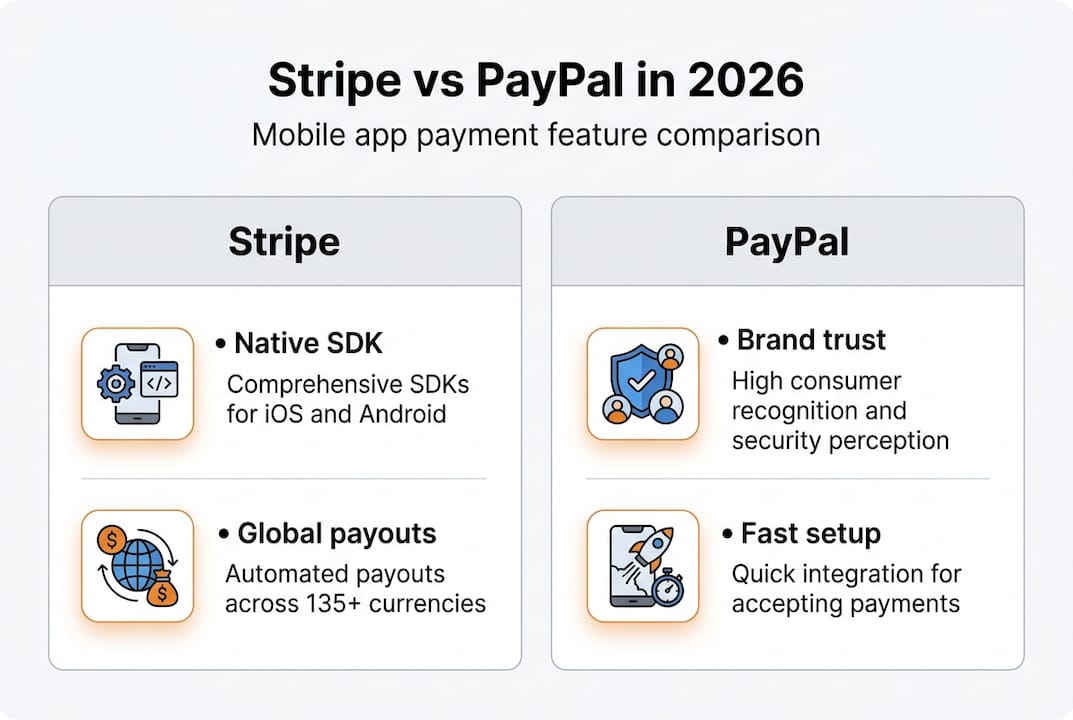
For founders building Stripe mobile payments into a custom app, Stripe's SDK is genuinely powerful. You can control every pixel of the checkout experience, vault cards for repeat purchases, and handle subscriptions natively. This matters a lot for retention-focused apps where a clunky checkout flow kills conversions.
PayPal's SDK, by contrast, shines for speed and breadth. If your users skew toward older demographics or international markets where PayPal has deep brand penetration, its SDK gives you instant credibility without extra design work.
Key mobile integration factors to consider:
Stripe suits founders with developer resources who want a fully branded, frictionless checkout inside the app
PayPal suits founders who need fast deployment and want to leverage PayPal's existing consumer trust
Both support Apple Pay and Google Pay, which is essential for mobile app types that rely on one-tap checkout
Card vaulting (saving payment methods for future use) is more advanced in Stripe, which benefits subscription and marketplace apps
Your development workflow tips will influence how quickly you can ship either integration
Pro Tip: If you're building a marketplace or SaaS app, Stripe Connect is a feature PayPal simply doesn't match. It handles multi-party payouts, platform fees, and compliance automatically.
Comparing fees, cross-border costs, and scalability
With integration clear, let's examine the numbers, because fees and scalability can deeply affect your margins.
Stripe standard fees are 2.9% plus $0.30 for online and domestic transactions, with lower rates available for high-volume businesses and an additional 1 to 1.5% for international payments. PayPal fees are more variable, ranging from 2.59% to 3.49% plus $0.49 online, with currency conversion costs of 3 to 4% and a cross-border fee of 1.5%.

Transaction type | Stripe | PayPal |
|---|---|---|
Domestic online | 2.9% + $0.30 | 2.59-3.49% + $0.49 |
International | +1 to 1.5% | +1.5% cross-border |
Currency conversion | ~1% | 3-4% |
Subscriptions | 2.9% + $0.30 | 2.59-3.49% + $0.49 |
High-volume discount | ✔ Negotiable | Limited |
At low transaction volumes, the difference between the two is modest. But as you scale mobile apps and process thousands of transactions monthly, those fractions of a percent add up fast. Here's how to think about it:
Early-stage apps (under $10K/month): PayPal's base rate can actually be competitive, especially if you're not doing much international volume.
Growth-stage apps ($10K to $100K/month): Stripe's flat, predictable fee structure becomes easier to model for subscriptions and recurring revenue.
Scale-stage apps ($100K+/month): Stripe's negotiated rates and lower currency conversion costs make it the clear winner for global expansion.
Micropayment-heavy apps: Both providers charge a fixed per-transaction fee, which hurts margins on small purchases. Stripe's Optimized Checkout Suite can help here.
Marketplace apps: Stripe Connect's pricing is purpose-built for platforms, while PayPal's equivalent is less flexible.
Pro Tip: If you're projecting significant international revenue, PayPal's 3 to 4% currency conversion fee can quietly erode your margins. Run a 12-month fee simulation with your projected volume before committing to a primary processor.
💰 The bottom line: Stripe tends to be more cost-effective at scale and for international transactions, while PayPal can be competitive for domestic, low-volume apps with a consumer-facing audience.
User experience: Conversion, trust, and in-app flow
Understanding the costs is one part, but how payments feel to your users is just as important.
Payment UX is where the Stripe vs PayPal debate gets genuinely interesting. PayPal is strong in brand trust, quick setup, and consumer recognition, which boosts mobile and first-time conversions in a measurable way. When a user sees the PayPal logo at checkout, there's an immediate trust signal that reduces hesitation, especially for new apps without an established brand reputation.
Stripe is better for seamless mobile UXthrough its embedded, branded checkout, while PayPal may redirect users but benefits from its trusted brand recognition.
"The best checkout experience is the one your users don't notice. When payment feels native to your app, friction disappears and conversions follow."
Here's how each provider shapes the user journey:
Stripe keeps users inside your app at every step, which reduces drop-off and creates a more polished product feel
PayPal redirects users to its own interface in some flows, which can interrupt the experience but also reassures cautious buyers
For recurring subscriptions, Stripe's native billing UI is cleaner and easier to manage from a user perspective
For digital goods and one-time purchases, PayPal's one-tap wallet experience is genuinely fast for existing PayPal users
Marketplace apps benefit from Stripe's ability to handle complex flows like split payments and escrow without breaking the UX
The redirect issue is worth taking seriously. Mobile users are impatient. Any friction that pulls them out of your app, even briefly, increases the chance they abandon the transaction. Investing in payment security and a smooth native flow pays dividends in conversion rates over time.
📊 For apps targeting first-time buyers or older demographics, PayPal's trust factor is a real conversion lever. For apps targeting tech-savvy users who expect a premium experience, Stripe's embedded flow wins.
When to choose Stripe, PayPal, or both for your app
Let's put all this together, how should your app make the call, and why might a blended approach be optimal?
Using Stripe as your primary processor with PayPal as an additional option is the optimal setup for maximum conversion, and Stripe's dispute and fraud tools give you a stronger operational foundation.
Here's a clear breakdown by use case:
Choose Stripe if you:
Are building a SaaS, subscription, or marketplace app
Have developer resources to implement a custom checkout
Plan to scale internationally and need lower conversion fees
Want advanced fraud tools, dispute management, and analytics
Need Stripe Connect for multi-party payouts
Choose PayPal if you:
Need to launch fast with minimal technical setup
Are targeting consumer markets where PayPal has high brand recognition
Have a non-technical team and need a plug-and-play solution
Are running a low-volume app where fee differences are minimal
Want Pay Later options to increase average order value quickly
Use both when:
You want to maximize checkout conversion across different user segments
Your app serves both tech-savvy users and traditional consumers
You're entering markets where PayPal has stronger penetration than cards
Pro Tip: Don't let perfect be the enemy of good. Start with the processor that fits your current team and launch timeline, then layer in the second option once you have real transaction data to guide the decision.
A few pitfalls to avoid: Don't choose based on brand familiarity alone. Don't ignore fee simulations before launch. And don't assume your first payment stack is permanent. Review your streamlined Stripe setup and overall app store optimization strategy together, because your monetization model and your distribution strategy are deeply connected.
Our take: The uncomfortable truth about Stripe vs PayPal for mobile app startups
Here's what most comparison articles won't tell you: the Stripe vs PayPal debate is largely a false binary. The founders who obsess over picking one and sticking with it are often leaving conversion and revenue on the table.
The most successful mobile apps we've worked with treat payment processing as a living part of their product stack, not a one-time setup decision. They test checkout flows, analyze drop-off data, and adjust their payment options based on what their users actually do, not what a blog post recommends.
Stripe is genuinely excellent for building a scalable, branded payment experience. But dismissing PayPal's trust signal is a mistake, especially in the early stages when your app has no reputation to lean on. Our honest take: start with payment strategy insights grounded in your specific user data, not generic advice. Use both processors if your volume justifies it. And revisit the decision every six months as your app grows.
🚀 The best payment stack is the one that evolves with your business, not the one that wins a theoretical comparison.
Need help integrating Stripe or PayPal into your mobile app?
If you want to act on these insights with seasoned pros, our team is ready to help.
At TouchZen Media, we've helped startups and growing companies across multiple industries build payment flows that convert. Whether you're integrating Stripe for a complex marketplace or setting up PayPal for a fast consumer launch, our mobile app experts know how to get it right the first time.

We're recognized among the top development companies in California, and we bring that same standard to every payment integration we build. From architecture decisions to launch-ready code, we handle the complexity so you can focus on growth. Ready to build something that works? Work with TouchZen Media and let's get your payment stack optimized.
Frequently asked questions
Which is faster to integrate: Stripe or PayPal?
PayPal is generally faster for non-technical founders due to its simple setup and quick launch for brand trust, but Stripe offers more flexibility for custom apps with some developer expertise.
Does using both Stripe and PayPal increase conversions?
Yes, offering both can capture more users and boost conversions. Using Stripe as primary with PayPal as an option is the optimal setup for maximum conversion across different user preferences.
Are Stripe's fees lower than PayPal's for startups?
Stripe's standard fees of 2.9% plus $0.30 are usually more predictable, while PayPal's variable rates of 2.59 to 3.49% plus $0.49 and higher currency conversion costs make Stripe more cost-effective for high-volume and international apps.
Does Stripe or PayPal support recurring subscriptions in mobile apps?
Both support subscriptions, but Stripe excels in customization and automation for subscriptions and marketplaces, making it the stronger choice for SaaS and platform-based apps.