

Joy Foroughi
Executive Assistant


How to Localize an App: Does Translation Increase Downloads?
Discover how to localize an app effectively. Does translation really increase downloads? Learn the strategies that drive up to 128% growth!

TL;DR:
Localization significantly increases app downloads by adapting keywords, visuals, and metadata to local markets. It also enhances user trust and engagement by providing content in native languages and culturally relevant visuals. Prioritizing metadata and visual localization offers the fastest growth, with ongoing measurement vital for sustained success.
App localization is the process of adapting your app, its store listing, and its in-app content to match the language, cultural norms, and search behaviors of a specific market. Translation is one component of localization, but it is not the whole picture. If you're wondering whether app localization really increases downloads, the data provides a clear answer: localization drives a 15–40% increase in downloads in targeted markets, with outliers reaching 101–128% lift through full App Store Optimization (ASO) localization. That kind of growth does not come from swapping words. It comes from adapting keywords, screenshots, and store metadata to match how local users actually search and decide.
What is the difference between translation and app localization?
Translation simply converts text from one language to another. Localization adapts your entire product experience, including store listing metadata, keywords, screenshots, and in-app content, to fit the cultural and technical expectations of a target market. The distinction matters because translation alone rarely unlocks meaningful download growth.
Metadata localization is the highest-leverage task
Your app name, subtitle, and keyword fields are the primary signals that app store algorithms use to rank your app in search results. Translating these fields word-for-word from English produces poor results because keyword research must reflect local search intent and cultural context, not literal translation. A fitness app popular in the United States may rank for "workout tracker," but German users search for entirely different terms. Matching those local terms is what drives impressions.
Screenshots and visuals must resonate locally
Localizing screenshots with captions boosts conversion by 10–30%, and the first three screenshots capture roughly 90% of user attention on app store pages. That means your visual assets carry enormous weight. A screenshot designed for an American audience, with English text and culturally specific imagery, will underperform in Japan or Brazil regardless of how well your app description is translated.
Key localization tasks beyond text translation include:
App name and subtitle: Adapt for local search terms, not direct translation.
Keyword fields: Research local search intent using native speaker input.
Screenshots and preview videos: Redesign with local language captions and culturally relevant imagery.
App description: Rewrite for tone and style, not just word-for-word conversion.
In-app UI strings: Adapt for text expansion and local conventions.
Pro Tip: Start your cultural UX adaptation with the keyword field and screenshots before investing time in localizing your in-app experience. These two assets drive the majority of your early download lift at the lowest cost.
How does localization improve downloads and user engagement?

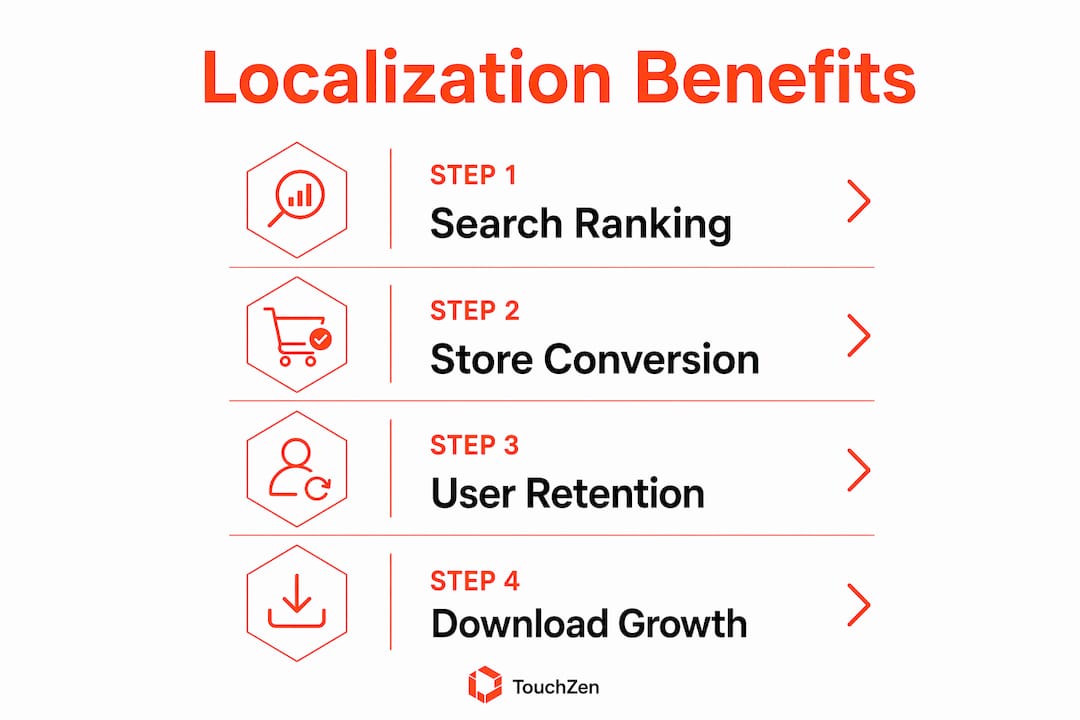
Localization improves downloads through three specific mechanisms: better search ranking, higher store page conversion, and stronger user trust. Each mechanism compounds the others.
Localized keywords improve search visibility
Apps with localized keywords appear more often in local search results, increasing discoverability significantly. App store algorithms treat keyword fields as primary ranking signals. When you replace English keywords with terms that native speakers actually type, your app surfaces in searches it previously missed entirely. This is the fastest way to grow organic impressions in a new market.
User preference for native language content drives installs
Over 56% of global app users prefer native language information over price when deciding whether to install an app. That statistic reframes the entire localization conversation. Users will pay more and accept a less familiar brand if the app speaks their language clearly. Localized games report 10–12% higher sales revenue compared to non-localized versions, which shows the effect extends well beyond the install moment.
The download and engagement benefits of localization follow a clear sequence:
Localized keywords increase search impressions in the target market.
Localized screenshots convert impressions into store page visits.
Localized descriptions convert store page visits into installs.
Localized in-app content converts installs into retained, paying users.
Each step builds on the previous one. Skipping any step leaves measurable growth on the table.
How to localize an app step by step
Effective localization follows a prioritized workflow, not a single translation sprint. Store metadata localization has the biggest early impact on downloads, while in-app localization improves retention and revenue over time. Treat them as two separate phases.
Phase 1: Market selection and metadata localization
Identify your top 3–5 target markets using existing download data, revenue reports, and app store analytics. Look for markets where you already have organic installs without any localization effort. Those signals indicate latent demand.
Localize your app name, subtitle, and keyword fields for each market. Use native speakers or professional keyword research tools to identify terms with real search volume. Do not rely on machine translation for this step.
Redesign your screenshots with localized captions and culturally appropriate imagery. Prioritize the first three screenshots, since they capture the vast majority of user attention.
Rewrite your app description in the target language, adapting tone and style for the local audience.
Pro Tip: Minimal metadata localization for a single market can be completed in as little as 2 hours for keyword fields alone. Full localization of UI and metadata across 10 or more markets typically requires 2–3 weeks. Plan your timeline accordingly and phase your rollout.
Phase 2: In-app content and measurement
Localization Task | Primary Impact | Recommended Timing |
|---|---|---|
Keyword fields | Search ranking | Before launch |
Screenshots and captions | Store conversion | Before launch |
App description | Install rate | Before launch |
In-app UI strings | Retention | Post-launch, Phase 2 |
User review responses | Trust and ratings | Ongoing |
Use AI translation tools for first drafts of descriptions and UI strings. AI performs well on descriptive text but poorly on keyword fields and constrained UI labels.
Validate all keyword and UI translations with native speakers before publishing. Machine translation errors in keyword fields directly reduce your search ranking.
Track impressions, conversion rates, and downloads by locale after each localization update. App store analytics platforms provide this data at the locale level. Use it to identify which markets respond best and where to invest next.
You can also align your mobile development workflow to build localization checkpoints into each sprint, which prevents localization from becoming a last-minute scramble before launch.
What are the most common app localization mistakes?
Most localization failures trace back to a small set of repeatable errors. Recognizing them early saves both time and budget.
The most expensive localization mistake is treating keywords as a translation task. Keywords must reflect how local users search, not how your English copy reads. A literal translation of your English keywords will rank for terms that no one in your target market types.
The other common pitfalls include:
Overreliance on automated translation for keyword and UI fields. Automated translation tools perform well for description text but poorly for keywords and constrained fields. Native speaker review is not optional for these assets.
Ignoring text expansion in UI design. Languages like German and Russian can expand UI text by 30–50% compared to English. Fixed-width UI elements will break. Use constraint-based, flexible layouts from the start of development to avoid costly redesigns.
Skipping screenshot localization. Developers frequently translate the description and ignore the screenshots. Since the first three screenshots drive roughly 90% of user attention, this is the highest-cost omission in terms of lost conversions.
Failing to measure by locale after launch. Localization without measurement is guesswork. Track impressions, conversion rates, and downloads separately for each locale and iterate based on what the data shows.
Treating localization as a one-time task. App store algorithms update, user search behavior shifts, and competitors localize their own listings. Localization requires periodic review and updates to maintain its impact.
Engineering leads recommend externalizing strings early and using modern localization file formats to reduce technical debt. Building localization support into your app architecture from day one costs far less than retrofitting it after launch. You can also use a phased project management approach to keep localization tasks organized across multiple markets without letting scope creep derail your timeline.
Key Takeaways
App localization drives measurable download growth only when it covers metadata, keywords, and visuals, not just in-app text translation.
Point | Details |
|---|---|
Localization beats translation | Adapting keywords, screenshots, and metadata drives 15–40% more downloads than text translation alone. |
Metadata comes first | Localizing your app name, subtitle, and keyword fields delivers the fastest and cheapest download lift. |
Screenshots convert users | The first three screenshots capture ~90% of user attention; localize them before anything else. |
Native speakers are non-negotiable | Machine translation fails on keyword fields; always validate with a native speaker before publishing. |
Measure by locale | Track impressions and conversions per market after each update and use that data to prioritize next steps. |
Why I think most developers underestimate localization ROI
Developers consistently underestimate localization because they frame it as a cost center rather than a growth channel. I have seen teams spend months perfecting in-app features while their store listing sits in English for every market. The result is predictable: organic downloads plateau, and the team assumes the market is simply not interested.
The data tells a different story. A 15–40% download lift from metadata localization alone represents a significant return on what is often a few days of focused work. The outlier cases, where full ASO localization produced 101–128% lift, are not anomalies. They reflect what happens when a team commits to the full workflow rather than stopping at description translation.
My honest observation is that the biggest barrier is not budget or technical complexity. It is prioritization. Metadata localization can be completed in hours for a single market. That is a faster path to measurable growth than most feature releases. The teams that treat localization as a repeatable, data-driven workflow, rather than a one-time checkbox, are the ones that build sustainable international revenue. The ASO services that support this kind of ongoing iteration are what separate apps that grow globally from those that stall at their home market ceiling.
— Cyrus
How TouchZen supports global app growth
TouchZen works directly with app developers and businesses to build localization into the development process from day one, not as an afterthought. The team has launched over 75 apps across multiple industries, with results including 100,000 downloads in the first year for several clients.
TouchZen's senior developers and designers handle mobile app development with localization workflows built into each project phase. That means keyword research, screenshot design, and metadata adaptation are planned alongside core feature development, not bolted on at the end. If you are ready to build an app that performs in multiple markets from launch, TouchZen is the team to call.
FAQ
Does translating an app really increase downloads?
Yes. Localization drives a 15–40% increase in downloads in targeted markets, with full ASO localization producing lifts up to 128% in some cases. Translation alone is insufficient; keyword and screenshot localization are required to see meaningful results.
What should I localize first in my app?
Localize your app name, subtitle, and keyword fields before anything else. Store metadata localization delivers the largest early download lift at the lowest cost and can be completed in as little as 2 hours for a single market.
How long does full app localization take?
Minimal keyword localization for one market takes roughly 2 hours. Full localization of UI and metadata across 10 or more markets typically requires 2–3 weeks, depending on team size and the number of languages involved.
Can I use AI tools to localize my app?
AI tools work well for translating description text but perform poorly on keyword fields and constrained UI labels. Always validate keyword translations and short UI strings with a native speaker before publishing to avoid ranking penalties.
Does localization improve retention, not just downloads?
Yes. Localizing in-app content improves retention and revenue after the install. Over 56% of users prefer native language information over price, and localized games report 10–12% higher sales revenue compared to non-localized versions.


