

Joy Foroughi
Executive Assistant


Ship a Phone Video Enhancement MVP in 8–12 Weeks for Product Teams
Learn how to scope a mobile video-enhancement MVP, choose between on-device and server-side processing, and plan for performance, privacy, and device compatibility.

A practical path to in-app video enhancement is a hybrid approach: keep lightweight improvements such as denoising on-device where latency matters, and reserve heavier processing, such as advanced upscaling or restoration, for server-side workflows when appropriate. The right split depends on your product, target devices, quality requirements, and privacy considerations.
TL;DR:
Denoising before encoding can improve perceived quality and may reduce bitrate requirements, depending on the footage, codec, and implementation.
Lightweight processing like denoise and stabilization should run locally, while heavier models like super-resolution are best reserved for server execution depending on latency and device capabilities.
Capability detection at runtime and adaptive pipelines are critical to ensure functions degrade gracefully on older or less powerful devices, avoiding outright failures.
Hardware acceleration and quantization can improve real-time performance, but teams should validate the quality and speed trade-offs on their target devices.
Privacy concerns require explicit user consent with encryption, plus processing primarily on-device, to minimize sensitive data transfer and compliance risks.
Core Video-Enhancement Features to Build Into Your App
These six capabilities are common considerations when product teams scope a video-enhancement feature:
Denoise removes sensor grain and low-light artifacts, and running it before encoding cuts bitrate needs while raising perceived sharpness.
Deblur corrects motion smear from handheld capture or fast subjects.
Super-resolution upscales resolution using learned detail reconstruction, not simple interpolation.
Stabilization smooths handheld shake using motion vectors or gyroscope data.
Tone mapping and HDR conversion adjust dynamic range so footage looks consistent across SDR and HDR displays.
Frame interpolation generates intermediate frames for smoother slow-motion or higher perceived frame rates.
For many mobile MVPs, denoising is a sensible feature to evaluate first because it can improve footage affected by low light or compression. Stabilization and region-based enhancement may follow if device testing shows they fit the available performance budget; heavier super-resolution can be evaluated separately for server-side processing.
Should You Process Video On-Device, on a Server, or Both?
The right architecture depends on latency tolerance, not just raw quality. Three criteria decide the lane for each feature:
Latency and UX pressure. Live preview, video calls, and instant playback need sub-frame-budget response, which rules out round trips to a server. On-device processing is the only option here.
Quality and cost ceiling. Diffusion-based upscaling and archive restoration produce better results with larger models than any phone can run continuously. A 2026 comparative decision-model study found deep-learning super-resolution often wins on quality, but heavy models remain impractical on mobile without dedicated accelerators, making a server or batch job the more sensible home for them.
Device diversity across your install base. A flagship phone with a modern NPU can run models a three-year-old midrange device cannot, which pushes teams toward adaptive rather than fixed pipelines.
A common hybrid pattern is to detect device capability at runtime, run lightweight enhancements locally where possible, and route more resource-intensive processing to a background server workflow when the product experience allows it. Build the capability check before you build the feature, not after a support ticket forces the issue.
Which SDKs and Libraries Should You Evaluate?
Four tools show up repeatedly in 2026 build plans, each solving a different piece of the pipeline.
NVIDIA AI for Media offers GPU-accelerated SDKs and microservices, including RTX Video Super Resolution and the Video Effects SDK, built for low-latency real-time pipelines on client, edge, or server deployments. It fits teams that need broadcast-grade enhancement and already have GPU infrastructure.
Google Play services Media Enhancement APIs provide on-device, GPU-accelerated image-enhancement capabilities, including tone mapping, deblurring, denoising, and upscaling. Teams considering them for a video product should confirm the API's fit for their specific capture or playback workflow before committing to an architecture. Integration requires manifest declarations, a runtime capability check, and model retrieval through
EnhancementClient, so budget engineering time for that setup, not just the inference call, per Android's developer documentation.FFmpeg handles pre- and post-processing, format conversion, and filter chains. Run it via NDK on-device for lightweight transforms, or server-side for batch jobs where CPU cost does not affect the user's session.
Hosted APIs cut time-to-market; in-house model deployment gives you control over cost-per-inference at scale. Most teams start hosted and migrate specific hot-path features in-house once volume justifies it.
How Do You Keep Enhancement Fast Enough to Feel Instant?
Frame budget is the constraint that decides almost everything else. At 60 frames per second, the app has roughly 16 milliseconds to decode, enhance, render, and update the UI, and that number does not move for your feature. Missing it is not a quality problem; it is a dropped-frame problem the user notices immediately.
Use zero-copy, hardware-backed frame paths,
CVPixelBufferon iOS andAHardwareBufferon Android, since CPU round-trips and format conversions eat the frame budget before your model even runs, a constraint detailed in this on-device enhancement engineering breakdown.Delegate inference to hardware accelerators: NNAPI or GPU delegates on Android, Core ML on iOS. Quantization can improve performance, but any quality trade-off should be validated against your quality bar.
Build thermal management in from the start: subscribe to thermal API callbacks, and drop to lower resolution or skip frames adaptively rather than letting the OS throttle the whole app.
Track latency, VMAF/PSNR/SSIM scores, CPU/GPU utilization, and thermal traces as your core benchmark set, not just a subjective "looks better" review.
Pro Tip: Run your thermal stress test on the oldest device in your target fleet, not your dev team's flagship. A model that holds 30 fps on a two-year-old midrange phone for ten straight minutes tells you far more than a five-second demo on a new device.
What Does an 8 to 12 Week MVP Roadmap Look Like?
A staged rollout keeps the scope honest and gives you real data before you commit to heavier server infrastructure. An 8–12 week timeline can be realistic for a tightly defined MVP with a prepared team and limited device scope; production complexity, custom models, server processing, and broader device coverage can extend it.
Discovery (weeks 1 to 2): Define target devices and OS versions, gather sample content across lighting and motion conditions, and set baseline quality metrics before writing a line of enhancement code.
Prototype (weeks 3 to 5): Integrate a lightweight denoise model plus region-based enhancement using a zero-copy pipeline, then test on three or four representative devices spanning your fleet's low end and high end.
Benchmark (weeks 6 to 8): Run NNAPI and Core ML delegation side by side, compare INT8 against FP16 quantization, and log thermal behavior under sustained use. This is also where you'd benchmark hardware and profile memory allocations as part of a formal test pass.
Rollout (weeks 9 to 11): Stage the feature behind capability-based flags, route heavy jobs to server processing, add telemetry, and gate access with an explicit opt-in for anything touching user media.
Validation (week 12): Measure retention lift, engagement change, and CDN or bitrate savings against your discovery-phase baseline.
Phase | Primary goal | Key output |
|---|---|---|
Discovery | Define scope and baseline | Device list, KPI targets, sample footage set |
Prototype | Prove the pipeline works | Working denoise + region-enhancement demo |
Benchmark | Validate performance limits | Latency, thermal, and quantization test results |
Rollout | Ship safely across device tiers | Feature flags, server queue, telemetry live |
Validation | Confirm business impact | Retention, engagement, and bandwidth deltas |
What Privacy Rules Apply When Enhancement Runs on a Server?
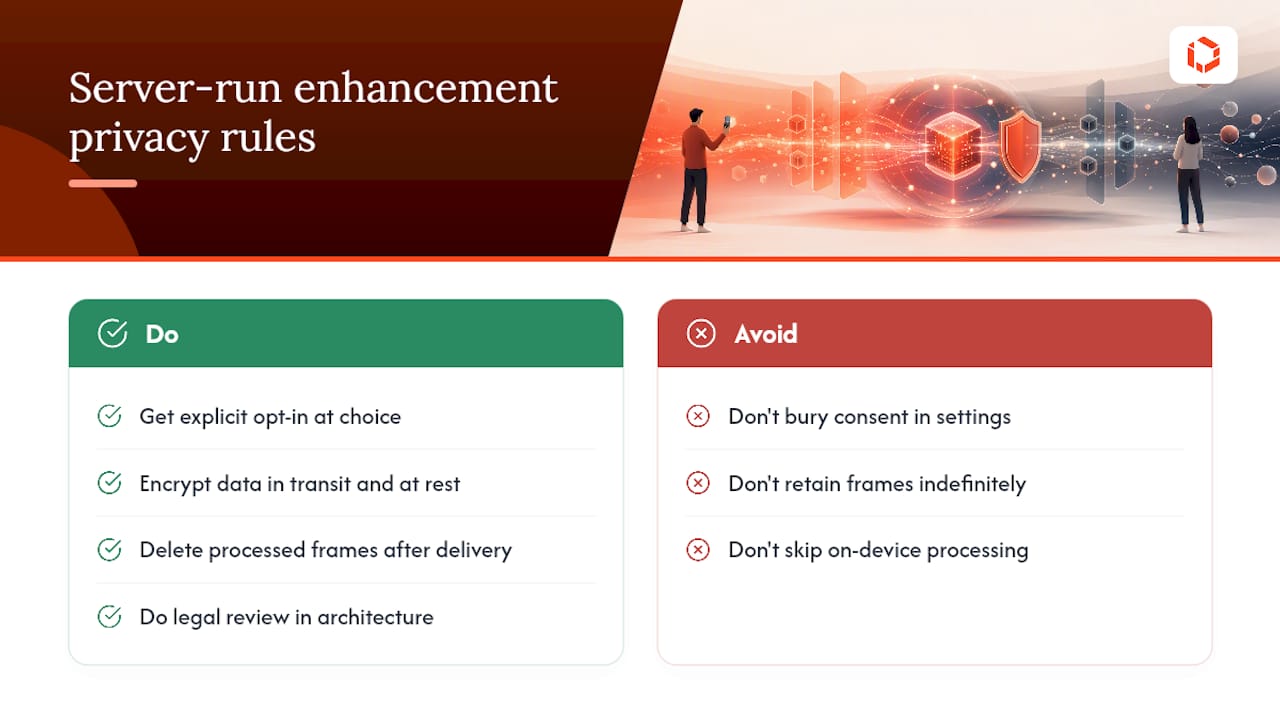
Any feature that sends raw video frames off the device turns your app into a data processor, and that carries obligations beyond model accuracy. Uploading user footage for server-side super-resolution or restoration means you are handling potentially sensitive visual content, faces, locations, documents visible in the background, and that data needs a clear retention policy, not an indefinite one.
The appropriate notice, consent flow, retention policy, and legal basis depend on the jurisdictions, data categories, and product design involved. Make the data transfer visible at the point of use, and validate the approach with qualified privacy counsel. Encrypt data in transit and at rest, and delete processed frames from server storage once the enhanced result reaches the user, unless you have a documented, disclosed reason to keep them longer.
Regional regulation varies, and rules like GDPR in the EU or CCPA in California carry different consent and deletion requirements, so legal review belongs in your architecture decision, not as a launch-week afterthought. If your app serves regulated industries, healthcare, finance, education, treat uploaded video with the same handling standard you'd apply to any other personal data category, regardless of whether the content itself looks sensitive.
The practical mitigation many teams underuse: keep as much processing on-device as your frame budget allows. Every feature that stays local is one less thing you have to explain in a privacy policy, and one less asset sitting on a server that could be breached.
What Order Should Enhancement Steps Run In?
Processing order should be validated for the specific models and footage you use, because each step changes the input available to the next. A common starting sequence is denoise first, then deblur, then super-resolution or tone mapping.
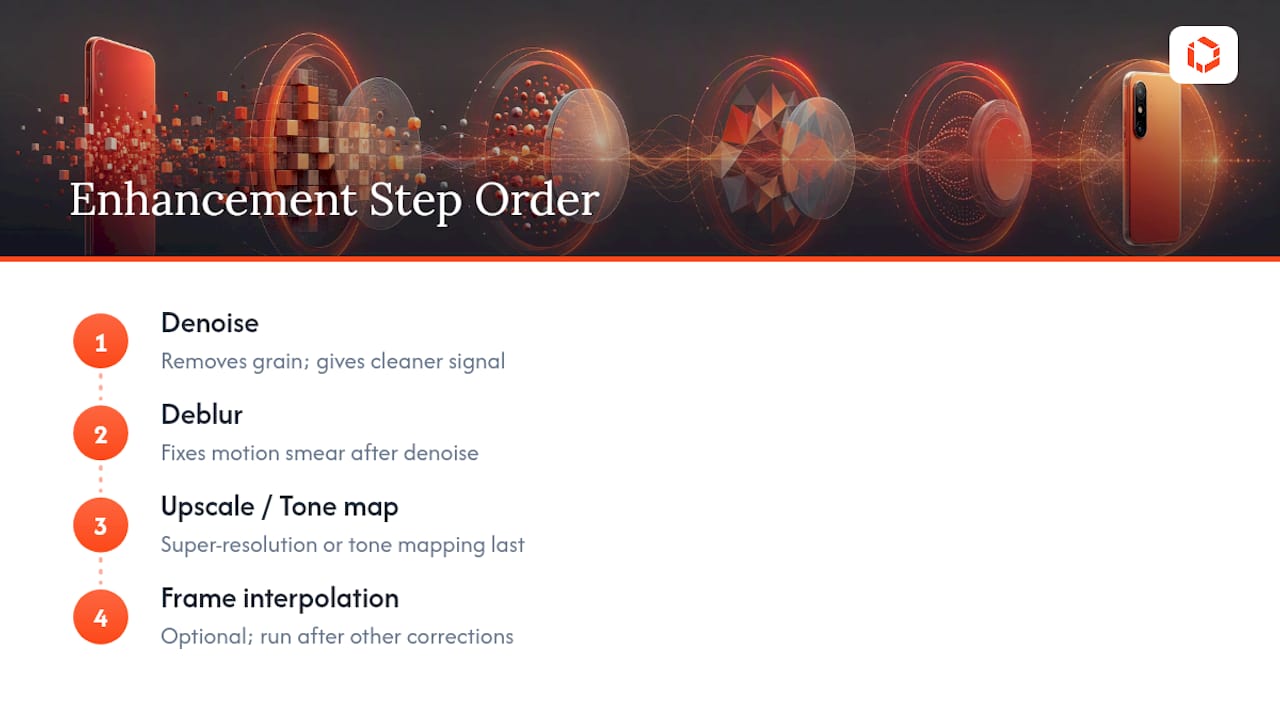
Denoise often goes first because noise can look like detail to a deblurring or upscaling model, which may amplify grain. Starting with denoising can give downstream steps a cleaner signal and may help reduce bitrate requirements, depending on the pipeline.
Deblur comes next, correcting motion smear on a frame that is no longer fighting noise artifacts. Attempting deblur before denoise tends to sharpen noise patterns along with real edges, which looks worse, not better.
Super-resolution and tone mapping run last because they operate on the highest-fidelity version of the frame you can produce. Upscaling noisy or blurry footage just makes the flaws bigger and more visible at higher resolution. If your pipeline includes frame interpolation for smoother motion, run it after the other corrections too, since interpolating between two noisy or blurry frames produces artifacts in the generated in-between frame.
For live, real-time pipelines, you may need to compress this into a single fused pass for latency reasons, but the logical order should still hold inside that fused model's design.
How Should Users Optimize Capture Before Enhancement Runs?
Enhancement models compensate for capture flaws, but they cannot manufacture detail that was never recorded. Guiding users toward better capture settings measurably improves the ceiling your enhancement pipeline can reach.
Encourage capture settings that fit the situation. Higher resolution can preserve more detail, while frame rate, low-light conditions, stabilization, storage, and upload constraints should also guide the recommended settings.
Stabilizing at capture time, either physically or through the phone's built-in stabilization, reduces the correction burden on your software pipeline and preserves more real detail than heavy digital stabilization applied after the fact. Similarly, adequate lighting at capture time reduces sensor noise before it ever reaches your denoise model, meaning the model has less to remove and less risk of stripping real texture along with the grain.
If your app lets users choose bitrate or compression settings, default to the highest setting the device and network can sustain. Heavy compression discards detail permanently, and no downstream enhancement model can recover information the codec already threw away. Consider surfacing a simple in-app tip at the capture screen, similar to how a video SEO strategy treats source quality as the foundation for everything that follows in discovery and engagement.
What Goes Wrong Most Often With Video Enhancement Apps?
Most enhancement failures trace back to one of a handful of predictable causes, and catching them early saves a costly rebuild later.
Over-aggressive denoise is the most common visual complaint. Push the strength too high and footage loses texture entirely, producing a flat, waxy look that users notice even if they cannot name why it looks wrong. Tune denoise strength against real user footage, not just clean test clips, since compression artifacts from prior sharing or re-encoding interact badly with aggressive noise removal.
Thermal throttling causes the second most common issue: a feature that works flawlessly in a five-minute demo and then visibly degrades or drops frames during a fifteen-minute recording session as the device heats up. This is a testing gap, not a model problem, and it only surfaces with sustained-use testing on real hardware.
Device fragmentation trips up teams that test primarily on flagship phones. A model that runs at 30 fps on a current-generation chipset may fall to single-digit frame rates on a three-year-old midrange device, and without capability detection, that user gets a broken feature instead of a degraded one.
Finally, silent model failures on unsupported hardware, where an enhancement call returns no error but produces no visible improvement, frustrate both users and support teams. Build explicit capability checks and user-facing fallback messaging rather than assuming the API will fail loudly when it cannot deliver.
How Do 2026's Top Video Enhancement Approaches Compare?
Product teams evaluating enhancement approaches in 2026 are generally choosing between three categories, each with a distinct trade-off profile.
GPU-accelerated real-time SDKs, the category NVIDIA's tooling represents, deliver the strongest raw quality for live scenarios but assume access to dedicated GPU or NPU hardware, either on-device or in a cloud deployment. The upside is broadcast-quality output with low latency; the downside is hardware dependency that limits reach on older or budget devices.
Platform-native on-device APIs, like the Android Media Enhancement API, trade some flexibility for tight OS integration and simpler compliance, since processing stays local and the platform vendor manages the model lifecycle. The limitation is platform lock-in: an equivalent iOS path requires separate integration work.
Cross-platform mobile engines can offer a single integration surface across iOS and Android, which may speed up development for teams shipping to both platforms. The trade-off is often less granular control over individual model behavior compared with assembling a custom pipeline from component SDKs.
None of these is universally "best." The right choice depends on your latency requirements, target device fleet, and whether you need platform-specific tuning or cross-platform speed. Most production apps in 2026 end up blending at least two of these categories rather than committing to one exclusively.
How Do You Roll Out Enhancement on iOS Versus Android?
The features are conceptually identical across platforms, but the integration path diverges enough to plan separately.
On Android, start by declaring the required hardware and library dependencies in your AndroidManifest.xml, since the Media Enhancement API needs these declared before it will initialize. Run a runtime capability check through EnhancementClient to confirm the device supports the requested enhancement mode, then request model download if it is not already cached locally. Wrap the async calls in Kotlin coroutines, as Android's own developer guidance recommends, to keep the enhancement call from blocking your UI thread. Test across at least three GPU/NPU tiers, since Android's hardware diversity is the platform's defining integration challenge.
On iOS, route inference through Core ML delegates where the model supports it, and use CVPixelBuffer for zero-copy frame handling between your capture pipeline and the enhancement model. Apple's more limited hardware variance simplifies testing somewhat compared to Android, but you still need separate handling for devices with and without the Neural Engine generation your model targets.
For both platforms, ship the feature behind a remote capability flag rather than a hard app-version gate, so you can adjust rollout by device tier without forcing a new app submission every time you tune the threshold.
How TouchZen Can Support Video Enhancement Features
Video enhancement requires careful product scoping, native mobile implementation, performance testing, and a clear approach to device compatibility. TouchZen has built 75+ mobile apps across industries and can help product teams evaluate feature scope, target-device requirements, and the right balance between on-device and server-side processing.
Ready to Build Video Enhancement Into Your App?
Building a coherent, thermally safe enhancement pipeline requires careful technical planning. TouchZen can help product teams scope native iOS and Android integrations, evaluate performance constraints, and plan an implementation approach around their target devices and feature priorities.
If you're scoping a video-quality feature for an existing app or planning one from scratch, the practical next step is a discovery conversation with TouchZen's team about your target devices, feature priorities, and timeline. Visit TouchZen's AI-powered app development page to see the team's approach to model integration and request a capability assessment for your project.
Sources
FAQ
What's the Fastest First Feature to Ship?
For a controlled MVP, denoising is often a sensible feature to evaluate first. Validate its quality and bitrate impact against your own footage, codec, and target devices.
Should Super-Resolution Run On-Device or on a Server?
Run lightweight super-resolution on-device for live use cases; route heavy diffusion-based upscaling and archive restoration to a server, since current research finds those heavier models impractical on mobile without dedicated accelerators.
How Much Does INT8 Quantization Actually Speed Things Up?
Quantization can improve inference speed, with potential trade-offs in output quality that should be validated against your target quality bar.
Can TouchZen Help Us Scope a Video Enhancement Feature Before We Commit to a Build?
Yes. Senior developers can run a capability assessment against your target devices and feature list before full development begins, reflecting the discovery step outlined in the MVP roadmap above.
What's the Biggest Mistake Teams Make With Thermal Testing?
Testing only on flagship devices for short demo sessions, which hides throttling issues that only appear during sustained recording on older or midrange hardware.


