

Joy Foroughi
Executive Assistant


App Engagement Metrics: 7 Measures of Whether Users Return
Seven useful app engagement metrics are Day-N retention, the DAU/MAU ratio, session frequency and interval, session length, churn and uninstalls, feature adoption, and in-app response rates. Retention and return frequency measure repeat use directly; the others help explain behavior, friction, and feedback. Downloads show initial interest. Together, these measures help teams understand who returns and what to investigate when users leave. Below, each one gets a definition, the way to calculate it, what to look for, and the mistake teams most often make with it.

Seven useful app engagement metrics are Day-N retention, the DAU/MAU ratio, session frequency and interval, session length, churn and uninstalls, feature adoption, and in-app response rates. Retention and return frequency measure repeat use directly; the others help explain behavior, friction, and feedback. Downloads show initial interest. Together, these measures help teams understand who returns and what to investigate when users leave. Below, each one gets a definition, the way to calculate it, what to look for, and the mistake teams most often make with it.
TL;DR
Start with Day-1, Day-7 and Day-30 retention. They are the clearest answer to "do users come back?"
Pair retention with the DAU/MAU ratio to see how habitual the app is. Around 20% is a commonly cited good mark, and above 25% is called great.
Session frequency, interval and length explain the pattern behind those numbers. Feature adoption explains the reason.
Benchmarks vary by category. Use them as a sanity check, then compare your app against its own past cohorts.
Pick three to five metrics tied to one decision each. A dashboard of 30 numbers tends to produce no decisions.
Why downloads stop being the number that matters
A download is a promise, not a result. The founders we talk to often have a healthy install curve and a quiet app: users open it once, finish onboarding or abandon it, and disappear. Engagement metrics separate those outcomes early, while there is still time to change the product.
The common failure is measuring what is easy rather than what is informative. Total installs and total sessions only go up. Metrics tied to a cohort, a time window and a specific behavior can go down, and that is exactly why they are useful.
If you are still setting up measurement, our guide to mobile app analytics for startups covers what to instrument before launch.
1. Retention rate (Day 1, Day 7, Day 30)
Retention is the share of a group of new users who come back after a set number of days. It is the first metric to look at because every other number is easier to read once you know whether users return at all.
How to calculate it. Group users by install date (a cohort). Day-N retention is the number of users from that cohort who were active on Day N, divided by the cohort size, times 100. Only installs old enough to have reached Day N belong in the calculation, as Linkrunner's retention documentation explains. Leanplum's documentation describes the same logic from the first-session date.
Pick your definition and keep it. There are three common versions:
Classic: the share of the cohort that opened the app on exactly Day N.
Cumulative: the share that opened it at any point between Day 1 and Day N.
Rolling: the share that opened it on Day N or any day after.
The same app produces three different numbers under these definitions, per the same Linkrunner documentation. Comparing your classic Day-7 figure to a rolling benchmark makes your app look worse than it is.
What to look for. One analyst's guideline puts a good 1-day retention above 20%, with 14% for 3-day and 10% for 7-day, according to PostHog's mobile metrics guide. Treat those as rough reference points, not targets.

Common mistake. Looking at blended retention across all users. Read it by cohort, so you can see whether last month's onboarding change moved Day 7. Our write-up on onboarding flows that survive Day 7 shows what to test first.
2. DAU, MAU and the DAU/MAU ratio
Daily active users (DAU) count unique users active on a day. Monthly active users (MAU) count unique users active across a month, as Similarweb's engagement guide defines them.
The ratio of the two is often called stickiness. Google's documentation describes it as the percentage of users who engaged in the last 24 hours compared with those who engaged in the last 30 days, and says higher ratios suggest good engagement and retention.
A worked example. Your app has 40,000 MAU and 10,000 DAU. The ratio is 25%: on that day, one in four monthly active users was active. If DAU falls to 6,000 with the same MAU, the ratio is 15%. Monthly reach is unchanged, but a smaller share was active that day; compare the trend over multiple days before concluding that habits have weakened.
What to look for. PostHog's guide treats 20% as good and above 25% as great. Be careful here: a tax-filing app or a travel-booking app is not built for daily use, so a low ratio can be normal. Judge the ratio against how often your product should be used.
3. Session frequency and session interval
Session frequency is the average number of sessions per active user in a set period, such as a week or a month: total sessions divided by unique active users in that period. Session interval is the elapsed time between consecutive sessions for the same user; report its median or distribution to reveal typical gaps and outliers. Together with session length, they show how regularly users find value in the app.
Frequency answers "how often?" and interval answers "how long do they go quiet?" An app with three sessions a week could have a steady two-day gap or a clump of three sessions on Saturday and nothing else. The averages match, and the product problem does not.
What to do with it. Watch the interval between a user's first and second sessions. A long gap can reflect the intended use pattern, unclear onboarding, limited core value, or technical friction. Review completed actions, errors, and user feedback before deciding whether to change onboarding, messaging, or the product itself. Compare the interval to your intended use pattern: a meditation app that expects daily use and sees a five-day gap has a clear target for lifecycle messaging.
4. Session length
Session length is the average duration of a user session in the app, as Udonis defines it. It is the metric teams most often misread.
Longer is not automatically better. For a streaming or reading app, a long session signals value. For a payments, scheduling or ordering app, a long session may mean users are lost. A two-minute session that ends in a completed task is a success.
Pro Tip: Never read session length alone. Put it beside task completion. If sessions get shorter and completions rise, you made the app faster, and that is a win.
5. Churn rate and uninstalls
Churn measures the share of a defined user population that stops meeting your activity or subscription criteria. For a period-based user churn rate, divide the number of users active at the start who meet your churn definition by the number active at the start, then multiply by 100. Churn equals 100% minus retention only when both measures use the same cohort, timeframe, and complementary definitions.
You have to decide what "churned" means. A user who has not opened the app in 30 days is one definition. An uninstall is a separate signal of departure, though users can also become inactive without removing the app. AppsFlyer's documentation explains that it infers uninstalls using silent push notifications and responses from push services. Treat uninstall reporting as an indirect signal that can lag, rather than a complete, real-time record of departures.
For subscription products, churn also means cancellations and failed renewals. We cover that in reducing subscription churn in a mobile app.
What to do with it. Track churn alongside the moment it happens: after onboarding, after a paywall, after a failed payment, after a period of silence. A single churn percentage hides all of those. For ideas once you can see the pattern, see seven ways to improve app user retention.
6. Feature adoption and screen flow
Retention tells you that users leave. Feature adoption tells you what they were doing, or not doing, before they left. Feature usage measures how often and how long users use specific features, and screen-level data can reveal where users find value or get confused by the interface.
How to calculate it. Feature adoption rate is the number of unique users who used the feature at least once in a period, divided by the number of eligible users in the same measurement population, multiplied by 100. Get the denominator right. If a feature only applies to users who finished setup, divide by that group, not by everyone who installed.
The pattern to look for. Pick the one action that best predicts a returning user, such as creating a first project, saving a first item, or completing a first order. Then check what share of new users reach it in the first session and the first week. Cohorts that reach the action tend to be your retained cohorts, and that gives onboarding a clear job. This is a correlation you should test, not assume. If the action drives retention, moving more users to it will show up in Day 7. If it does not, you have learned something cheaply.
When the screen flow shows a steep drop at one step, investigate usability, bugs, load times, pricing, and user intent before choosing a fix. Our piece on why users abandon apps during onboarding walks through the common culprits.
7. In-app response rates
The seventh measure is whether users answer when you ask them something. PostHog's guide cites 28% as a good response rate for in-app prompts and 13% for surveys. A user who engages with a prompt is paying attention, and the answers give you the reason behind the numbers above.
Calculate prompt response rate as completed responses divided by prompt impressions, multiplied by 100. For surveys, track completed surveys divided by survey invitations shown, multiplied by 100; define whether you count unique users or exposures and keep that choice consistent. Report prompt and survey results separately, since their effort and audiences differ.
Use this measure to explain, not to rank. If Day-7 retention is falling, a two-question prompt shown after the first completed task, asking what the user came to do, can tell you more than another week of dashboards. Keep prompts rare and well-timed, since over-asking is a churn driver of its own.
The seven measures at a glance
Metric | Question it answers | Basic formula | Read it with |
|---|---|---|---|
Day-N retention | Do new users return? | (Cohort users active on Day N ÷ cohort size) × 100 | Cohort date, definition used |
DAU/MAU | How habitual is use? | (DAU ÷ MAU) × 100 | Expected use frequency |
Session frequency and interval | How often, and how long between visits? | Total sessions ÷ unique active users in period; elapsed time between consecutive sessions | Day-1 to Day-7 behavior |
Session length | How long is each visit? | Average session duration | Task completion |
Churn and uninstalls | Who is leaving, and when? | (Starting active users who meet churn criteria ÷ starting active users) × 100 | Moment of exit |
Feature adoption | Which parts earn return visits? | (Unique feature users ÷ eligible users in the measurement population) × 100 | Retention by cohort |
In-app response rate | Will users tell us why? | (Responses ÷ prompt impressions) × 100; surveys measured separately | Retention changes |
How to read benchmarks without fooling yourself
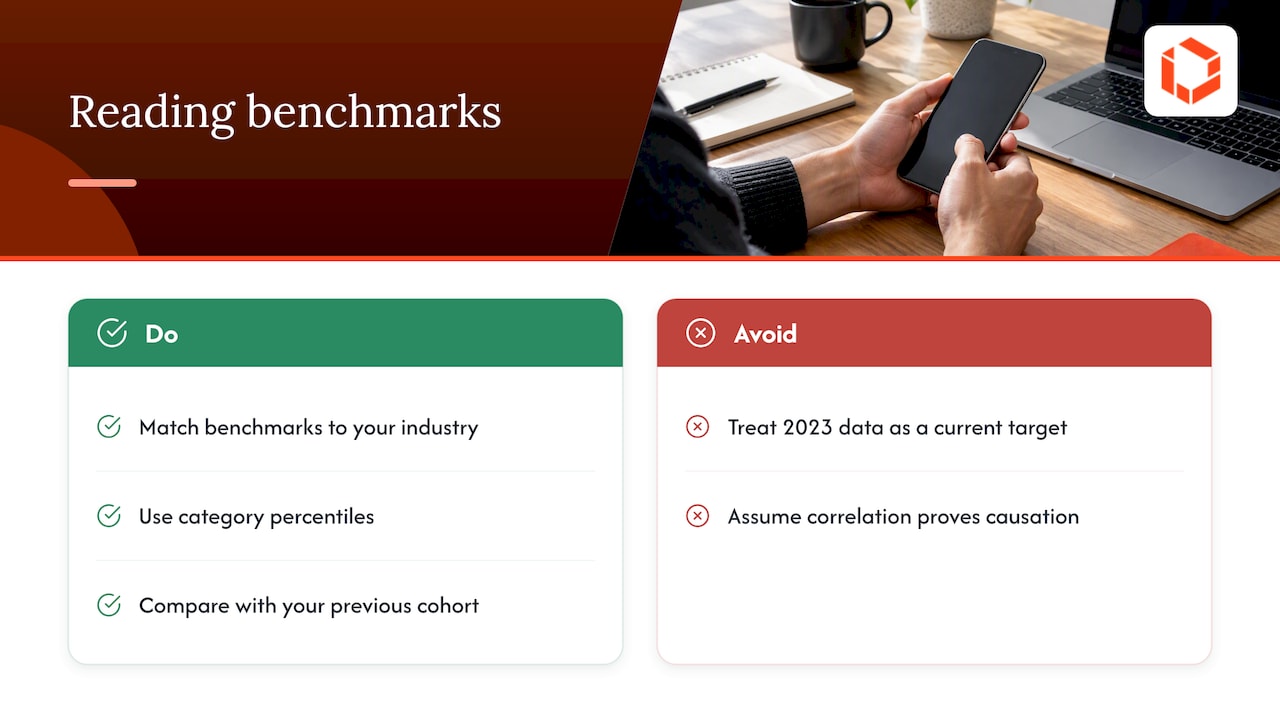
Benchmarks are useful for orientation and risky for decisions. Three habits help.
Match the category. Pushwoosh notes that trends and benchmarks vary significantly by industry, and that game apps may not reflect the norms of other verticals. A Day-7 number that is excellent for a utility app could be weak for a game.
Use percentiles, not only averages. Airship's 2023 benchmark report uses percentiles to show where an app sits within its category. For shopping apps, its study found that an engagement score of 46% or higher placed an app in the top 10%. Because the data is from 2023, treat it as a shape of the distribution, not a current target.
Remember correlation is not causation. One mobile engagement benchmark report cautions that its own data may show correlation rather than causation. That applies to your own dashboards too.
The benchmark that matters most is your own previous cohort. If this month's Day-7 retention beats last month's after a release, the change may have helped. Check acquisition mix, seasonality, cohort size, and other changes; use a controlled experiment where practical before attributing the improvement to the release.
Choosing the metrics that fit your app
You do not need all seven on day one. Match them to your stage:
Pre-launch or beta: Day-1 retention, feature adoption for the one core action, and in-app responses. Your user base is small, so qualitative signal outweighs ratios.
Early growth: add Day-7 and Day-30 retention by cohort, plus session interval, to see whether a habit forms.
Scaling: add DAU/MAU, churn by exit moment, and session length against task completion.
For each metric, write the decision it drives before you build the chart. "If Day-7 drops below last month's cohort, we review the first-run flow." A metric without a decision attached is decoration. If you are still choosing a tool, our comparison of Firebase Analytics and Mixpanel for retention lays out the tradeoffs.
Our perspective: engagement is a design and communication problem
We have launched more than 75 apps across industries, and the engagement problems we see most often are not analytics problems. They are decision-latency problems. A team sees Day-7 retention slipping, but the designer who could fix the first-run flow is two layers away from the person reading the dashboard, so the fix takes a quarter instead of a week.
That is why we work the way we do: senior developers and designers talk directly with the founders and product managers who own the numbers. When the person who reads the metric and the person who changes the screen are in the same conversation, an insight becomes a release quickly. Our advice to founders is to agree on three metrics and one core action before the first line of code, instrument them in the MVP, and review them on a fixed rhythm after launch. Engagement is something you build in and then keep tuning, not something you audit once a year.
— Cyrus
Turning these metrics into a product that keeps users
If your numbers show users arriving and leaving, the fix usually sits in strategy, onboarding design or core features. Our team handles that end to end, from product strategy and consulting and UX/UI design through development, and then stays on after launch through ongoing support and growth. If you are planning a first version, our MVP development for startups builds measurement into the product from the start. You work directly with senior people, so what the data says reaches the people who can act on it.

FAQ
What are the most common user engagement metrics for mobile apps?
The usual set is daily and monthly active users, retention rate, session frequency, time spent, churn rate and in-app actions, as Similarweb's guide lists them. Most teams start with retention and the DAU/MAU ratio, then add the others as the app matures.
What is a good DAU/MAU ratio?
PostHog's guide calls 20% good and above 25% great. Those marks assume a product people could use daily. For apps with naturally occasional use, compare against your own trend and your intended frequency.
How do you calculate Day-7 retention?
Take all users who installed on a given day, count how many were active on Day 7, and divide by the cohort size. Only include cohorts old enough to have reached Day 7. State whether you use classic, cumulative or rolling retention, since the three produce different numbers.
How many engagement metrics should a startup track?
Three to five is enough early on. Choose ones that each trigger a specific decision, such as Day-7 retention by cohort, adoption of your core action, and churn at the point users leave. Add more only when a new question needs one.
Sources
App Engagement Guide: Metrics, Strategies and Tools (Similarweb)
Mobile app engagement metrics: terms, tactics, and trends (Sendbird)
31 Mobile App Metrics to Track Performance and Engagement (Udonis)
2021 Mobile App Engagement Benchmark Report (Apptentive by Alchemer)


